The core Taos Engine book builds an engine: a render graph, a component system, asset loaders, audio, and networking primitives. None of those pieces know what a grass block is, or that a creeper should explode when it gets close to the player. Crafty is where those decisions live. It is a Minecraft-style voxel sandbox built entirely on the engine, and it is large enough — tens of thousands of lines across the game, the voxel library, and the server — that it helps to have a map before diving into any single system.
This chapter is that map. It walks through what the game does, how its source is laid out, what happens between opening the page and the first rendered frame, how the renderer is configured, what runs every frame and in what order, and how single-player and multiplayer differ. Each later chapter zooms into one of the boxes drawn here.
What Crafty Is#
Crafty is an infinite, procedurally generated block world that runs in a browser tab on WebGPU. The feature set, all of which is in the code today:
- World: seeded, infinite terrain streamed in 16³ chunks around the player, with biomes, caves, ores, trees, villages, and far-distance LOD rings. A second dimension (the nether) can be swapped in, and a baked "castle" world type replaces procedural terrain with an imported build.
- Blocks: hundreds of block types generated from a texture atlas, greedy-meshed on worker threads, with flowing water and lava, emissive blocks, colored block light, redstone, furnaces, chests, and farming.
- Game modes: creative (unlimited blocks, no damage) and survival (gathered inventory, crafting, tools with durability, health, hunger, air, fall damage, combat, fishing, and bows).
- Creatures: passive animals (ducks and ducklings, pigs, rabbits, bees, cats and kittens), fireflies at night, and hostile mobs (creepers, zombies, skeletons, spiders), with the undead burning off at sunrise.
- Sky and weather: a day-night cycle with a moon that goes through phases, a procedurally baked sky, and biome-dependent weather — clear, cloudy, overcast, rain, snow, and fog.
- Rendering: a deferred HDR pipeline with shadows, ambient occlusion, optional voxel or screen-space GI, volumetric clouds and fog, water with reflections and caustics, instanced grass, and a full post-processing chain.
- Multiplayer: an authoritative WebSocket server hosts shared worlds with player sync, block-edit replication, chat, and per-player saved positions and inventories.
- Persistence: local worlds are saved to IndexedDB as a seed plus an edit log, with a thumbnail for the world picker.
- Platforms: keyboard and mouse, touch controls on phones and tablets, gamepads with haptics, and an opt-in WebXR VR mode.
Source Layout#
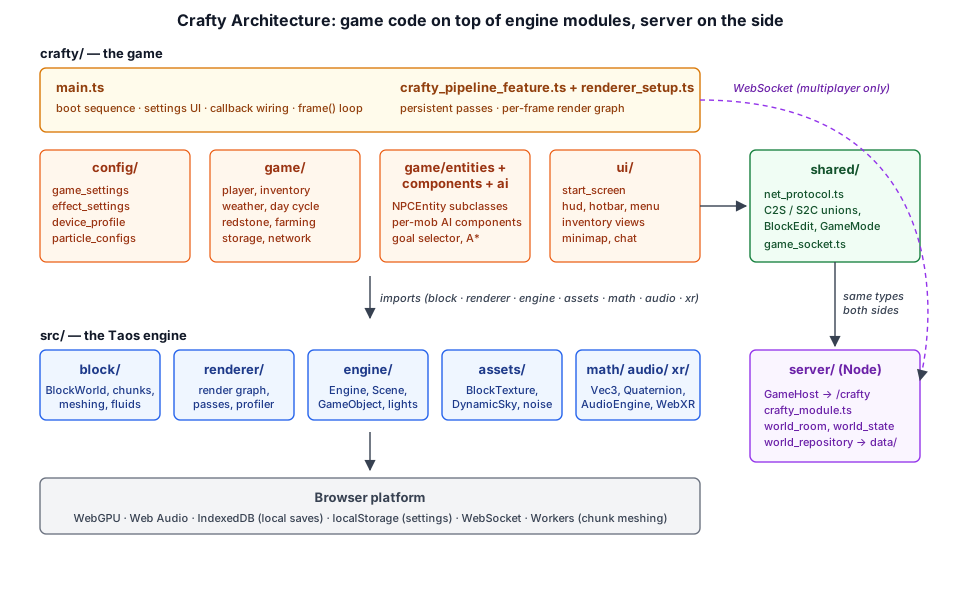
Crafty's code sits in two places. Everything game-specific lives in crafty/. The voxel world itself — chunks, world generation, meshing, fluids, block ticking — lives in the engine under src/block/, because it is reusable by any block-based sample, not just this game.
crafty/
├── index.html                  — canvas + <script type="module" src="./main.ts">
├── main.ts                     — entry point: boot, settings UI, callbacks, frame loop
├── crafty_pipeline_feature.ts  — the whole render pipeline as one RenderFeature
├── renderer_setup.ts           — builds the passes, wires the per-frame render graph
├── vxgi_block_table.ts         — per-block data for voxel GI
├── config/                     — settings, effect toggles, device tiers, particle configs
├── game/                       — runtime game systems
│   ├── entities/               — NPCEntity subclasses (Duck, Pig, Creeper, …)
│   ├── components/             — per-mob AI components (DuckAI, HostileAI, …)
│   ├── ai/                     — goal selector, mob body, A* pathfinding
│   ├── assets/                 — procedural meshes for the mobs and held items
│   └── *.ts                    — player, inventory, weather, redstone, storage, network, …
└── ui/                         — DOM UI: start screen, HUD, hotbar, menus, minimap, chat
The multiplayer server is a separate npm package in server/, and the wire protocol both sides compile against is in shared/net_protocol.ts.
1.2.1 The Game Folders#
| Folder | Responsibility | Examples |
|---|---|---|
| crafty/config/ | Tunable, mostly data-only settings | game_settings.ts, effect_settings.ts, device_profile.ts, particle_configs.ts |
| crafty/game/ | Gameplay systems that run inside the world | player_controller.ts, block_interaction.ts, weather_system.ts, day_cycle.ts, inventory.ts, redstone.ts |
| crafty/game/entities/ | Concrete creatures, each a GameObject subclass | duck_entity.ts, creeper_entity.ts, hostile_entity.ts |
| crafty/game/components/ | AI behavior, attached to entities as Components | pig_ai.ts, hostile_ai.ts |
| crafty/game/ai/ | Shared AI machinery | goal_selector.ts, mob_body.ts, pathfind.ts |
| crafty/ui/ | Plain DOM overlays on top of the canvas | start_screen.ts, hotbar.ts, hud.ts, minimap.ts, chat.ts |
The split follows one rule from the engine's conventions: engine code stays in src/, and anything that only makes sense for this game — entities, AI, UI chrome, world-generation tuning — goes in crafty/.
1.2.2 Engine Dependencies#
Counting import statements across crafty/ gives a quick picture of which parts of the engine the game leans on:
| Engine module | Imports | Used for |
|---|---|---|
| src/block/ | 91 | BlockWorld, BlockType, biomes, fluids, block behaviors, castle import |
| src/renderer/ | 65 | Render graph, every pass, GPU profiler, graph visualizer |
| src/engine/ | 50 | Engine, Scene, GameObject, Component, lights, MeshRenderer, camera controllers |
| src/assets/ | 44 | BlockTexture, Texture, DynamicSky, cloud noise, meshes and materials |
| src/math/ | 37 | Vec3, Mat4, Quaternion, Random |
| src/xr/, src/audio/, src/particles/ | 5 | VR mode, the AudioEngine, particle configs |
Two things are notably absent. Crafty does not use the engine's rigid-body physics module: the player and mobs are kinematic bodies swept directly against the voxel grid (see Chapter 3). And it does not use the engine's editor or scene-file runtime: the scene is assembled in code by main.ts.
The Boot Sequence#
Everything starts in main() in crafty/main.ts. It is a long, strictly sequential async function; the order matters, because later steps depend on objects the earlier ones created.
1.3.1 Start Screen First#
The very first thing Crafty does — before touching the GPU — is ask the player what they want to play:
// Launcher: pick a local seed or connect to a server before any GPU work.
// `?autoload` / `?world=last` bypasses it and reopens the last local world.
const startChoice = (await autoLoadLastWorld()) ?? await showStartScreen();
const playerName = startChoice.playerName;
const network: NetworkClient | null = startChoice.mode === 'network' ? startChoice.network : null;
const welcome: ConnectResult | null = startChoice.mode === 'network' ? startChoice.welcome : null;
const savedWorld: SavedWorld | null = startChoice.mode === 'local' ? startChoice.world : null;
const worldStorage: WorldStorage | null = startChoice.mode === 'local' ? startChoice.storage : null;
showStartScreen() in crafty/ui/start_screen.ts resolves with a tagged union. For a local world the chosen SavedWorld has already been written to storage; for a network game the WebSocket is already open and the server's welcome message has already arrived:
export type StartChoice =
  | { mode: 'local'; world: SavedWorld; storage: WorldStorage | null; playerName: string }
  | {
      mode: 'network';
      playerName: string;
      serverUrl: string;
      network: NetworkClient;
      welcome: ConnectResult;
      world: WorldSummary;
    };
From this point on, the rest of main() reads the world seed, game mode, and world type from whichever of welcome or savedWorld is non-null. That single branch point is what makes single-player and multiplayer share almost all of their code (see Section 1.8). Older local saves are migrated here too, before anything replays their edit log.
1.3.2 Settings, Then the Engine#
Settings are loaded next, ahead of the renderer, because one of them — reversed-Z depth — is baked into the render context and every pipeline at creation time. URL parameters such as ?vxgi=1 and ?vr=1 override stored settings for a session:
const gameSettings = loadGameSettings();
// ── ?vxgi= override elided ──
const vrMode = new URLSearchParams(location.search).get('vr') === '1';
const engine = await Engine.create({
  canvas,
  contextOptions: {
    enableErrorHandling: false,
    maxPixelRatio: isTouchDevice() ? MOBILE_DPR : undefined,
    reversedZ: vrMode ? false : gameSettings.reversedZ,
    xrCompatible: vrMode,
    hdr: vrMode ? false : undefined,
  },
});
const ctx = engine.ctx;
const { device } = ctx;
const scene = engine.scene;
Engine.create (see Taos Engine Chapter 12) gives Crafty its RenderContext and Scene. On touch devices the pixel ratio is capped at 1.0, because a deferred renderer at a phone's native 3× DPR is far too much fragment work. A per-pass GpuProfiler is also created here, disabled until the P key turns it on.
1.3.3 Assets#
Crafty has very few file assets. The world's look comes from three block atlases (color, normal, and a metal/emission/roughness "MER" map), plus a handful of small textures:
const dynamicSky = DynamicSky.create(ctx);
const skyTexture = dynamicSky.panoramaTexture;
const iblTextures = dynamicSky.iblTextures;
const cloudNoises: CloudNoiseTextures = createCloudNoiseTextures(device);
// ── skin-atlas selection elided ──
const blockTexture = useSkin
  ? await BlockTexture.load(device, skinColorAtlasUrl, skinNormalAtlasUrl, skinMerAtlasUrl, 32)
  : await BlockTexture.load(device, colorAtlasUrl, normalAtlasUrl, merAtlasUrl);
await loadBlockColors(colorAtlasUrl);
const blockCracksTexture = await Texture.fromUrl(device, blockCracksUrl, { srgb: true });
const dudvTexture = await Texture.fromUrl(device, dudvUrl, { generateMips: true });
const gradientTexture = await Texture.fromUrl(device, gradientUrl);
There is no sky HDR file: DynamicSky bakes an equirectangular panorama and the IBL cubes on the GPU from the atmosphere model, and the frame loop re-bakes them as the sun moves. The mob meshes are procedural too — each entity class builds its geometry (from crafty/game/assets/) in an initMeshes(device) call later in the boot.
1.3.4 World and Device Profile#
The BlockWorld is created from the seed, and a device profile decides how much of it may be resident:
const worldSeed = welcome?.seed ?? savedWorld?.seed ?? 13;
const world = new BlockWorld(worldSeed);
// Memory tier (see crafty/config/device_profile.ts): sizes the view range,
// the far-LOD rings, the block cache and the renderer's fixed chunk tables.
const profile = detectDeviceProfile();
world.enableAsyncMeshing();
world.meshDeliveryBudgetMs = 3;
// ── ?lod= override elided ──
world.lodScales = [...profile.lodScales];
enableAsyncMeshing() moves chunk meshing onto a worker pool (src/block/chunk_mesh_pool.ts) so crossing a chunk boundary does not hitch the frame, and meshDeliveryBudgetMs spreads the resulting GPU uploads over several frames. Section 1.5 covers the profile itself. In a castle world this is also where the baked build is loaded and installed as the world's chunkGenerator.
1.3.5 Lights, Player, and UI#
The scene gets two DirectionalLights — a sun and a dimmer, blue-tinted moon that rides opposite it — and then the player rig:
const playerSetup = setupPlayer(canvas, scene, world, ctx.width, ctx.height, flashlightTexture.gpuTexture, hud.reticle, hotbar.element);
const { cameraGO, camera, player, freeCamera } = playerSetup;
crafty/game/player_setup.ts builds a camera GameObject with a 70° perspective camera, a flashlight SpotLight child, a voxel-aware PlayerController, and a free-flying CameraController for spectating; the player toggles between the two. The DOM UI — hotbar, HUD, system menu, inventory menu, minimap, chat — is created around the same time. The UI chapters cover these; the only architectural note here is that many UI callbacks are forward-declared (let openTimePopover = () => {}) and assigned later, because in a single linear main() the hotbar has to exist before the systems its buttons control.
1.3.6 The Renderer#
With the world and textures ready, the entire render pipeline is created as one engine RenderFeature:
const pipelineFeature = new CraftyPipelineFeature({
  effects,
  blockTexture,
  blockCracksTexture,
  skyTexture,
  dudvTexture,
  gradientTexture,
  iblTextures,
  cloudNoises,
  world,
  profile,
});
await engine.addFeature(pipelineFeature);
// ── render graph visualizer (G key) and pause-menu wiring elided ──
let passes = pipelineFeature.passes;
passes.setAOMethod(aoMethod);
passes.setAAMethod(aaMethod);
addFeature awaits the feature's async setup(), which calls buildRenderTargets() in crafty/renderer_setup.ts to compile every pipeline. The returned passes object is what the rest of main.ts talks to. Section 1.4 looks inside it.
1.3.7 Gameplay Systems#
Next come the systems that populate and animate the world. Mob meshes are uploaded once and shared; spawners hook the world's chunk-load callbacks; block behaviors register tick handlers with the world:
Duck.initMeshes(device);
Duckling.initMeshes(device);
Pig.initMeshes(device);
// ── remaining mob meshes elided ──
setupAnimalSpawning(world, scene, () => sunAngleToHours(sunAngle));
// Let the undead read the world clock, so they burn off at sunrise.
HostileAI.getHours = () => sunAngleToHours(sunAngle);
const fireflies = setupFireflies(world, scene, device);
// ── dropped items and arrows elided ──
registerWorldStructures();
registerDefaultBlockBehaviors();
registerFluids();
registerFurnace();
registerRedstone();
setupMobSpawners(world, scene);
registerFarming();
The comment above this block in the source carries an important ordering constraint: spawners must be registered before the first world.update(), so the initial bulk load around the spawn point also populates animals.
1.3.8 Spawn and the First Frame#
After the multiplayer wiring (Section 1.8), the player is placed. There are three sources of truth, in priority order — the server's remembered position, the local save's position, or a fresh terrain drop found by crafty/game/spawn_point.ts, which searches for a dry column by evaluating the terrain noise directly, so a fresh world never starts the player underwater. In every case the world is pre-warmed synchronously so there is ground underfoot on frame one:
const savedRate = world.chunksPerFrame;
world.chunksPerFrame = 200;

const spawn = findSpawnPoint(cameraGO.position.x, cameraGO.position.z, worldSeed);
const spawnX = spawn.x;
const spawnZ = spawn.z;

world.update(new Vec3(spawnX, spawn.y, spawnZ), 0);
world.chunksPerFrame = savedRate;
const topY = world.getTopBlockY(spawnX, spawnZ, 200);
The settings panel (Game, Graphics, and Audio tabs), weather state, and auto-save scaffolding are built last, and main() ends by calling scheduleFrame() to start the loop.
The Render Pipeline#
1.4.1 Persistent Passes, Per-Frame Graph#
Crafty's renderer follows the pattern from Taos Engine Chapter 3: Rendering Architecture: pass objects are long-lived and own their pipelines, bind-group layouts, and GPU data; the render graph that connects them is rebuilt from scratch every frame.
buildRenderTargets() creates each persistent pass once, reusing any that already exist in the passes argument. Optional passes exist only when their effect flag is on:
const blockGeometryPass = passes.blockGeometryPass ?? BlockGeometryPass.create(ctx, blockTexture,
  new ChunkGeometryStore(ctx.device, { maxSlots: profile.chunkSlots, pageQuads: profile.arenaPageQuads }));
// Shadows draw from the geometry pass's chunk store (one upload per chunk).
const blockShadowPass = passes.blockShadowPass ?? BlockShadowPass.create(ctx, blockTexture, blockGeometryPass.store);
const waterPass = passes.waterPass ?? WaterPass.create(ctx, skyTexture, dudvTexture, gradientTexture, profile.waterSlots);
// ── ~40 more passes elided ──
const godrayPass = effects.godrays ? (passes.godrayPass ?? await GodrayPass.create(ctx)) : null;
const ssrPass = effects.ssr ? (passes.ssrPass ?? SSRPass.create(ctx)) : null;
const bloomPass = effects.bloom ? (passes.bloomPass ?? await BloomPass.create(ctx)) : null;
Notice that the chunk geometry store — the big GPU arena that holds every chunk's quads — is sized by the device profile. Chunk data is uploaded once into that store and read by the G-buffer pass, the shadow pass, and voxel GI.
Each frame, the returned object's render() method builds a new RenderGraph, wires every pass into it, compiles, and executes:
async render(ctxArg: RenderContext, frame: FrameDeps, viz?: RenderGraphViz, xrOutput?: XrRenderOutput): Promise<void> {
  const graph = new RenderGraph(ctxArg, cache);
  const backbuffer = xrOutput
    ? graph.setBackbuffer(xrOutput.texture)
    : graph.setBackbuffer('canvas');
  // ── XR output viewport elided ──
  this.wireGraph(graph, frame, backbuffer);
  const compiled = graph.compile();
  viz?.setGraph(graph, compiled);
  await graph.execute(compiled);
},
The small FrameDeps struct carries only what the graph topology itself needs — shadow cascades, the shadow-caster list, the camera position, the key light, and whether block shadows are on. Everything else is pushed as uniforms directly onto the persistent pass instances from main.ts before render() runs.
A note on how this sits in the engine: CraftyPipelineFeature implements the engine's RenderFeature interface, with an addPasses() that forwards to wireGraph(), so the pipeline could be driven by engine.frame(). Crafty does not currently do that. It uses the feature for construction (setup) and rebuilding, and calls passes.render() from its own frame loop, which gives it the per-eye control it needs for VR.
1.4.2 Pass Order#
wireGraph() numbers its steps in comments. Condensed:
| Step | Passes | Notes |
|---|---|---|
| 1 | ShadowPass, BlockShadowPass, DirectionalVsmPass | Mesh and voxel shadow casters into cascades (or clipmap levels); optional EVSM2 moments |
| 2 | PointSpotShadowPass | Shadow maps for point and spot lights |
| 3 | BlockGeometryPass, GeometryPass, GrassPass | G-buffer: chunks clear it, entity meshes and grass blades draw over it; snow cubes join here |
| 4 | GTAOPass / HBAOPlusPass / SSAOPass | One AO algorithm, chosen by setAOMethod |
| 5 | VXGIPass or SSGIPass | Optional indirect diffuse (mutually exclusive) |
| 6 | AtmospherePass, CloudShadowLutPass | Sky clears the HDR target; cloud-shadow transmittance bake |
| 7 | DeferredLightingPass | Sun or moon, IBL, AO, and GI resolved over the sky |
| 8 | PointSpotLightPass, SSRPass, StarsPass, VolumetricFogPass | Local lights, reflections, star catalog, froxel fog |
| 9 | WaterPass, GodrayPass | Alpha-blended water; additive god rays |
| 10 | ParticlePass × several | Rain or snow, block-break debris, explosion sparks, hearts, underwater motes |
| 11 | CloudPass | Cloud overlay |
| 12 | AutoExposurePass | Histogram on pre-AA HDR |
| 13 | TAA / SMAA / SMAA T2x → MotionBlurPass → DofPass → LensFlarePass → BloomPass → BlockHighlightPass → ViewModelPass | Post chain, then the targeted-block crack overlay and the first-person held item |
| 14 | CompositePass | Tonemap, fog, underwater tint, and caustics to the backbuffer |
Because the render graph culls unused resources, an effect that is off simply never enters the graph that frame. The shading details of these passes are covered in the core book; Chapter 2 covers the voxel-specific ones (block geometry, water, SSR).
1.4.3 Chunk Lifecycle Hooks#
The world streams chunks in and out on its own schedule, so the renderer needs to hear about it. On the first build, buildRenderTargets() installs the world's chunk callbacks:
const onAdded = (chunk: Chunk, mesh: ChunkMesh): void => {
  blockGeometryPass.addChunk(chunk, mesh); // shared store: shadows + VXGI see it too
  waterPass.addChunk(chunk, mesh);
  worldHeightmapGpu.refreshChunk(chunk, world);
  grassField.notifyChunkChanged(chunk);
};
// ── onUpdated / onRemoved mirror this ──
world.onChunkAdded = onAdded;
world.onChunkUpdated = onUpdated;
world.onChunkRemoved = onRemoved;
Later in the boot, main.ts wraps these same callbacks to add its own listeners — the bee flower index, per-chunk edit replay, and the minimap — by saving the previous handler and calling it first:
const prevOnChunkAdded2 = world.onChunkAdded;
world.onChunkAdded = (chunk, chunkMesh) => {
  prevOnChunkAdded2?.(chunk, chunkMesh);
  // ── scan the new chunk for flowers so bees can find them ──
};
This chaining pattern is how most Crafty systems subscribe to world events. It is simple and has no allocation cost, but it does mean installation order matters: the renderer must install first.
1.4.4 Rebuilding on Changes#
When the player flips an effect in the settings panel, or the weather switches between rain and snow, the pass set changes. main.ts calls rebuildRenderTargets(), which reruns buildRenderTargets() with the existing passes (so persistent passes and their chunk data survive), then invalidates the engine's cached graph:
async function rebuildRenderTargets(): Promise<void> {
  await pipelineFeature.rebuild(engine, effects);
  passes = pipelineFeature.passes;
  passes.setAOMethod(aoMethod);
  passes.setAAMethod(aaMethod);
  camera.aspect = ctx.width / ctx.height;
  // ── re-hook creeper explosion particles ──
}
The one setting that cannot be applied live is reversed-Z; changing it persists the setting and reloads the page.
Device Tiers and Quality Settings#
1.5.1 The Memory Tier#
Crafty's biggest scaling problem is not GPU speed but memory. Each resident near chunk costs roughly 20 KB between its block grid, GPU quads, and uniform slot, and iOS Safari kills a tab at around 1 GB. crafty/config/device_profile.ts picks one of two tiers at startup:
const HIGH: Omit<DeviceProfile, 'reason'> = {
  tier: 'high',
  defaultRenderDistance: 20,
  maxRenderDistance: 28,
  renderDistanceV: 4,
  blockCacheSize: 4096,
  chunkSlots: 81920,
  waterSlots: 32768,
  arenaPageQuads: 1 << 21,
  lodScales: [2, 4, 8],
};

const LOW: Omit<DeviceProfile, 'reason'> = {
  tier: 'low',
  defaultRenderDistance: 8,
  maxRenderDistance: 12,
  renderDistanceV: 3,
  blockCacheSize: 512,
  chunkSlots: 24576,
  waterSlots: 8192,
  arenaPageQuads: 1 << 20,
  lodScales: [2, 4, 8],
};
Detection is heuristic: iOS and iPadOS user agents (including iPadOS's desktop-style UA with touch points), or a navigator.deviceMemory of 4 GiB or less, select low. A ?mem=low|high URL parameter forces either path on any machine. Both tiers keep the three far-LOD rings, so a low-tier device still sees a distant horizon — only the full-detail radius shrinks.
The profile flows to two places: main.ts applies the view-range fields to the BlockWorld (clamping a persisted view range that exceeds the tier's ceiling, so a range saved on a desktop cannot sink an iPad using the same synced browser profile), and CraftyPipelineFeature passes the table sizes to the chunk geometry store and water pass.
1.5.2 Effect Toggles#
There is no single "low / medium / high" preset. Instead, every rendering feature is a boolean in DEFAULT_EFFECTS in crafty/config/effect_settings.ts, grouped for the settings panel:
export const EFFECT_GROUPS: ReadonlyArray<{ title: string; keys: ReadonlyArray<EffectKey> }> = [
  { title: 'Lighting',        keys: ['ssao', 'godrays', 'cloud_shadows', 'far_shadows', 'ssr', 'colored_shadows', 'gpu_cull', 'block_light', 'emissive_lights'] },
  { title: 'Post-processing', keys: ['motion_blur', 'dof', 'bloom', 'lens_flare', 'aces', 'hdr', 'auto_exp', 'volumetric_fog'] },
  { title: 'Environment',     keys: ['rain', 'wetness', 'milky_way', 'aurora', 'underwater_fog', 'caustics', 'leaf_subsurface'] },
  { title: 'Debug',           keys: ['debug_info', 'ao_dbg', 'shd_dbg', 'chunk_dbg'] },
];
A few related booleans are exposed as selectors rather than toggles because they are mutually exclusive: a Shadows selector (off, cascade, evsm2, evsm2-sdsm, clipmap) and a Clouds selector (off, volumetric, hq). The AO algorithm (ssao, gtao, hbao+; default GTAO) and the anti-aliasing method (taa, smaa, smaa-t2x, off; default SMAA T2x) are separate settings. The shipped defaults favor EVSM2 shadows, SSR, god rays, bloom, and instanced grass, with voxel GI, HQ clouds, and volumetric fog off.
Two runtime performance levers sit outside the settings entirely: F9 cycles the canvas resolution through full, ¾, and ½ scale, and the touch-device pixel-ratio cap from Section 1.3.2 applies automatically.
1.5.3 Persisted Settings#
All of this state is one GameSettings object in crafty/config/game_settings.ts, stored as JSON in localStorage under crafty.game.settings. It holds the effect map, AO and AA methods, volume levels, time-of-day pause, reversed-Z, view range, shadow cascade count, grass density/height/wave, and the three "god mode" gameplay switches (no hunger, no damage, no item damage). loadGameSettings() merges stored values over the defaults and validates every field, so a stale or hand-edited entry cannot break the game; persistSettings() in main.ts writes it back whenever a control changes.
Per-world state — seed, game mode, world type, player position, sun angle, inventory — is not in GameSettings. It belongs to the SavedWorld record (local) or the server (multiplayer), covered in Chapter 9.
The Frame Loop#
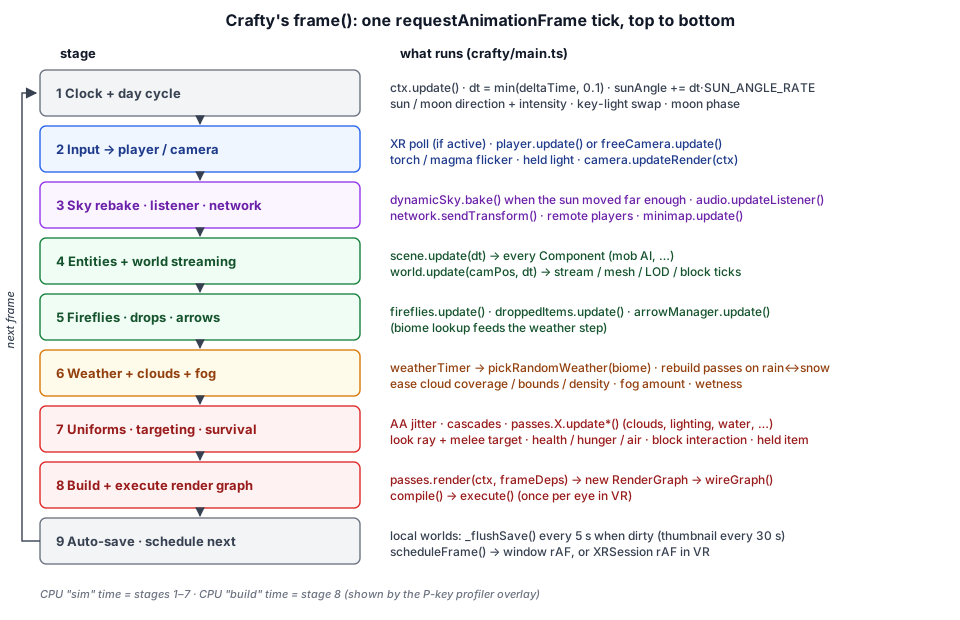
Crafty drives its own loop. frame() in main.ts is an async function scheduled with requestAnimationFrame (or the XR session's equivalent in VR). It clamps the time step, runs the simulation, updates pass uniforms, renders, and schedules itself again.
1.6.1 Simulation#
The first half of the frame advances game state. Condensed from frame(), keeping the order:
async function frame(): Promise<void> {
  ctx.pushPassErrorScope('frame');
  ctx.update();
  const dt = Math.min(ctx.deltaTime, 0.1);

  // Advance the day-night cycle, unless the player paused it or is actively
  // scrubbing either time-of-day slider (which drives `sunAngle` directly).
  if (!timePaused && !timeControls.some((tc) => tc.isScrubbing())) {
    sunAngle += dt * SUN_ANGLE_RATE;
  }
  // ── sun/moon direction, intensity, moon phase, key-light swap ──

  if (playerSetup.isPlayerMode()) {
    player.update(cameraGO, dt);
  } else {
    freeCamera.update(cameraGO, dt);
  }
  updateTorchFlicker(ctx.elapsedTime);
  updateMagmaFlicker(ctx.elapsedTime);
  heldLight.update(hotbar.getSelected(), ctx.elapsedTime);
  camera.updateRender(ctx);
  const camPos = camera.position();

  // ── re-bake sky + IBL if the sun moved far enough ──
  // ── audio listener follows the camera ──
  NPCEntity.playerPos.set(camPos.x, camPos.y, camPos.z);
  NPCEntity.heldItem = hotbar.getSelected();

  if (network !== null && network.connected) {
    network.sendTransform(camPos.x, camPos.y, camPos.z, player.yaw, player.pitch);
  }
  for (const rp of remotePlayers.values()) {
    rp.update(dt);
  }
  // ── minimap.update(...) ──

  scene.update(dt);
  world.update(camPos, dt);
  fireflies.update(dt, timeOfDay, camPos.x, camPos.y, camPos.z);
  droppedItems.update(dt, camPos.x, camPos.y, camPos.z);
  arrowManager.update(dt);

  const biome = world.getBiomeAt(camPos.x, camPos.y, camPos.z);
  // ── weather timer, transitions, eased cloud/fog parameters ──
A few ordering decisions are worth calling out:
- The player moves before the camera matrices are cached.
camera.updateRender(ctx)must run after the controller mutates the camera transform and before any pass reads view or projection matrices. - Mobs read the player through statics.
NPCEntity.playerPosandNPCEntity.heldItemare set once per frame beforescene.update(dt)runs every mob's AI component, so the AI never has to hold a reference to the player object. scene.updateruns beforeworld.update. Entity components (the mob AI in Chapter 4) tick first; thenBlockWorld.update()streams chunks around the camera, updates the LOD rings, drains the mesh queue within its time budget, and runs block ticks — fluids, redstone, crops — at a fixed rate with a catch-up cap.- Weather follows the biome under the camera. A weather change that alters the environment effect (none, rain, or snow) changes which precipitation pass exists, so it triggers
rebuildRenderTargets()from inside the frame.
The day length follows from SUN_ANGLE_RATE = 0.00556 radians per second: one full cycle takes about 19 real minutes, and a skew curve in crafty/game/day_cycle.ts keeps the sun above the horizon for about 7/9 of it.
1.6.2 Uniforms, Interaction, and Rendering#
The second half of the frame prepares and submits the render. It picks the AA jitter, fits shadow cascades (or clipmap levels) to whichever light is currently the key — the sun by day, the moon by night — collects mesh renderers into draw and shadow lists, and pushes uniforms into each pass. Interleaved with that are the systems that depend on the look ray: block targeting and the crack overlay, melee targeting, survival bookkeeping (health, hunger, air, fishing, respawn), block break/place progress, and the held-item viewmodel.
Finally the graph is built and executed:
const frameDeps = {
  iblTextures, cascades, shadowItems, camPos, blockShadowEnabled, clipmap: effects.clipmap_shadows,
  keyLightDir: { x: keyLightDir.x, y: keyLightDir.y, z: keyLightDir.z },
  keyLightColor: { x: keyLight.color.x, y: keyLight.color.y, z: keyLight.color.z },
  keyLightIntensity: keyLight.intensity,
};

const _tRenderStart = performance.now();
if (craftyXr.active && xrViews && xrViews.length > 0) {
  // ── once per eye: set the eye's view/projection, re-upload camera
  //    uniforms, render into that eye's projection-layer sub-image ──
} else {
  await passes.render!(ctx, frameDeps, graphViz);
}
// ── CPU profiler EMAs ──
await ctx.popPassErrorScope('frame');
// ── auto-save tick (local worlds) ──
scheduleFrame();
The CPU time before _tRenderStart is reported as "sim" and the time inside render() as "build" by the P-key profiler overlay, next to per-pass GPU timings from timestamp queries (see Taos Engine Chapter 18).
In VR the simulation still runs once per frame with the head camera; only the camera-dependent uniforms are re-uploaded and the graph re-executed for each eye.
1.6.3 Scheduling and Auto-Save#
The loop hands itself to whichever compositor is active:
function scheduleFrame(): void {
  if (craftyXr.active && craftyXr.session) {
    craftyXr.session.requestAnimationFrame((_t, xf) => {
      currentXrFrame = xf;
      void frame();
    });
  } else {
    currentXrFrame = null;
    requestAnimationFrame(() => { void frame(); });
  }
}
For local worlds, the end of each frame marks the save dirty if the player moved more than half a block or the sun moved more than about 0.3°, and flushes at most every 5 seconds, capturing a 160×90 thumbnail at most every 30 seconds. Saves are also forced when the tab is hidden or closed.
How Systems Talk to Each Other#
With no event bus and one big main(), Crafty connects its systems with three plain mechanisms. Recognizing them makes the rest of the code much easier to read.
Callback properties on engine objects. BlockWorld exposes onChunkAdded, onChunkUpdated, onChunkRemoved, onBlockSet, and onBlockBeforeRemove. The renderer, spawners, minimap, bee flower index, and edit-replay logic all hook these, chaining to the previous handler as shown in Section 1.4.3. The player controller likewise exposes onStep and onLand, which main.ts routes to footstep and landing sounds, gamepad rumble, and fall damage.
Static hooks on entity classes. Mob behavior that needs to affect the wider game calls a static callback that main.ts assigns once:
// A mob died: drop its (block-item) loot and remove it from the scene.
NPCEntity.onMobDeath = (mob) => {
  if (inventory.mode === 'survival') {
    for (const id of mob.loot) {
      droppedItems.spawn(mob.position.x, mob.position.y + 0.5, mob.position.z, id);
    }
  }
  scene.remove(mob);
};
Others in the same style are NPCEntity.onPlayerAttacked, NPCEntity.onTame, Skeleton.onShoot, Creeper.onExplode, Creeper.onBlockDestroyed, and HostileAI.getHours. This keeps entity code free of references to the inventory, the particle passes, or the network client.
Hooks on the interaction state. crafty/game/block_interaction.ts owns mining and placement, and exposes canPlace, onPlaced, onToolUsed, onAttack, onUseEntity, onUseHeld, and onLocalEdit. Survival rules (spend a block, wear down a tool, eat food, fire a bow) are layered on in main.ts through these hooks, so the interaction code does not need to know which game mode is active.
Single-Player and Multiplayer#
Crafty has one code path for both modes. The difference is where authoritative state comes from and where local edits go.
| Concern | Local world | Network world |
|---|---|---|
| Seed, game mode, world type | SavedWorld record | Server welcome message |
| Existing block edits | savedWorld.edits | welcome.edits |
| Spawn position | savedWorld.player (returning player) | welcome.lastPosition |
| A local block edit | Appended to the edit log; save marked dirty | Sent as block_place / block_break |
| Remote players | None | RemotePlayer rigs + name labels |
| Chat | Slash commands only (/players, /who, /me) | Relayed through the server |
| Saving | IndexedDB, auto-save every 5 s | Server persists to its data/ folder |
In both modes, edits are also bucketed by chunk in memory. The world regenerates a chunk from the seed whenever it streams back in, which would wipe out any edits; an onChunkAdded hook re-applies the chunk's bucket each time it loads. This is the "seed plus edit log" model that Chapter 9 develops in detail.
The multiplayer branch installs the network callbacks and routes local edits to the server:
if (network !== null) {
  network.setCallbacks({
    onPlayerJoin: (playerId, name) => {
      _spawnRemote(playerId, name);
    },
    onPlayerLeave: (playerId) => {
      _despawnRemote(playerId);
    },
    onPlayerTransform: (playerId, x, y, z, yaw, pitch) => {
      // ── set the remote player's interpolation target ──
    },
    onBlockEdit: (edit) => {
      _stashEdit(edit);
      // ── applyRemoteBlockEdit(edit, world, scene) ──
    },
    onChat: (playerId, name, text, kind) => chat!.addMessage(playerId, name, text, kind),
    onChatSystem: (text) => chat!.addSystem(text),
  });
  blockInteraction.onLocalEdit = (edit) => {
    // ── stash, then network.sendBlockPlace(...) or network.sendBlockBreak(...) ──
  };
}
The client in crafty/game/network_client.ts is two-phase: a lobby phase (hello, list_worlds, create_world, join_world) that runs inside the start screen, and an in-game phase that begins with welcome. Because main() spends several seconds on GPU and asset setup after welcome arrives, the client buffers in-game events that arrive before setCallbacks() and replays them in order, so a player who joins during that window is not lost. Transforms are coalesced to 20 Hz.
On the other end, the server in server/ is one Node process that hosts several games as modules routed by URL path; Crafty's is server/src/modules/crafty/crafty_module.ts, backed by world_room.ts, world_state.ts, and world_repository.ts. The server is authoritative for the edit log, game mode, and saved positions and inventories; the client does minimal prediction. The message unions both sides share are in shared/net_protocol.ts:
export type C2S =
  // Lobby phase
  | { t: 'hello'; playerKey: string; name: string; version: number }
  | { t: 'list_worlds' }
  | { t: 'create_world'; name: string; seed: number; gameMode: GameMode; worldType?: WorldType }
  | { t: 'join_world'; worldId: string }
  // In-game phase
  | { t: 'transform'; x: number; y: number; z: number; yaw: number; pitch: number }
  | { t: 'block_place'; x: number; y: number; z: number; fx: number; fy: number; fz: number; blockType: number }
  | { t: 'block_break'; x: number; y: number; z: number }
  | { t: 'inventory'; state: InventoryState }
  | { t: 'chat'; text: string };
Note what is not on the wire: chunk data. Every client regenerates terrain from the shared seed, and only the edits travel. Chapter 8 covers the gameplay side of this protocol; the transport layer is in Taos Engine Chapter 16.
How the Rest of This Book Is Organized#
Each remaining chapter takes one region of the architecture above and goes deep:
| Chapter | Covers | Main code |
|---|---|---|
| 2: Block Voxel Terrain | Chunks, world generation, greedy meshing, block light, water, SSR, villages | src/block/, block passes in src/renderer/render_graph/passes/ |
| 3: Player Physics | The kinematic player controller, AABB collide-and-slide, block ray casting | player_controller.ts, block_interaction.ts |
| 4: NPC AI | Entities, AI components, state machines, spawning, animation | crafty/game/entities/, crafty/game/components/, crafty/game/ai/ |
| 5: Game UI | Hotbar, inventory, menus, minimap, pointer-event routing | crafty/ui/ |
| 6: Weather System | Biome-driven weather states, cloud coverage, precipitation | weather_system.ts |
| 7: Audio | Surface sound pools, footsteps, ambient music | audio_manager.ts, audio_surface.ts |
| 8: Multiplayer Gameplay | Player sync, snapshot interpolation, edit replication, chat | network_client.ts, remote_player.ts, server/ |
| 9: World Persistence | Seed + edit-log saves, schema versioning | world_storage.ts |
The chapters can be read in order, but they do not have to be. Chapter 2 is the foundation for everything else; after that, each chapter mostly stands on its own and points back here for how its system is wired into main.ts.
Summary#
Crafty is a thin but wide layer on top of the engine:
- Layout: game code in
crafty/(config, game systems, entities, AI, DOM UI); the reusable voxel world insrc/block/; the multiplayer server inserver/, sharing its protocol throughshared/. - Boot sequence: start screen first (local world or server join), then settings,
Engine.create, assets,BlockWorld+ device profile, lights and player, the render pipeline as aRenderFeature, gameplay systems, and a pre-warmed spawn. - Renderer: persistent pass objects created by
buildRenderTargets()and a fresh render graph wired every frame bywireGraph(); optional passes exist only when their effect flag is on, and changing flags triggers a rebuild that keeps the persistent passes and their chunk data. - Device tiers: a
low/highmemory profile sizes the view range, block cache, and GPU chunk tables; rendering quality is a set of individually toggleable effects plus shadow, cloud, AO, and AA selectors, persisted inlocalStorage. - Frame loop: a self-scheduled
frame()that advances the day cycle, moves the player, updates the scene and the streaming world, runs weather, pushes pass uniforms, handles interaction and survival, renders (once per eye in VR), and auto-saves. - Wiring: chained world callbacks, static entity hooks, and interaction hooks connect systems without an event bus.
- Modes: single-player and multiplayer share one code path; only the source of the world record and the destination of local edits differ. Terrain is always regenerated from the seed, and only edits are stored or sent.
Further reading:
- crafty/main.ts — Boot sequence, settings UI, callback wiring, and the frame loop
- crafty/renderer_setup.ts —
buildRenderTargets(),wireGraph(), andrender() - crafty/crafty_pipeline_feature.ts — The pipeline as an engine
RenderFeature - crafty/config/device_profile.ts — Memory tiers and world-memory estimate
- crafty/config/effect_settings.ts — Effect defaults, labels, groups, and shadow/cloud selectors
- crafty/config/game_settings.ts — Persisted settings with validation
- crafty/ui/start_screen.ts — The launcher and
StartChoice - src/block/world.ts —
BlockWorld.update(): streaming, LOD, mesh delivery, block ticks - shared/net_protocol.ts — Client and server message types
- Taos Engine Chapter 3: Rendering Architecture and Taos Engine Chapter 12: Game Engine Design — The render graph and engine layer this chapter builds on