The game engine provides the structure for placing objects in the world and updating them each frame. Input — keyboard, mouse, and touch — and the controllers that consume it live in their own chapter (Chapter 13: Input); this one focuses on the entity/component system, scene graph, and frame loop.
The Component/Entity System#
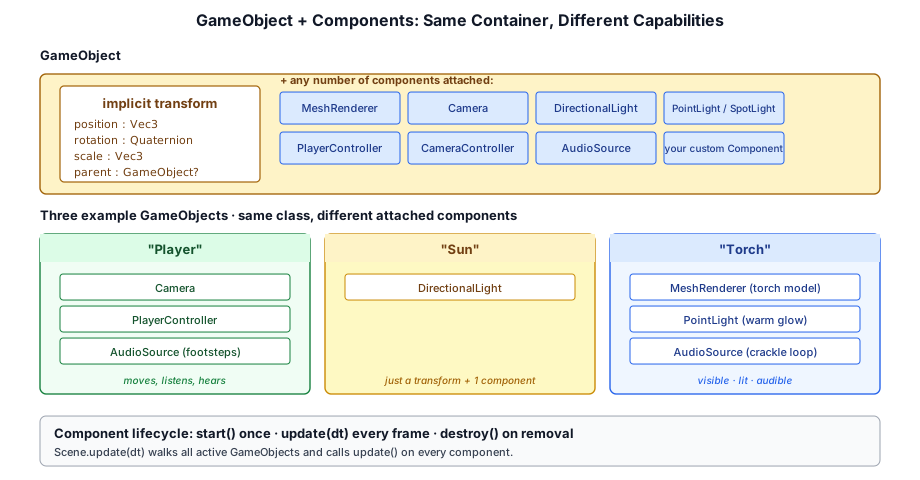
Taos Engine uses a component/entity pattern, though it is simplified compared to pure ECS architectures. A GameObject is a container for components, each component adding a specific capability.
GameObject
├── Transform        — local TRS + lazily-cached world matrix
├── Camera           — view matrix, projection
├── MeshRenderer     — draws a mesh with a material
├── DirectionalLight — sun light with cascade data
├── PointLight       — point light source
├── SpotLight        — cone light source
├── PlayerController — first-person movement
└── AudioSource — spatial audio emitterGameObject and Component#
class GameObject {
  id: string;                     // stable identity (auto-generated; editor overwrites)
  enabled = true;
  name: string;
  readonly transform: Transform;  // owns local TRS + the cached world matrix
  parent: GameObject | null = null;
  children: GameObject[] = [];

  // Local TRS — forwarding accessors onto `transform`.
  get position(): Vec3;           // local-space, mutate in place
  get rotation(): Quaternion;
  get scale(): Vec3;

  // World-space, recovered from the parent chain (transform-owned, copy before holding).
  get worldPosition(): Vec3;
  get worldRotation(): Quaternion;
  get worldScale(): Vec3;
  getWorldPosition(out?: Vec3): Vec3;    // allocation-free variants

  addComponent<T extends Component>(c: T): T;
  getComponent<T extends Component>(ctor: new (...args: never[]) => T): T | null;
  getComponents<T extends Component>(ctor: new (...args: never[]) => T): T[];
  addChild(child: GameObject): void;
  localToWorld(): Mat4;                   // fresh copy of the cached world matrix
  localToWorldInto(out: Mat4): Mat4;      // allocation-free, for per-frame loops
}
Every GameObject owns a Transform (§12.2.1). The position / rotation / scale properties are forwarding accessors onto it — code that writes go.position.y += dt is really mutating go.transform's local position. The id is a stable, per-session identity: auto-generated for runtime objects, but overwritten by the editor with a persistent id so references, selection, and prefab links survive save / load / undo.
Components attach to a GameObject and implement lifecycle methods:
abstract class Component {
  gameObject!: GameObject;
  get time(): Time;                    // Scene clock (delta, elapsed, frameCount, scale)

  onAttach(): void {}                  // Called when addComponent binds this instance
  onDetach(): void {}                  // Called when removeComponent runs
  update(dt: number): void {}          // Called every frame
  updateRender(ctx: RenderContext): void {}  // Per-frame refresh of render-side caches
}
update(dt) drives simulation. updateRender(ctx) runs immediately afterwards and is where components refresh GPU-facing state that depends on the final transform — Camera, for instance, rebuilds its view + projection matrices here so render passes always see a consistent snapshot.
The dt argument is the only number update receives, but a component often needs more than the inter-frame delta — absolute elapsed time for a sine-wave bob, the frame counter, or a timeScale it can honor for pause and slow-motion. Rather than widening every update signature, the engine exposes a per-scene clock through the Component.time getter (see §12.4 Time). this.time.delta is identical to the dt argument, so a component can ignore dt entirely and read everything off this.time.
12.2.1 The Transform: caching and compare-on-read invalidation#
The job of a transform looks trivial — store position, rotation, and scale; hand back a world matrix — but doing it cheaply every frame, for thousands of objects in a parent/child tree, is where the design earns its keep. The world matrix of any object is the product of its own local TRS matrix with its parent's world matrix, recursively up to a root:
worldMatrix = parent.worldMatrix × localMatrix (root: worldMatrix = localMatrix)Recomputing that product from scratch every read is wasteful — a static prop's matrix never changes, and a moving object usually only moves itself, not its whole subtree. So the Transform caches both the local matrix and the world matrix, and only redoes the matrix math for transforms that actually moved. The interesting question is how it knows what moved.
Compare-on-read, not write-interception#
The usual answer is a dirty flag: intercept every write to position/rotation/scale, set a boolean, and recompute on the next read. That requires the transform to own the writes — typically by hiding the fields behind setters or wrapping the vectors in observable proxies. Taos Engine deliberately doesn't do that, because the entire codebase mutates transforms by direct field access:
go.position.y += dt * speed;        // component gameplay
go.position.set(x, y, z);           // controllers
this.gameObject.rotation.setAxisAngle(AXIS_Y, angle);
position is a plain mutable Vec3; none of those writes route through the Transform, so there's no hook on which to hang a dirty flag. Rewriting every call site to go through transform.setPosition(...) — and forbidding pos.y += ... — was the alternative, and it was rejected. Instead, invalidation is compare-on-read: nothing is marked on write, and worldMatrix detects change when it is read.
The transform keeps the ten scalars (3 position + 4 quaternion + 3 scale) that were last baked into its local matrix. On read, it compares the current TRS scalars against those baked values; a mismatch means the local TRS changed since the last bake, so the local matrix is rebuilt:
private _refreshLocal(): boolean {
  const p = this._position, r = this._rotation, s = this._scale;
  if (
    p.x === this._bpx && p.y === this._bpy && p.z === this._bpz &&
    r.x === this._brx && /* …7 more… */ s.z === this._bsz
  ) {
    return false;                      // nothing changed → no work
  }
  this._localMatrix.setTrs(p, r.x, r.y, r.z, r.w, s);
  this._bpx = p.x; /* …snapshot all 10 scalars… */
  return true;                         // rebuilt
}
The ten baked scalars start as NaN, and because NaN !== NaN the very first read always counts as a change and bakes the matrix once. The cost of "did this transform move?" is ten float comparisons — far cheaper than a setTrs (which builds a rotation matrix and three scaled basis columns), so the comparison pays for itself the moment an object holds still for even one extra frame.
Propagating parent movement with a version counter#
A local-scalar comparison catches self movement, but a child must also rebuild when an ancestor moves, even though its own local TRS is untouched. Walking to the root and re-multiplying on every read would defeat the purpose. Instead, each transform carries a _worldVersion integer that it bumps every time it recomputes its own world matrix. A child remembers the parent version it last folded in (_parentVersionSeen); when the two differ, the parent has moved since the child last looked:
get worldMatrix(): Mat4 {
  let dirty = this._refreshLocal() || !this._worldComputed;
  const parent = this.gameObject.parent;
  if (parent) {
    const pw = parent.transform.worldMatrix;          // recurse up the chain first
    if (!this._hadParent || parent.transform._worldVersion !== this._parentVersionSeen) {
      dirty = true;
      this._parentVersionSeen = parent.transform._worldVersion;
    }
    if (dirty) {
      this._worldMatrix.setMultiply(pw, this._localMatrix);
    }
  } else if (dirty) {
    this._worldMatrix.copyFrom(this._localMatrix);
  }
  if (dirty) {
    this._worldComputed = true;
    this._worldVersion++;                              // children downstream will notice
  }
  return this._worldMatrix;
}
Reading worldMatrix therefore walks to the root, but at each level it does only cheap scalar/integer comparisons; it performs an actual matrix multiply only on the levels that genuinely changed. Move the root of a 1000-node tree and every descendant correctly rebuilds; move one leaf and only that leaf's chain recomputes — the siblings, queried later in the frame, see matching versions and return their cached matrices untouched.
This also handles re-parenting and detaching without any explicit notification. _hadParent records whether the previous read saw a parent: gaining one (newly added child), losing one (detached to a root, where the world matrix reverts to the local matrix), or being moved under a different parent all surface as a dirty recompute on the next read, because either _hadParent flips or the new parent's version won't match the remembered one.
GameObjects whose worldMatrix is read every frame, the way draw bucketing reads it; a node lights up only on frames when its _worldVersion advanced. Swing one arm and only that arm's chain recomputes; move the root and the whole tree does; wiggle one finger and a single leaf pays for a matrix multiply while every other node returns its cache after a few comparisons.Layered caches: inverse and world-space TRS#
Two further derived values hang off the same version counter, each recomputed only when _worldVersion advances:
worldToLocalMatrix— the inverse of the world matrix (used to bring a world-space point or ray into local space). Inversion is expensive, so it's memoized against_worldVersionand recomputed lazily on first use after a change.worldRotation/worldScale— the rotation and scale decomposed back out of the world matrix (recovering an object's absolute orientation through a chain of parent rotations and scales). The decomposition — extracting per-axis basis lengths, folding a mirrored determinant's sign into X, then converting the normalized basis to a quaternion — is the heaviest operation on the class, so it too runs only when the world matrix actually changed, guarded by a_trsVersionthat tracks_worldVersion.
worldPosition is the exception: it's just the translation column of the world matrix (data[12..14]), so there's nothing to decompose — it's read directly every time.
Allocation discipline#
The world getters return objects owned by the transform — worldPosition hands back a reused internal Vec3, not a fresh one. That keeps per-frame reads allocation-free, but it means a caller who stows the result and reads it next frame sees stale (or overwritten) data. For callers that need to keep a value, the getWorld*(out?) variants write into a caller-supplied target (allocating only when out is omitted):
const p = go.getWorldPosition(this._scratch); // writes into _scratch, no allocationThe same split applies to the matrix itself: localToWorld() returns a fresh Mat4 clone for convenience, while localToWorldInto(out) copies the cached matrix into the caller's storage — the form the engine's per-frame draw-bucketing and light updates use, so a full scene walk allocates nothing.
The Scene Graph#
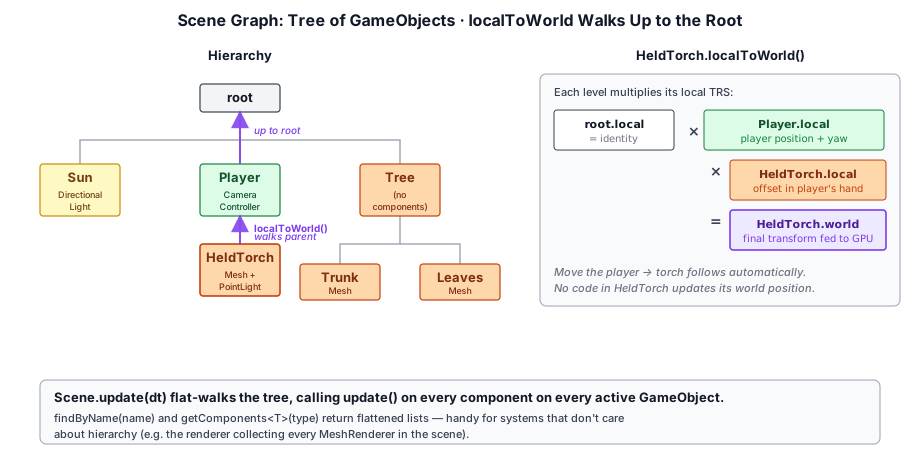
The Scene class manages the hierarchy of GameObjects:
class Scene {
  readonly gameObjects: GameObject[];          // Root-level GameObjects
  readonly time: Time;                         // Simulation clock for this scene

  add(go: GameObject): GameObject;             // Add a root GameObject (returns it, for chaining)
  remove(go: GameObject): void;                // Remove a root GameObject

  update(dt: number): void;                    // Recursively ticks every enabled component
  updateRender(ctx: RenderContext): void;      // Per-frame render-side refresh

  findCamera(): Camera | null;                 // First Camera in the hierarchy
  findSunLight(): DirectionalLight | null;     // First DirectionalLight in the hierarchy
  collectMeshRenderers(): MeshRenderer[];      // Walks the full hierarchy
  getComponents<T>(ctor): T[];                 // One per root (first match)
}
The scene is a forest of root GameObjects, each of which can have arbitrary children. Children inherit their parent's transform via GameObject.localToWorld, which multiplies up the chain from the leaf to the root — but only re-multiplying the levels that actually moved, thanks to the compare-on-read caching in §12.2.1.
The Engine and the Game Loop#
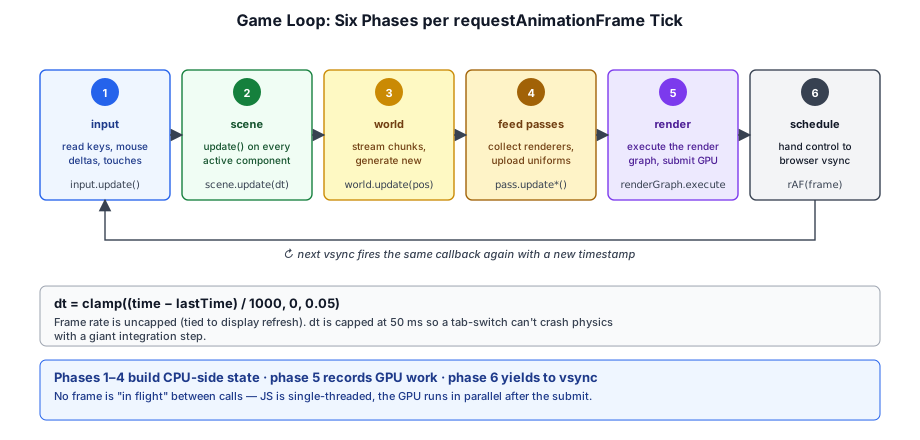
The frame loop is owned by the Engine class. The application hands Engine.create a canvas and a render preset — a function that registers a coordinated bundle of RenderFeature instances — and then calls engine.run() to start a requestAnimationFrame loop. Driving the scene, bucketing draw items, feeding uniform updates to passes, and rebuilding the graph all happen inside a single engine.frame() call:
async frame(): Promise<void> {
  ctx.update();                                  // 1. canvas resize, dt
  this.scene.time.advance(...);                  //    advance the scene clock (dt = time.delta)
  this.scene.update(dt);                         // 2. simulation tick
  this.scene.updateRender(ctx);                  // 3. component render-side refresh
  this._bucketScene();                           // 4. opaque / transparent / shadow buckets

  for (const f of features) f.earlyUpdate?.(frame);  // 5. mutate camera/uniforms early
  for (const f of features) f.update?.(frame);       // 6. per-frame uniform refresh

  const graph = new RenderGraph(ctx, cache);     // 7. fresh per-frame graph
  for (const f of features) f.addPasses(frame);  // 8. each feature wires its passes
  for (const cb of beforeRender) cb(frame);      // 9. one-off inline passes

  const compiled = graph.compile();              // 10. validate + cull + sort + bind
  await graph.execute(compiled);                 // 11. one command encoder, one submit
}
The scene walk, draw-bucketing, and camera-matrix caching all live in the engine, so applications don't drive them. And the per-frame state every pass needs — buckets, camera, time, the live graph, the chained HDR handle — is exposed as a single Frame object that every feature receives.
Render Features#
A RenderFeature is one unit of rendering work — usually one or two related passes plus the per-frame update and addPasses logic that owns them — bundled into a self-contained object:
interface RenderFeature {
  readonly name: string;          // 'ShadowFeature', 'BloomFeature', ...
  enabled: boolean;               // Toggle without removing
  setup(engine): void | Promise<void>;
  earlyUpdate?(frame: Frame): void;
  update?(frame: Frame): void;
  addPasses(frame: Frame): void;
  destroy?(): void;
}
Lifecycle:
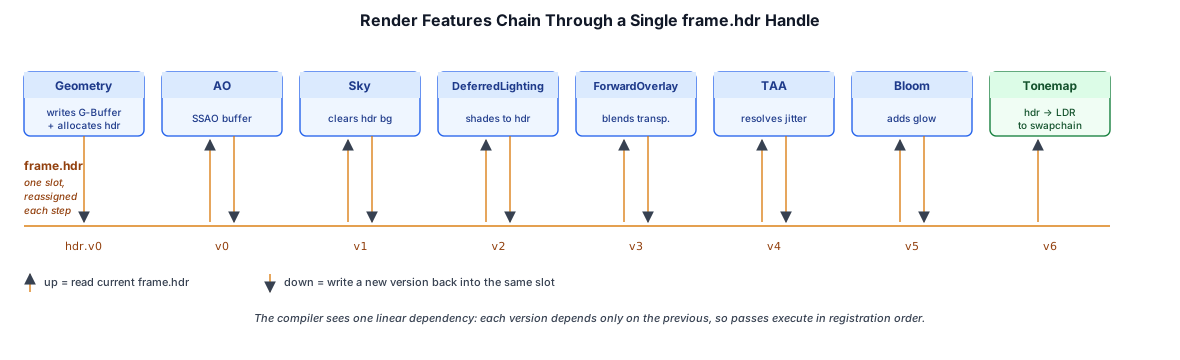
setup(engine)runs once when the feature is added. Construct the pass instance(s), allocate any persistent GPU buffers.earlyUpdate(frame)runs across all features before anyupdate— used for things that must mutate camera/uniform state before downstream features sample it (TAA's sub-pixel jitter is the canonical example).update(frame)runs once per frame after bucketing. Push per-frame uniforms to the owned passes.addPasses(frame)runs while the graph is being built. Readframe.hdr/frame.gbuffer/frame.shadowMap, callpass.addToGraph(graph, ...), and write the new handles back intoframe.hdrso downstream features pick them up.destroy()releases the pass's long-lived GPU resources.
Features chain through the Frame object — each one reads the current frame.hdr, declares its pass, and reassigns the slot. The compiler sees a clean linear dependency.
Presets — Composing Features#
A preset is a function that registers a bundle of features on an engine. The three built-ins live in src/renderer/presets/:
export function deferredPreset(opts: DeferredPresetOptions = {}): RenderPreset {
  return (engine: Engine): void => {
    if (opts.shadow !== false) engine.addFeature(new ShadowFeature(opts.shadow));
    engine.addFeature(new GeometryFeature());
    if (opts.ao !== false) engine.addFeature(new AOFeature({ method: opts.ao ?? 'ssao' }));
    registerSkyFeature(engine, opts.sky);           // 'none' | 'color' | 'texture' | 'atmosphere'
    engine.addFeature(new DeferredLightingFeature({ ibl: opts.ibl, ...opts.lighting }));
    if (opts.pointSpotLights) engine.addFeature(new PointSpotLightFeature());
    if (opts.transparent ?? true) engine.addFeature(new ForwardOverlayFeature({
      plus: opts.overlayLighting === 'forward+',    // transparency overlay backend
    }));
    if (opts.taa ?? true) engine.addFeature(new TAAFeature());
    if (opts.dof)   engine.addFeature(new DofFeature(...));
    if (opts.bloom) engine.addFeature(new BloomFeature(...));
    engine.addFeature(new TonemapFeature({ exposure: opts.exposure, aces: opts.aces }));
  };
}
All three presets share the same option vocabulary where it makes sense: sky (a tagged SkyOption with kind: 'none' | 'color' | 'texture' | 'atmosphere'), shadow, ibl, taa, dof, bloom, exposure, aces, hdrCanvas. forwardPreset is the smallest — sky → optional shadow → forward-lit → optional TAA/DoF/Bloom → tonemap — for simple material-showcase scenes. forwardPlusPreset sits in the middle: optional sky → optional shadow → ForwardPlusFeature (the tiled cull + shading pair) → tonemap, picked when the scene has many small point lights or needs forward-native transparency/MSAA. deferredPreset adds the path-specific knobs: ao, transparent, pointSpotLights, lighting, and overlayLighting: 'forward' | 'forward+'.
That last option picks which forward pass shades the transparency overlay. 'forward' (the default) uses ForwardPass. 'forward+' swaps in ForwardPlusPass with the deferred gbuffer depth wired as the tile-cull pre-pass's input — useful when the transparent layer needs to see hundreds of point lights without the per-fragment fixed loop blowing up.
Presets are pure convenience constructors: they call engine.addFeature(...) in registration order. Applications that don't fit any of the shipped shapes skip the preset and call addFeature directly. The crafty game does exactly this — it registers a single CraftyPipelineFeature that wires the full voxel-world pipeline (chunk geometry, weather particles, godrays, clouds, block highlight) without using a preset at all.
A Concrete Frame#
A complete forward-rendered hello-world fits in twenty lines:
const engine = await Engine.create({
  canvas,
  renderPreset: forwardPreset({ sky: { kind: 'texture', texture: skyTexture }, ibl }),
});

const sphere = new GameObject({ name: 'Sphere' });
sphere.addComponent(new MeshRenderer(sphereMesh, sphereMaterial));
engine.scene.add(sphere);

const sun = new GameObject({ name: 'Sun' });
sun.addComponent(new DirectionalLight(direction, color, intensity));
engine.scene.add(sun);

const cameraGO = new GameObject({ name: 'Camera' });
cameraGO.setPosition(0, 3, -6);
cameraGO.addComponent(Camera.createPerspective(60, 0.1, 100, aspect));
engine.scene.add(cameraGO);

engine.run();
The engine resolves the camera on the first frame via scene.findCamera(), so the application doesn't even set engine.camera. After that, every frame:
- the scene walks itself, ticks components, refreshes render-side state, and gets bucketed into opaque / transparent / shadow lists,
- every enabled feature runs
update(frame)to push per-frame uniforms, - the engine creates a fresh
RenderGraphand asks every feature toaddPasses(frame), - the graph compiles, executes, and submits one command buffer.
Hooks Around the Frame#
For work that doesn't fit a feature — input handling, UI updates, one-off debug overlays — the engine exposes three callbacks:
engine.beforeFrame((frame) => {/* top of frame, before scene.update */});
engine.beforeRender((frame) => {/* while graph builds, after features added passes */});
engine.afterFrame((frame) => {/* after submission */});
A controller that mutates transforms (camera, player) is usually best modeled as a Component on the object it drives — scene.update then ticks it for free (this is what CameraController does when you addComponent it). Reach for beforeFrame when something must run before scene.update reads the transforms, e.g. a controller that has to update ahead of other per-frame work in the same callback (the geo tutorials update the camera here right before floating-origin reanchoring). beforeRender is the escape hatch for one-off inline passes that don't justify a full feature class — declare a pass via frame.graph.addPass(...) and reassign frame.hdr if needed. afterFrame runs after the command buffer is submitted; it's where FPS readouts and the render-graph viz overlay live.
Time#
Each Scene owns a Time clock that the engine advances once per frame, immediately after ctx.update() and before scene.update. Components reach it through this.time; applications can reach it through engine.time (a shorthand for scene.time).
class Time {
  scale = 1;            // 1 = real time, 0 = paused, 0.5 = slow-mo, 2 = double speed

  delta = 0;            // scaled seconds since last frame — this is the `dt` passed to update()
  unscaledDelta = 0;    // real seconds since last frame, ignoring scale
  elapsed = 0;          // scaled seconds since start (stops while paused)
  unscaledElapsed = 0;  // real seconds since start
  frameCount = 0;       // total frames since start
  fps = 0;              // smoothed frames-per-second

  advance(unscaledDelta, unscaledElapsed, frameCount, fps): void;  // called by the engine
}
The split between scaled and unscaled is the point of the abstraction. delta and elapsed are multiplied by scale, so gameplay that reads them obeys a single global knob — set engine.time.scale = 0 to pause every behavior at once, or 0.25 for bullet-time. State that must keep moving regardless (UI animation, a free-look camera, the pause menu itself) reads unscaledDelta / unscaledElapsed instead.
The engine sets the dt argument to time.delta, so the value handed to update(dt) and the value read from this.time.delta can never disagree:
override update(): void {                     // dt argument now optional
  this.angle  += this.speed * this.time.delta;       // gameplay — respects pause / slow-mo
  this.glow    = Math.sin(this.time.elapsed);        // absolute simulation time
  this.bob     = Math.sin(this.time.unscaledElapsed); // keeps moving even when paused
}
Because the clock lives on the Scene rather than in a module-level global, separate engine instances on the same page (multiple canvases, a picture-in-picture preview) each keep their own independent time and scale.
GameObject (and the moon off its planet), so the scene graph composes their orbits. Every pivot is turned by a small component that integrates this.time.delta, so one engine.time.scale pauses, slows, or speeds up the whole system. The ring above the sun reads this.time.unscaledElapsed, like a pause menu would, and keeps turning even at a scale of 0.Frame Rate#
The frame rate is uncapped — engine.run() is a requestAnimationFrame loop, so it ticks at the display refresh. dt is clamped to 100 ms inside engine.frame() to prevent physics explosion on tab-switch:
const dtRaw = Math.min(ctx.deltaTime, 0.1);                 // clamp the raw frame delta
this.scene.time.advance(dtRaw, ctx.elapsedTime, ctx.frameCount, ctx.fps);
const dt = this.scene.time.delta;                           // scaled delta drives the sim
Applications that drive their own loop (XR session, screenshot automation) call engine.frame() directly instead of engine.run(). frame() resolves once the command buffer has been submitted.
update(dt) would. Every few seconds the widget blocks the "main thread" and then delivers the whole stall as one frame's dt, as requestAnimationFrame does when a tab comes back. With the 100 ms clamp the step stays stable and the world just loses the stalled time (the readout counts it); without it, a single step past the spring's stability limit makes it explode.Summary#
The game engine layer provides:
- Entity/component system:
GameObject+Componentwith scene graph tree hierarchy; each GameObject owns aTransformthat caches its world matrix and invalidates by compare-on-read (no dirty flags), recomputing only the levels of the parent chain that actually moved - Per-scene time: a
Timeclock (delta,elapsed,frameCount,scale) reachable from any component viathis.time, withtimeScalefor global pause and slow-motion - Engine + features + presets:
Engine.frame()owns the per-frame loop;RenderFeatures bundle pass instances with the per-frame update + graph-wiring logic; presets compose features into ready-made forward and deferred pipelines
Input — keyboard, mouse, pointer lock, and the touch overlay — and the controllers that consume it (camera and player) live in Chapter 13: Input. How the Crafty game persists its worlds — the IndexedDB save layer, schema versioning, and edit-log replay — is covered in Crafty Chapter 9: World Persistence.
Further reading:
- src/engine/transform.ts —
Transform: local TRS, the cached world matrix, and compare-on-read invalidation - src/engine/game_object.ts —
GameObject: the transform/children/components container and its forwarding accessors - src/engine/engine.ts —
Engine.create, the per-frame loop, feature registration, hooks - src/engine/time.ts — The
Timeclock: scaled/unscaled delta + elapsed,timeScale - src/engine/render_feature.ts —
RenderFeatureinterface and lifecycle - src/engine/frame.ts — The
Frameobject features read and write each frame - src/renderer/presets/ —
forwardPreset,forwardPlusPreset, anddeferredPresetreference compositions - src/renderer/features/ — Every built-in feature
- docs/api-guide.md — Practical API quick-start for driving the engine