What is Taos Engine?#
Taos Engine is a game engine and rendering framework built entirely from scratch on top of WebGPU. It is written in TypeScript and runs in any browser that supports the WebGPU API.
The engine demonstrates a complete, production-quality rendering pipeline:
- Multi-pass deferred rendering with a G-Buffer, HDR lighting, and a forward or tiled forward+ overlay for transparency
- Physically based materials, from a metallic-roughness PBR model up to OpenPBR Surface and MaterialX
- Shadows: cascaded shadow maps for the sun, variance and exponential-variance shadow maps, clipmap shadows, PCSS, and screen-space contact shadows
- Global illumination: image-based lighting, SSAO/GTAO, screen-space GI, voxel cone tracing, and dynamic diffuse probes
- GPU compute particles, a physically based atmosphere, volumetric clouds and fog
- A full post-processing suite: temporal anti-aliasing (TAA), bloom, depth of field (DOF), motion blur, god rays, auto-exposure, and HDR tonemapping
- A component/entity game engine with a scene graph, input, spatial audio, UI, multiplayer networking, and rigid-body physics
Writing a game engine is only useful if it can be used to build an actual game, so Taos Engine ships a fully featured voxel sandbox game called Crafty as its showcase — a style of game many people are familiar with, which makes it a good yardstick for how well the engine is doing. Crafty, and engine subsystems large enough to deserve their own treatment, are covered in companion books (see §1.8); this book stays focused on the engine itself.
But Taos Engine is more than a demo — it is a teaching vehicle. The renderer and engine core are built by hand on nothing but the WebGPU API and the TypeScript standard library — there are no middleware rendering libraries and no black boxes. If you want to understand how a modern real-time renderer works from the GPU queue up, you can read every line of code here. Where a subsystem does build on an established library — rigid-body physics runs on the Jolt engine compiled to WebAssembly (Chapter 17), and compressed meshes and textures use their reference decoders — the book explains why the library was chosen and how Taos Engine wraps it.
A Brief History of Graphics APIs#
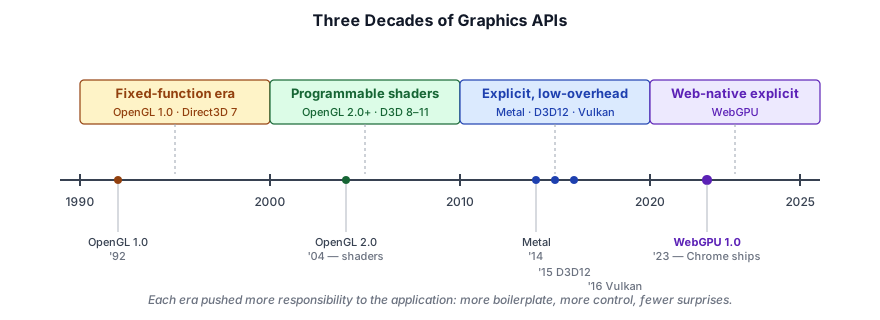
To understand why WebGPU exists, it helps to see where it came from.
The fixed-function era (1990s). OpenGL 1.0 and Direct3D 7 gave you a fixed pipeline: set a light, set a material, draw a triangle. You could configure parameters, but you could not reprogram how the GPU worked. This was simple but limiting — every effect that deviated from the standard model required expensive CPU-driven workarounds.
The shader revolution (2000s). OpenGL 2.0 / Direct3D 8 introduced programmable vertex and fragment shaders. Suddenly developers could write small programs that ran directly on the GPU. The fixed-function pipeline was still there as a fallback, but the industry rapidly moved toward fully programmable pipelines. OpenGL 3.2 (2009) made the core profile mandatory and deprecated the fixed-function path.
The explicit API shift (2010s). OpenGL and Direct3D 11 were driver-managed — the driver handled memory allocation, synchronization, and state validation. This made them easy to use but unpredictable. Games that pushed hardware limits needed lower overhead. Apple developed Metal (2014), Microsoft released Direct3D 12 (2015), and the Khronos group standardized Vulkan (2016). These explicit APIs gave applications direct control over GPU resources and command submission, at the cost of significantly more boilerplate.
WebGPU — the web-native explicit API. The web needed a modern graphics API that could run on all three native backends (Metal, D3D12, Vulkan) without the legacy baggage of WebGL (which was based on OpenGL ES 2.0/3.0). WebGPU, designed by the W3C GPU for the Web Community Group, is the result. It provides an explicit, low-overhead API with a clean, ergonomic design that feels like Metal with Vulkan's validation philosophy baked in.
Why WebGPU?#
We chose WebGPU for Taos Engine for several reasons:
Zero installation. The user opens a URL and the engine runs. No downloads, no SDKs, no platform-specific builds. This dramatically lowers the barrier to entry for readers who want to experiment.
First-class TypeScript. The entire engine is written in TypeScript, which means we get static typing, modern async/await, and a rich ecosystem of developer tooling — all without a compilation step to native code. Debugging is done in the browser's DevTools, which every web developer already knows.
Clean API design. Compared to Vulkan, WebGPU eliminates enormous amounts of boilerplate. The object hierarchy is short — an adapter, a device, and the device's single default queue — with no physical-device enumeration, queue-family selection, or swapchain management. There is no explicit memory allocation and no manual synchronization: the browser's WebGPU implementation tracks resource usage and inserts barriers itself, with more predictable costs than an OpenGL driver. Yet WebGPU retains the explicit pipeline state objects, descriptor-based resource binding, and command buffer recording that make modern APIs efficient.
Cross-platform. Write once, run on Windows (D3D12), macOS/iOS (Metal), Linux/Android (Vulkan), and — eventually — all major browsers. No #ifdef platform paths.
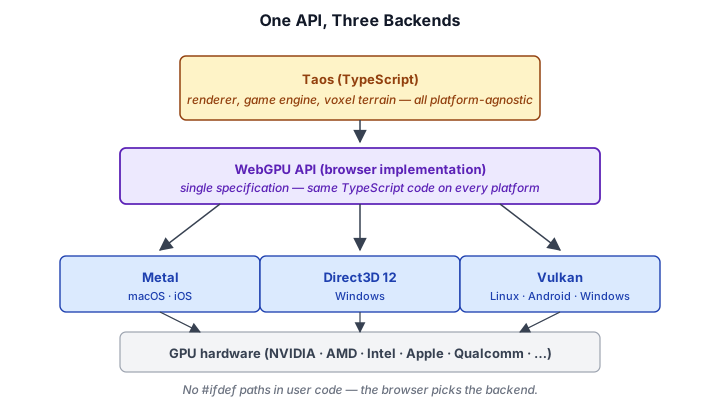
It is the future of graphics on the web. WebGL 2.0 is in maintenance mode. All major browser vendors have committed to WebGPU as the successor. Learning WebGPU today means your skills are relevant for the next decade.
Literate Programming with This Book#
This book follows the tradition of Donald Knuth's Literate Programming and, more directly, Physically Based Rendering: From Theory to Implementation by Pharr, Jakob, and Humphreys. The core idea is simple:
The code is the explanation. We present source files alongside the reasoning that produced them.
Each chapter focuses on a subsystem of Taos Engine. We walk through the key source files, showing annotated excerpts that illustrate the central logic. When a full file is needed, we show it in its entirety. You are encouraged to open the actual source tree alongside this book — every code block references its file path.
The convention for annotated excerpts is:
// ... boilerplate context elided ...
// The G-Buffer attachments share the canvas dimensions
const screenDesc = (format: GPUTextureFormat): TextureDesc => ({
  format, width: ctx.width, height: ctx.height,
});
// ── end of excerpt ──
Code blocks that are complete file listings are marked by listing the full path at the top and containing the entire file's content.
Setting Up the Development Environment#
To follow along with this book, you need:
- A browser that supports WebGPU. Open
webgpureport.orgto check if your browser supports WebGPU. This will include a report about all of the features available to WebGPU. - Node.js 20+ (for development tooling).
- A code editor — VS Code is recommended for its TypeScript integration.
Clone the repository and install dependencies:
git clone https://github.com/brendan-duncan/TaosEngine
cd TaosEngine
npm install
Start the development server:
npm run devThis launches Vite on http://localhost:5173. Open it in your browser and you should see a screen letting you open the Crafty game or one of the Samples.
Crafty can be opened at http://localhost:5173/crafty/.
The project uses the following toolchain:
| Tool | Purpose |
|---|---|
| TypeScript (https://www.typescriptlang.org) | All source code, strict mode enabled |
| Vite (https://vite.dev) | Development server and production bundler |
| Vitest (https://vitest.dev/) | Unit testing framework |
| @webgpu/types (https://github.com/gpuweb/types) | TypeScript type definitions for the WebGPU API |
You can run the test suite to verify your environment:
npm testThe full package.json at package.json defines all available scripts:
| Command | What it does |
|---|---|
npm run dev | Start Vite dev server |
npm run build | Type-check then production build |
npm test | Run tests once |
npm run test:watch | Run tests in watch mode |
npm run test:coverage | Run tests with coverage |
npm run server | Start the multiplayer server |
There are also self-contained sample pages in samples/. Each sample pairs an HTML file with a TypeScript entry point. To view a sample, navigate to its HTML path, e.g. http://localhost:5173/samples/rg_forward_simple.html.
The Taos Engine Codebase at a Glance#
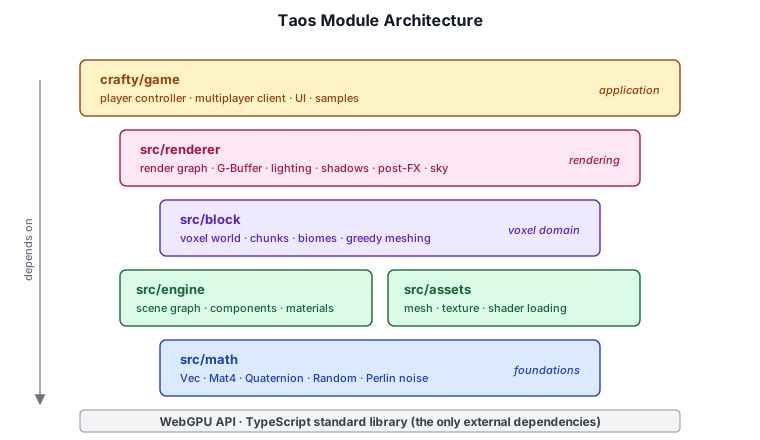
The project root is organized as follows:
TaosEngine/
 ── src/                    # Core engine library
│   ├── math/               # Vec3, Mat4, Quaternion, noise, random
│   ├── engine/             # Scene graph, components, materials
│   ├── assets/             # Mesh, texture, shader loading
│   ├── block/              # Voxel world, chunks, biomes
│   └── renderer/           # WebGPU render graph and passes
├── crafty/                 # Game application
│   ├── config/             # Classes for storing various engine configurations.
│   ├── game/               # Crafty game engine code
│   └── ui/                 # HUD, hotbar, start screen
├── server/                 # WebSocket multiplayer server (Node.js)
├── samples/                # Samples to test engine and rendering features
├── tests/                  # Unit tests (Vitest)
├── scripts/                # Build tools (texture atlas, etc.)
├── package.json
├── tsconfig.json
└── vite.config.ts
The library code in src/ is self-contained and could be used independently from the crafty game in crafty/. The game was written to demonstrates many of the features of the Taos Engine.
These directories form a layered architecture — each layer depends only on the ones below it, with WebGPU and the TypeScript standard library at the very bottom:
A Note on Mathematics#
Real-time rendering rests on a foundation of math — vectors, matrices, quaternions, and the conventions that tie them together. Rather than front-load a full math chapter, this book gets into the fun parts of the project as early as possible. The math you need is introduced in context as each subsystem is built, and the full reference lives in Appendix A: Mathematics Reference.
If you want a deeper grounding before continuing, that appendix covers Vec2/Vec3/Vec4, Mat4, Quaternion, transform composition, the coordinate-space transformation pipeline, the seeded random number generator (RNG) and Perlin noise used for procedural generation. It serves as both a tutorial and a quick lookup.
A few conventions used everywhere in Taos Engine are worth noting up front:
| Convention | Taos Engine choice |
|---|---|
| Handedness | Right-handed |
| Up | +Y (0, 1, 0) |
| Forward | -Z (0, 0, -1) |
| Matrix storage | Column-major in Float32Array |
| Depth range | [0, 1] (WebGPU) |
| Winding order | Counter-clockwise (front faces) |
Taos Engine uses a right-handed, Y-up, -Z-forward coordinate system — the same convention as OpenGL. WebGPU itself is right-handed with a [0, 1] depth range (unlike OpenGL's [-1, 1]), and matrices are stored column-major to match WGSL's default layout. The math types live in src/math/: Vec2, Vec3, Vec4, Mat4, Quaternion, plus the procedural-generation helpers Random and the Perlin noise family in noise.ts.
When something more involved comes up — the lookAt view matrix, quaternion SLERP, the inverse-transpose normal matrix, FBM noise — we will introduce just enough of the math to motivate the code, and link to Appendix A for the full derivation.
Where We Go From Here#
This book proceeds in four parts, followed by reference appendices. It stays focused on the engine itself — the reusable foundation that is not tied to any particular game.
- Foundations (Chapters 1–2): Introduction and WebGPU API fundamentals.
- Rendering (Chapters 3–11): The render graph, meshes, textures, materials, lighting, shadows, particles, sky and atmosphere, post-processing.
- Game Engine (Chapters 12–17): Components and scene graph, input, audio, UI patterns, network architecture, and rigid-body physics.
- Performance & Tools (Chapters 18–19): Profiling, culling, async compilation, the sample framework, and the asset pipeline.
Larger subsystems and the games built on the engine each get their own companion book, so they can grow without crowding the core:
- Crafty: Building a Voxel Sandbox Game — the first full game built on Taos Engine: block voxel terrain, player physics, NPC AI, game UI, weather, audio, multiplayer gameplay, and world persistence.
- Heightmap Terrain — a continuous terrain system: CDLOD, virtual texturing, and GPU-driven indirect drawing.
- Geospatial Streaming — planet-scale globe streaming with 3D Tiles, quantized mesh, and a floating origin.
- Sample Deep Dives — long-form walkthroughs of the larger sample programs.
The companion books assume the core book as background and link back into it wherever they build on an engine system.

By the end, you will understand how every pixel on the screen got there — from the WGSL shader that computed it to the WebGPU pipeline that rasterized it to the game engine that placed the object in the world.