The sky is the largest object in any outdoor scene. Taos Engine supports multiple sky rendering techniques: a fixed sky texture, a procedural atmospheric sky, a dynamic sky texture baked from that atmosphere on the GPU, and volumetric clouds.
Fixed Sky Texture#
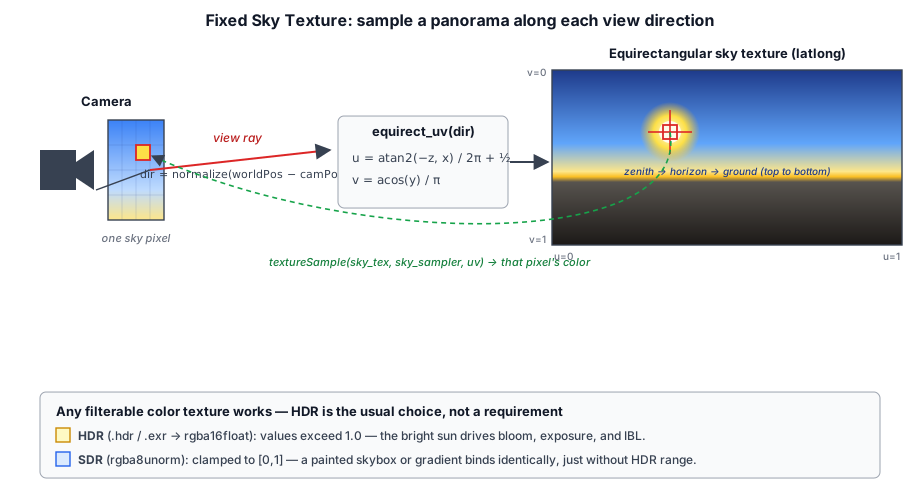
The simplest sky is a fixed sky texture — a single panorama sampled as a fullscreen background. The SkyTexturePass reconstructs each pixel's world-space view direction from the inverse view-projection matrix, maps it to equirectangular (latlong) UVs, and samples the texture there:
let dir = normalize(world_h.xyz / world_h.w - sky.cameraPos);
let rgb = textureSample(sky_tex, sky_sampler, equirect_uv(dir)).rgb;
The texture is usually a high dynamic range environment map — a 360° capture of a real sky. HDR matters here because the sky's true range is enormous: the sun can be thousands of times brighter than the blue overhead, and only a texture that preserves that range feeds physically-based bloom, eye adaptation, and image-based lighting (§7.10) correctly.
Nothing in the pass requires HDR, though. The sky source is bound as an ordinary filterable float texture, so a standard dynamic range image drops in just as well — a painted skybox, a stylized gradient, or an rgba8unorm photo. It simply caps brightness at 1.0, which is fine for a flat or stylized look that does not drive HDR effects.
How these images get onto the GPU — RGBE decoding for Radiance .hdr, half/float channels for OpenEXR .exr, or the browser's built-in path for ordinary SDR formats — is the subject of Chapter 5: Textures. The atmosphere only cares about the result: a filterable texture it can sample as the background.
Atmospheric Sky#
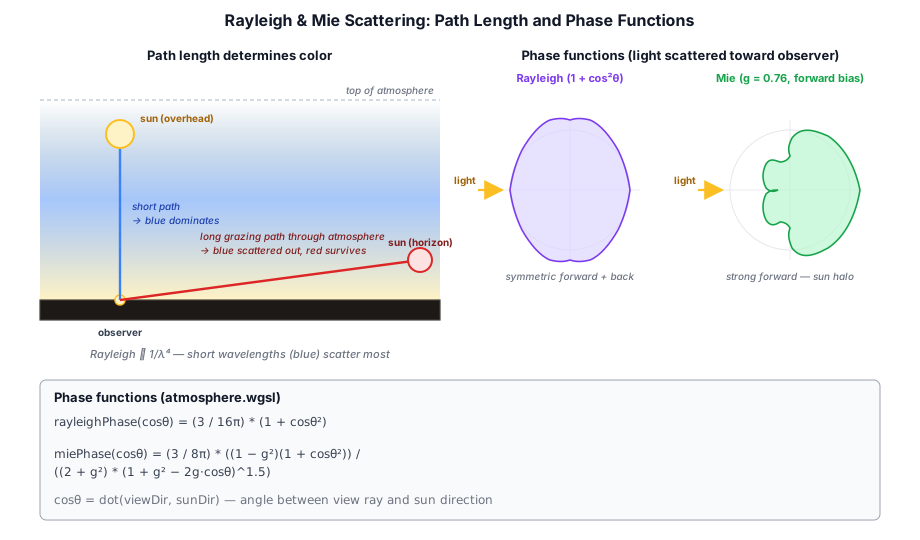
The AtmospherePass (src/renderer/render_graph/passes/atmosphere_pass.ts) renders a procedural sky using a simplified atmospheric scattering model. Rayleigh scattering (blue sky at zenith, red at sunset) and Mie scattering (sun halo) are computed per-pixel based on the view direction and sun position.
Single Scattering Approximation#
fn phaseR(mu: f32) -> f32 {   // Rayleigh
  return (3.0 / (16.0 * PI)) * (1.0 + mu * mu);
}

fn phaseM(mu: f32) -> f32 {   // Mie
  let g2 = G * G;             // G = 0.758 — forward-scattering haze
  return (3.0 / (8.0 * PI)) *
    ((1.0 - g2) * (1.0 + mu * mu)) /
    ((2.0 + g2) * pow(max(1.0 + g2 - 2.0 * G * mu, 1e-4), 1.5));
}
The atmosphere pass writes directly into the HDR target with a fullscreen draw. It supports a day/night cycle driven by the sun's elevation angle.
The scattering math itself lives in a shared, #import-able module — src/shaders/modules/atmosphere_model.wgsl. Its functions take the sun direction and ozone flag as explicit arguments rather than reading a uniform, so they carry no bind-group dependency. The screen-space pass is only one of the module's two consumers; the other is the dynamic sky bake (§10.5), which evaluates the very same model into a texture.
The view-ray march inside scatterP does not use a fixed sample count. A zenith ray crosses roughly one shell thickness of air (~60 km), while a horizon-grazing ray from the surface spans an ~875 km chord — fixed sampling either wastes work looking up or bands at the limb and at sunset. The count scales with the square root of path length over that grazing chord, landing near the old fixed 16 for vertical rays and spending up to 32 samples where the integrand actually varies:
let graze_chord = sqrt(max((atm.r_a - atm.r_e) * 2.0 * atm.r_a, 1.0));  // ≈ 875 km for Earth
let n_samples = 8 + i32(24.0 * sqrt(saturate((tMax - tMin) / graze_chord)));Oren-Nayar Diffuse Ground#
The base atmosphere model treats the ground as fully absorbing — a view ray that reaches the surface simply stops. In reality the lit ground reflects sunlight back up, brightening and slightly warming the lower atmosphere. The atmosphere model adds this as a ground-bounce term: the sunlit ground becomes a secondary, diffuse light source folded into the scattering integral.
Oren-Nayar BRDF#
The ground is rough, so its reflection is modeled with an Oren-Nayar BRDF rather than a pure Lambertian — Oren-Nayar keeps rough surfaces bright at grazing angles instead of darkening them:
fn orenNayar(cosI: f32, cosR: f32, cosPhiDiff: f32, roughness: f32) -> f32 {
  let sigma2 = roughness * roughness;
  let A = 1.0 - 0.5 * sigma2 / (sigma2 + 0.33);
  let B = 0.45 * sigma2 / (sigma2 + 0.09);
  let thetaI = acos(clamp(cosI, -1.0, 1.0));
  let thetaR = acos(clamp(cosR, -1.0, 1.0));
  let alpha  = max(thetaI, thetaR);
  let beta   = min(min(thetaI, thetaR), 1.2);  // clamp avoids the tan() blow-up
  return A + B * max(0.0, cosPhiDiff) * sin(alpha) * tan(beta);
}
roughness is the microfacet slope σ: at 0 the model collapses to Lambertian; larger values widen the reflection lobe. cosI is the cosine between the ground normal and the sun, cosR between the normal and the view ray, and cosPhiDiff their azimuthal difference — the max(0, cosPhiDiff) term is what brightens the ground when looking toward the sun.
Folding the Bounce into the Scattering Integral#
Before the view-ray march, scatter() computes the ground's outgoing radiance once — sunlight reaching the ground (attenuated by the atmosphere along the sun ray), shaped by the BRDF and the ground albedo:
let sunUp       = max(sunDir.y, 0.0);
let groundIrrad = SUN_INTENSITY * sunUp
                * transmittance(vec3<f32>(0.0, R_E, 0.0), sunDir, ozone);
let sunAz       = normalize(sunDir.xz + vec2<f32>(1e-6, 1e-6));
let viewAz      = normalize(rd.xz + vec2<f32>(1e-6, 1e-6));
let on          = orenNayar(sunUp, clamp(rd.y, 0.0, 1.0),
                            dot(sunAz, viewAz), GROUND_ROUGHNESS);
let groundRad   = GROUND_ALBEDO * groundIrrad * on * (1.0 / PI);
Each step of the march then accumulates a ground-bounce weight sumG, using only the camera→sample transmittance and an exp(-h / GROUND_BOUNCE_H) falloff so the bounce stays in the dense low haze where it is visible. After the loop the bounce is in-scattered with an isotropic phase — ground light arrives from a wide spread of downward directions, so it has no forward peak — and added to the direct single-scattering result:
let bounce = groundRad * (BETA_R + vec3<f32>(BETA_M)) * sumG
           * (GROUND_BOUNCE_STRENGTH / (4.0 * PI));
return direct + bounce;
GROUND_ALBEDO is a warm earthy tone, so the bounce tints the lower sky toward yellow-orange. The contribution scales with sunUp, so it is strongest when the sun is high and fades to nothing at night. GROUND_BOUNCE_STRENGTH is the overall gain — a single constant tuned by eye against the running sky.
Ozone Absorption (Chappuis Band)#
Ozone in the stratosphere absorbs visible light in the Chappuis band (500–700 nm, peak ~600 nm). While the effect is negligible at high sun angles, it becomes visible at twilight when sunlight travels through a long path in the ozone layer. The absorption gives the zenith sky a subtle purple-pink hue at sunset.
Unlike Rayleigh and Mie, ozone only absorbs light — it never scatters it. So ozone contributes to the atmosphere's extinction (it dims the transmittance term) but never appears as an in-scattered source term, and it needs no phase function.
Absorption Coefficient and Layer Profile#
The absorption is a wavelength-dependent extinction coefficient, ordered red/green/blue to match BETA_R. Absorption peaks in the orange-green band, so green is removed most strongly while blue passes almost untouched — it is this selective loss of green along the long twilight light path that produces the purple-pink cast:
const BETA_O: vec3<f32> = vec3<f32>(0.650e-6, 1.881e-6, 0.085e-6);Ozone is concentrated in a stratospheric layer rather than thinning out with a scale height the way air molecules and haze do. Its density is modeled with a tent profile — peaking at 25 km and falling linearly to zero 15 km either side (so the layer spans roughly 10–40 km):
const OZONE_CENTER: f32 = 25000.0;      // altitude of peak concentration (m)
const OZONE_HALF_WIDTH: f32 = 15000.0;  // tent half-width → layer spans 10–40 km

fn ozoneDensity(h: f32) -> f32 {
  return max(0.0, 1.0 - abs(h - OZONE_CENTER) / OZONE_HALF_WIDTH);
}
Applying Ozone Extinction#
The ozone optical depth is accumulated alongside the Rayleigh and Mie integrals — opticalDepthToSky returns a vec3<f32> whose .z component carries the ozone term. The combined extinction folds ozone into the transmittance exactly like the other two:
let tau = BETA_R * (odR + odL.x)
        + BETA_M * 1.1 * (odM + odL.y)
        + BETA_O * (odO + odL.z);
let T   = exp(-tau);
Because ozone only enters through tau, it darkens both sumR and sumM without adding a source term of its own. This produces the characteristic purple-pink zenith glow at sunset that a Rayleigh+Mie-only model misses.
Optional Quality Setting#
Ozone adds a small per-sample cost: a tent evaluation at every step of both the view-ray march and the inner light-ray march. To keep the sky cheap on low-end hardware, it is exposed as a performance/quality toggle. A uniform flag (u.ozoneEnabled) gates the work — atmosphere.wgsl reads it and passes the result into the shared scatter(), where, because the flag is constant across the whole draw, the branch is coherent and genuinely costs nothing when ozone is off:
let ozone = u.ozoneEnabled > 0.5;
var color = scatter(ro, rd, u.sunDir, ozone);

// ── from src/shaders/modules/atmosphere_model.wgsl — inside scatter()'s raymarch ──
if (ozone) { odO += ozoneDensity(h) * ds; }
On the host side, AtmospherePass.setOzoneEnabled(enabled) flips the flag, and the game wires it to the OZONE button in the control panel (crafty/config/effect_settings.ts). When disabled, the ozone optical depth stays zero and exp(-BETA_O * 0) leaves the transmittance unchanged — the sky falls back to the pure Rayleigh+Mie model.
The Dynamic Sky Texture#
The atmosphere pass (§10.2) paints the visible sky every frame, but the renderer also consumes the sky as an input. Image-based lighting reads it for ambient and specular reflection (§7.10), and the water surface samples it as the fallback for reflection rays that miss the scene. Loading a static .hdr panorama for that job (§10.1) freezes both at a single time of day — pick a noon sky and the world stays noon-lit through every sunset.
Taos Engine drops the static asset entirely. Instead it bakes the sky on the GPU from the same scattering model the atmosphere pass uses, and rebakes it as the sun moves. DynamicSky (src/assets/dynamic_sky.ts) owns the panorama texture and the IBL cubes derived from it.
One Model, Two Consumers#
scatter(), transmittance(), the phase functions, the ozone tent, and the Oren-Nayar ground bounce all live in a #import-able module — src/shaders/modules/atmosphere_model.wgsl. Both atmosphere.wgsl (the screen-space dome) and sky_panorama.wgsl (the bake) pull it in, so the baked sky and the visible sky are guaranteed to agree.
The module functions take the toward-sun vector and the ozone flag as explicit arguments rather than reading a uniform. That keeps the module free of any bind-group dependency — each importing shader declares its own uniform layout and passes the values in:
fn scatter(ro: vec3<f32>, rd: vec3<f32>, sunDir: vec3<f32>, ozone: bool) -> vec3<f32> { ... }Baking an Equirectangular Panorama#
sky_panorama.wgsl draws a fullscreen triangle into a 512×256 rgba16float texture. For each texel it maps the equirectangular UV back to a world direction — the exact inverse of the equirect_uv used by the IBL baker and the water shader — then evaluates scatter() toward that direction:
fn dir_from_equirect(uv: vec2<f32>) -> vec3<f32> {
  let az    = (uv.x - 0.5) * 2.0 * PI;  // atan2(-z, x)
  let polar = uv.y * PI;                // acos(y)
  let sinP  = sin(polar);
  return vec3<f32>(cos(az) * sinP, cos(polar), -sin(az) * sinP);
}
The hard sun disk that atmosphere.wgsl adds for the visible sky is deliberately left out of the bake. A single ~1000-intensity texel would blow the GGX-prefiltered IBL into a sparkling firefly and stamp a hard bright dot into water reflections. The directional light already supplies the scene's direct sun term, so the panorama only needs the scattered sky glow.
From Panorama to Lighting#
A bake records three stages into a single command buffer — fully GPU-side, with no CPU/GPU synchronization:
| Stage | Work |
|---|---|
| Panorama render | Evaluate scatter() across the 512×256 equirectangular texture (mip 0). |
| Mip chain | 2× box-downsample each level. The IBL prefilter does filtered importance sampling and needs coarser mips for wide GGX lobes. |
| IBL convolution | Convolve the panorama into the diffuse irradiance cube and the GGX-prefiltered specular cube. |
The IBL step reuses the compute shaders described in §7.10, but through a different driver. computeIblGpu() — the one-shot path — allocates fresh textures and awaits GPU completion on every call, which suits a sky baked once at load. For a sky that rebakes continuously, that per-call allocation and stall is wasteful, so src/assets/ibl.ts also exposes IblBaker:
bake(sunDir: SunDir, cameraHeight: number, ozoneEnabled: boolean): void {
  // ... write the SkyParams uniform ...
  const encoder = this._device.createCommandEncoder({ label: 'DynamicSkyBake' });
  // render panorama mip 0, then box-downsample the mip chain ...
  this._iblBaker.record(encoder);          // convolve irradiance + prefiltered cubes
  this._device.queue.submit([encoder.finish()]);
}
IblBaker allocates its cubes, uniform buffers, and bind groups exactly once, then re-records the 6 + 30 convolution dispatches into a caller-supplied encoder on demand — no per-bake allocation, no sync.
Rebaking as the Sun Moves#
The bake is cheap, but running it every frame would be pointless: ambient light and reflections only need to track the sun at a human-perceptible rate. The game loop gates the rebake on sun travel — once sunAngle has advanced past a small threshold since the last bake:
if (Math.abs(sunAngle - lastSkyBakeAngle) > SKY_BAKE_ANGLE_THRESHOLD) {
  dynamicSky.bake(sun.direction, camPos.y, effects.ozone);
  lastSkyBakeAngle = sunAngle;
}
SKY_BAKE_ANGLE_THRESHOLD is ~0.05 rad of sunAngle — a few degrees of sun travel per rebake: coarse enough that the bake stays cheap, fine enough that the lighting shift reads as smooth. The day/night cycle that advances sunAngle is covered in §10.6.
Crucially, bake() overwrites the panorama and IBL textures in place. The deferred lighting pass and the water pass hold the same texture handles every frame, so a rebake costs no rewiring — the next frame simply samples the updated contents. Ambient lighting, specular reflections, and water reflections all drift with the sky through the whole day/night cycle.
Day/Night Cycle and Star Rendering#
The day/night cycle is driven from the game loop in crafty/main.ts. A single linear angle sunAngle controls the entire cycle:
let sunAngle = welcome?.sunAngle ?? savedWorld?.sunAngle ?? Math.PI * 0.3;Each frame the angle advances at a fixed rate, giving a full cycle of roughly 10.5 minutes:
sunAngle += dt * 0.01;Sun Position Skew#
The linear angle is skewed so the sun spends more time above the horizon than below, preventing unrealistically short days. A _dayFraction of 0.80 maps the first 80% of the linear cycle to the visible hemisphere (sun above horizon) and the remaining 20% to night:
const _dayFraction = 0.80;
const _norm = ((sunAngle % (2 * Math.PI)) + 2 * Math.PI) % (2 * Math.PI);
const _dayPortion = _dayFraction * 2 * Math.PI;
const _skewed = _norm < _dayPortion
  ? (_norm / _dayPortion) * Math.PI
  : Math.PI + ((_norm - _dayPortion) / (2 * Math.PI - _dayPortion)) * Math.PI;
_skewed is remapped from [0, 2π] to [0, π] during the day portion (sun rises, peaks, sets) and [π, 2π] during the night portion (sun below the horizon). This produces a smooth sinusoidal elevation profile throughout the day.
Sun Direction, Intensity, and Color#
The sun direction uses a fixed X component (the sun arcs across the sky rather than passing directly overhead) with Y and Z driven by the skewed angle:
const sinA = Math.sin(_skewed);
const rawDirX = 0.25;
const rawDirY = -sinA;
const rawDirZ = Math.cos(_skewed);
const dLen = Math.sqrt(rawDirX * rawDirX + rawDirY * rawDirY + rawDirZ * rawDirZ);
sun.direction.set(rawDirX / dLen, rawDirY / dLen, rawDirZ / dLen);
The sun's elevation (sinA) directly controls intensity and color. Intensity ramps from 0 at the horizon to 6.0 at zenith. The color shifts from warm orange-red at sunrise/sunset to cool white at midday:
const elev = sinA;
sun.intensity = Math.max(0, elev) * 6.0;
const t = Math.max(0, elev);
sun.color.set(1.0, 0.8 + 0.2 * t, 0.6 + 0.4 * t);
At sunrise (elev ≈ 0) the color is (1.0, 0.8, 0.6) — warm amber. At noon (elev = 1) it reaches (1.0, 1.0, 1.0) — pure white.
Sky and Cloud Driven by Day Fraction#
The elevation also feeds into the cloud ambient color and water reflection brightness:
const dayT = Math.max(0, elev);
const cloudAmbient: [number, number, number] =
  [0.02 + 0.38 * dayT, 0.03 + 0.52 * dayT, 0.05 + 0.65 * dayT];
passes.waterPass!.updateTime(ctx, waterTime, Math.max(0.01, dayT));
Clouds are illuminated with a dim blueish ambient at night that brightens to warm white during the day. The water pass uses dayT as skyIntensity to control the brightness of sky reflections on the water surface.
Persistence#
The sunAngle is saved to SavedWorld.sunAngle each time the world is persisted (crafty/game/world_storage.ts), and restored on load. This means the time of day is preserved between sessions — when you re-enter a world, the sun is at the same position you left it.
Sun Disk and Flare Halo#
The atmosphere shader draws the sun as a hard bright disk wherever the view ray falls within SUN_COS_THRESH of the sun direction, attenuated by the atmospheric transmittance toward the sun. A hard disk on its own reads as a flat sticker, so a flare halo is layered around it — a soft glow that turns the sun into a hazy bright source and spreads warm glare into the surrounding sky.
The halo is the sum of two lobes: a tight inner lobe that hugs the disk and a broad, faint outer lobe that spreads across tens of degrees — the atmospheric glare you see looking near the sun:
fn sunFlare(mu: f32, flare_power: f32, flare_strength: f32) -> f32 {
  let m     = max(mu, 0.0);              // mu = dot(view, sunDir)
  let inner = pow(m, flare_power);       // tight core that hugs the disk
  let outer = pow(m, max(flare_power * 0.08, 2.0)) * 0.12;  // broad faint halo
  return (inner + outer) * flare_strength;
}
Both the disk and the halo are multiplied by transmittanceP(...) toward the sun, so the glare reddens with the sun at sunset. AtmospherePass.setSunFlare(power, strength) tunes it — a strength of 0 leaves just the hard disk.
Moon Rendering#
Originally the moon was a flat disk locked antipodal to the sun, so it was always geometrically full. It now carries its own direction, so it can sit anywhere in the sky and show real lit phases with earthshine on the shadowed limb.
moonDiskShade reconstructs the moon's surface normal at each point on its disk (treating the disk as the projection of a sphere), lights that normal by the sun with a soft terminator, and fills the dark side with a faint earthshine term — sunlight bounced off the planet:
fn moonDiskShade(rd, moonDir, sunDir, disk_cos, up_hint, earthshine) -> f32 {
  let cam_dir = -moonDir;                  // disk-center normal, toward the viewer
  // ... build a disk basis and recover the sub-disk point's sphere normal ...
  let ndl = dot(normal, sunDir);
  let lit = smoothstep(-0.08, 0.08, ndl);  // soft terminator
  return lit + earthshine * (1.0 - lit);   // earthshine fills the dark limb
}
The dome multiplies that brightness by the moon's transmittance, a cool tint, and a night_t factor that fades the moon in only after the sun sets — so it is invisible by day and fully visible at night:
if (dot(rd, u.moonDir) > MOON_COS_THRESH) {
  let night_t = saturate((-sunElev - 0.05) * 10.0);
  let phase   = moonDiskShade(rd, u.moonDir, u.sunDir, MOON_COS_THRESH, localUp, u.earthshine);
  color += transmittanceP(ro, u.moonDir, ozone, atm)
         * vec3<f32>(0.85, 0.90, 1.0) * 15.0 * phase * night_t;
}
AtmosphereFeature({ moon: () => dir }) supplies the toward-moon direction; with no provider it defaults to the sun's antipode — a full moon, matching the legacy look, so existing scenes are unchanged. AtmospherePass.setEarthshine(amount) tunes the dark-side fill. The disk size is controlled by MOON_COS_THRESH = 0.9997 and the cool tint is (0.85, 0.90, 1.0).
The moon carries its own flare halo, separate from the sun's — the same two-lobe sunFlare glow but dim and cool-tinted, and weighted by the moon's illuminated fraction (0.5 · (1 − dot(moonDir, sunDir))), so a crescent glows far less than a full moon. Both the disk and its glow sit behind a frame-uniform night_t > 0 gate so the whole moon block folds out cheaply during the day. AtmospherePass.setMoonFlare(strength) tunes it (it reuses the sun's flare_power for tightness).
By default the phase follows the real sun↔moon geometry. For art direction the phase can also be set explicitly, decoupled from the sun: AtmospherePass.setMoonPhase(p) (with p ∈ [0,1]: 0.5 = full, 0/1 = new, 0.25/0.75 = the quarters; null restores the geometric phase). When enabled (flags bit 2), the dome lights the moon from a synthesized direction built by moonPhaseLightDir in the moon's own disk basis, so the terminator lands exactly where the slider asks. The atmosphere_test sample exposes this as its MOON PH slider.
Star Rendering#
Stars are implemented as a standalone post-process pass in StarsPass (src/renderer/render_graph/passes/stars_pass.ts) using a GPU-generated star field. Samples that want stars without the rest of the composite uber-shader (most of the engine samples, and any pipeline running on an HDR canvas without tonemap) wire StarsPass in directly; the game's CompositePass (src/renderer/render_graph/passes/composite_pass.ts) folds the same starfield code into its uber post-processor — one fullscreen pass that also does fog, the underwater effect, and tonemap — to avoid an extra HDR read/write on the hot game path. Both paths upload the sun direction to the star uniform buffer:
d[20] = sunDir.x;  d[21] = sunDir.y;  d[22] = sunDir.z;
d[23] = this.blackLowerHemisphere ? 1 : 0;
Both the standalone shader (src/shaders/stars.wgsl) and the composite shader (src/shaders/composite.wgsl) pull the same starfield math from one shared module, src/shaders/modules/postfx_stars.wgsl — a single source of truth rather than a copy pasted into each (the atmosphere dome's own night sky imports it too). Stars are drawn only on sky pixels (depth >= 1.0) and faded by night_t computed from the sun's Y component:
if (depth >= 1.0) {
  let world_h = star_uni.invViewProj * vec4<f32>(in.uv * 2.0 - 1.0, 1.0, 1.0);
  let ray_dir = normalize(world_h.xyz / world_h.w - star_uni.cam_pos);
  if (ray_dir.y > -0.05) {
    let night_t     = saturate((-star_uni.sun_dir.y - 0.05) * 10.0);
    let above_horiz = saturate(ray_dir.y * 20.0);
    let star_fade   = night_t * above_horiz;
    if (star_fade > 0.001) {
      scene += postfx_sample_stars(ray_dir) * (star_fade * 2.0);
    }
  }
}
Three factors gate star visibility:
night_t— fades stars in as the sun drops below the horizon (same factor used for the moon)above_horiz— prevents stars from rendering below the horizon even at nightdepth >= 1.0— restricts stars to sky pixels only (they are not reflected on geometry)
The postfx_sample_stars() function (in the shared module) generates a procedural star field using a pseudo-random hash of the view direction, producing thousands of stars of varying brightness without any texture. This keeps the star field crisp at any resolution.
Real-star catalog. Beyond the procedural field, StarsPass can draw the real night sky from the Yale Bright Star Catalog (BSC5, 9,096 stars). bakeStarCatalogTexture (src/assets/star_catalog.ts) splats each catalogd star — placed by right ascension / declination, tinted by its blackbody temperature, and weighted by apparent magnitude — into an equirectangular rgba16float texture once at startup (the catalog data itself is generated offline by scripts/build_star_catalog.mjs). The same shared module samples it: postfx_sample_star_catalog(tex, samp, dir) reads the baked equirect along the view ray, and the pass picks between the two paths each frame via a catalog_mode uniform — set only when catalogMode is on and a catalog has actually been baked, so it falls back to the procedural field until the asynchronous bake lands. StarsFeature({ catalog: { width: 4096 } }) wires this up; the planet_explorer and planet_atmosphere samples expose it as a Catalog stars toggle, and space_combat flips it with the B key.
Why stars run at the very end. The atmosphere pass might seem the natural home for stars — it already paints the sky and carries the very camera and sun uniforms a star field needs. Stars are deliberately added at the end of the frame instead (either as StarsPass after all post-processing, or inlined into CompositePass's uber-shader), running after depth of field, bloom, TAA, and auto-exposure. Drawing them there keeps each star a crisp, sub-pixel point of light at a fixed brightness. Were they written into the HDR target up front by the atmosphere pass, every downstream pass would work them over: depth of field would blur them, bloom would smear each into a soft blob, TAA would make them shimmer frame to frame, and auto-exposure would both meter against them and rescale them. Stars are the one part of the scene that must stay pin-sharp, so they are added past all of it.
The Atmosphere LUT Family#
The single-scattering model in §10.2 is evaluated per pixel — 8–32 adaptive view-ray steps, each step doing an 8-step inner integral toward the sun for optical depth, plus an ozone branch and a ground-bounce contribution. That's up to ~300 atmospheric-density samples per sky pixel, before the cloud raymarch piles its own integrals on top. It works on a modern GPU but it is wasteful: most of that work is recomputing the same optical_depth_to_sky numbers across pixels and across frames.
The standard fix, popularised by Sebastien Hillaire's 2020 paper A Scalable and Production Ready Sky and Atmosphere Rendering Technique, is to precompute the recurring sub-integrals into small look-up tables. Taos Engine ships the full family:
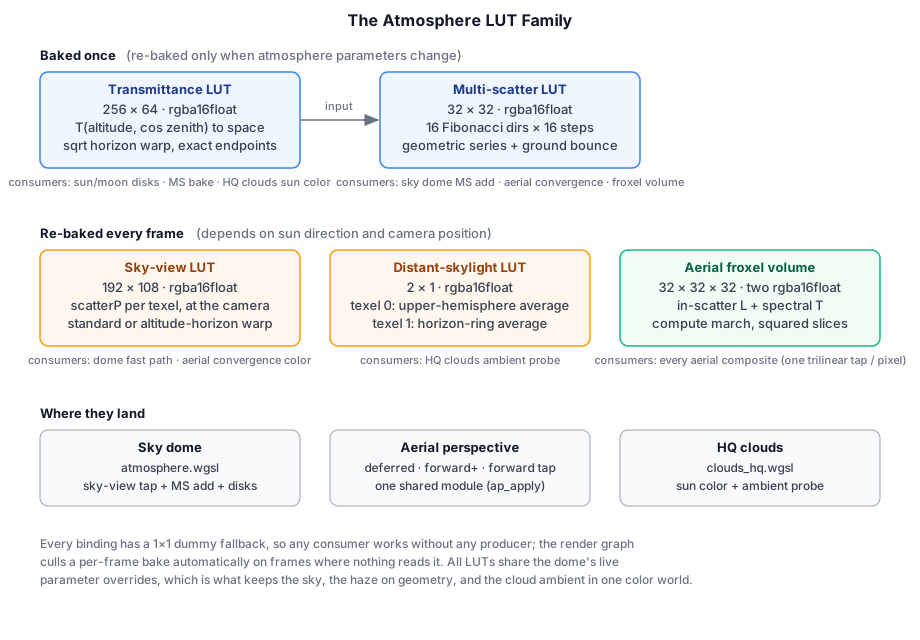
- Transmittance LUT (256 × 64) and multi-scattering LUT (32 × 32) — baked once, re-baked only when atmosphere parameters change (§10.7.1–10.7.2).
- Sky-view LUT (192 × 108) — the whole sky's single-scatter, re-baked every frame at the camera altitude and sun direction (§10.7.4).
- Distant-skylight LUT (2 × 1) — the sky integrated into two ambient values, re-baked every frame (§10.7.5).
- Aerial froxel volume (32³ × 2) — the haze between the camera and geometry, marched every frame by a compute pass (§10.9.1; it belongs to the same family but is big enough to earn its own section).
All are rgba16float. Two conventions hold the family together. First, every consumer binding has a 1×1 dummy fallback, so any pass works without any producer — a scene with no AtmosphereLutsFeature still renders, it just falls back to the analytic path or a no-op. Second, every bake reads the same live parameter overrides the dome uses, which is what keeps the sky, the haze applied to geometry, and the cloud ambient in one consistent color world — the property most of this section is ultimately about.
10.7.1 Transmittance LUT#
A 256 × 64 texture keyed by (cos_zenith, normalized_altitude). Each texel stores exp(-extinction · optical_depth) — Rayleigh + Mie + ozone — from that altitude in that direction up to the top of the atmosphere. The bake shader is a fullscreen draw that reads the AtmosphereParams uniform and integrates the same opticalDepthToSkyP walk the analytical model does:
@fragment
fn fs_main(in: VertOut) -> @location(0) vec4<f32> {
  let p = lut_uv_to_params(in.uv);
  let altitude   = p.x;
  let cos_zenith = p.y;
  let pos = vec3<f32>(0.0, u.r_e + altitude, 0.0);
  let sin_zenith = sqrt(max(1.0 - cos_zenith * cos_zenith, 0.0));
  let dir = vec3<f32>(sin_zenith, cos_zenith, 0.0);
  // ...
  let od = opticalDepthToSkyP(pos, dir, ozone, atm, true);
  let trans = exp(-(atm.beta_r * od.x + atm.beta_m * 1.1 * od.y + atm.beta_o * od.z));
  return vec4<f32>(trans, 1.0);
}
The U axis uses a sign(x) · x² warp (and the consumer reverses it with sign · sqrt) so the LUT spends most of its texels around the horizon — the angle range where transmittance changes fastest as a ray skims the limb. The V axis is linear in altitude.
One subtlety worth calling out because it silently biases every LUT of this kind: if the bake maps texel i to parameter (i + 0.5)/N (the naïve texel-center convention), then the endpoints of the parameter range are never representable — a lookup at "ground level" actually returns the row baked for ~470 m altitude, because clamp-to-edge sampling can only reach the border texel's center. Taos Engine uses the sub-UV remap pair: the bake maps texel 0 and texel N−1 to exactly parameter 0 and 1, and the samplers remap the unit parameter into [0.5/N, 1 − 0.5/N]:
fn from_sub_uv(x: f32, n: f32) -> f32 {
  return clamp((x * n - 0.5) / (n - 1.0), 0.0, 1.0);
}
// ── sample side (modules/atmosphere_luts.wgsl) ──
fn atm_to_sub_uv(x: f32, n: f32) -> f32 {
  return (x * (n - 1.0) + 0.5) / n;
}
The half-texel error sounds academic until you notice who samples at altitude zero: the multi-scatter bake's ground-bounce term (§10.7.2) and the clouds' sun-color attenuation both do, and both were quietly getting the 470 m atmosphere instead of the ground one. The samplers get the texture size from textureDimensions, which also makes the 1×1 dummies safe — n = 1 degenerates to sampling the single texel.
AtmospherePass (when created with useMultiscatterLut: true) samples the LUT for the sun-disc and moon-disc attenuation, replacing the inline transmittanceP(...) calls.
10.7.2 Multi-scattering LUT#
A 32 × 32 texture keyed by (cos_sun_zenith, normalized_altitude). Each texel stores the integrated 2nd-order-and-higher scattered luminance per unit (sun_intensity × σ_scattering). The bake follows Hillaire 2020 §5 directly:
- For each LUT texel, shoot N = 16 uniformly-distributed view directions on the sphere (Fibonacci sampling — no clumping).
- For each direction, ray-march through the atmosphere with 16 steps. At each step, sample air density, look up sun-ray transmittance from the transmittance LUT, and accumulate the in-scatter using a uniform-phase source (1 / 4π).
- When a direction hits the planet, add the sunlit ground's Lambertian bounce —
albedo/π · N·L · T_sun— through the accumulated view transmittance. This is a light source, not a scattering event, so it contributes to the luminance but not to the series ratio below. - Accumulate two quantities: L₂ (the 2nd-order radiance) and f_ms (the same integral with the scattering coefficient itself set to 1 — the dimensionless fraction of light that ever scatters).
- The geometric series sums all higher orders:
L_ms = L₂ · 1 / (1 − f_ms).
if (hit_ground) {
  let gn  = normalize(pos + dir * t_end);
  let ndl = max(dot(gn, sun_dir), 0.0);
  if (ndl > 0.0) {
    let T_sun_g = sample_transmittance(0.0, ndl);
    L_dir += T * u.ground_alb * (1.0 / PI) * ndl * atm.sun_intensity * T_sun_g;
  }
}
// ...
let ms = L_2 / max(vec3<f32>(1.0) - f_ms, vec3<f32>(1e-6));
The ground bounce (step 3) is easy to omit — Taos Engine originally did — and the symptom is instructive: near the horizon, where grazing view rays integrate mostly extinction toward the ground, the LUT contributes almost nothing and the sky develops a dark band just above the horizon. The geospatial scenes papered over it for a while with an artificially bright dome ground-albedo; with the bounce baked in, the physical fill returned and the albedo could drop back to a realistic value. The moral: in an additive-LUT scheme, a missing term doesn't look like a bug, it looks like a tuning problem.
The bake reads the transmittance LUT as input (so it has to run after the transmittance bake — AtmosphereLutsPass schedules them in order). The result is sampled by AtmospherePass and added on top of the existing single-scatter integral:
if (USE_MULTISCATTER_LUT) {
  let cam_alt = max(length(ro) - atm.r_e, 0.0);
  let cos_sun_at_cam = dot(localUp, u.sunDir);
  let ms = atm_sample_multiscatter(
    multiscatter_lut, atm_lut_samp, cam_alt, cos_sun_at_cam,
    atm.r_a - atm.r_e,
  );
  let dR = exp(-cam_alt / atm.h_r);
  let dM = exp(-cam_alt / atm.h_m);
  let sigma_s = atm.beta_r * dR + vec3<f32>(atm.beta_m) * dM;
  color += atm.sun_intensity * ms * sigma_s * sky_t;
}
The visible result: a ground-level sky is no longer crushed in the directions away from the sun (single-scatter alone leaves the zenith-opposite half of the sky too dark); indoor surfaces lit only by sky ambient stop reading as dead gray; and the noon horizon brightens without going washed-out (single-scatter overshoots the warm tint in that direction). The existing analytical integral remains the floor — the LUT contribution is strictly additive — so the system can never look worse than the un-LUT'd sky, only better.
10.7.3 Pipeline integration#
The LUTs are baked by AtmosphereLutsPass (src/renderer/render_graph/passes/atmosphere_luts_pass.ts) — a pass that owns two persistent textures ('atmosphere:transmittance_lut' and 'atmosphere:multiscatter_lut') and a dirty flag. On the frame the parameters first land (or whenever setParams() sees a change), it schedules both bake sub-passes; on idle frames it just returns the cached handles. AtmosphereFeature reads the handles from frame.extras published by AtmosphereLutsFeature:
engine.addFeature(new GeometryFeature());
engine.addFeature(new AtmosphereLutsFeature());                  // publishes LUTs to frame.extras
engine.addFeature(new AtmosphereFeature({
  planet: { radius: PLANET_RADIUS, atmosphereHeight: ATMOSPHERE_HEIGHT },
  horizonless: true,
  useMultiscatterLut: true,                                       // adds MS contribution to sky
}));
engine.addFeature(new AltitudeStarsFeature());
engine.addFeature(new CloudFeature({
  noises: cloudNoises, settings: stdCloudSettings, overlay: true,
}));
engine.addFeature(new TonemapFeature({ aces: true, exposure: 1.0 }));
AtmosphereFeature always declares a bind group for the LUTs in its pipeline layout (so the shape is stable). When the LUT flag is off, the host binds a 1×1 white dummy texture and the shader-level override constant tells the compiler to constant-fold the LUT sample away — there's no runtime cost on the no-LUT path.
Cost. Transmittance LUT bake: 256 × 64 fragments, each doing the same 8-step density walk the analytical model does — ~0.4 ms on a mid GPU at startup, zero on subsequent frames. Multi-scatter LUT bake: 32 × 32 fragments × 16 directions × 16 steps = 256 K texture taps, ~0.6 ms at startup. Per-frame consumer cost: one LUT sample replaces an 8-step integral (atmosphere sun-disc). Total memory: 256 × 64 × 8 bytes + 32 × 32 × 8 bytes ≈ 138 KB.
10.7.4 Sky-view LUT#
The two LUTs above cache sub-integrals; the sky-view LUT caches the whole answer. It is a 192 × 108 texture where each texel holds the full scatterP result for one view direction, baked fresh every frame at the current camera altitude and sun direction (unlike the parameter-keyed LUTs, it depends on both). When useSkyViewLut is on, the dome replaces its per-pixel march with a single tap — the same integral runs ~20 K times per frame instead of once per screen pixel.
Two things make the mapping non-trivial. The elevation axis uses a signed-sqrt warp centered on the horizontal (elevation 0), because that is where sky color changes fastest — but at altitude the planet's geometric horizon dips well below horizontal, and the bright lit-atmosphere limb sits right on that dipped horizon. An opt-in altitude-horizon mapping (altitudeHorizonSkyView, flags bit 7) re-centers the warp on the actual horizon elevation, which fixes limb banding in orbit-to-ground views and degenerates exactly to the standard mapping at the surface, so enabling it never changes a ground view. Bake and dome must agree on the mapping and on the (ro, up, sunDir) frame, or the whole sky shifts relative to the geometry — the bake shader shares the dome's uniform buffer byte-for-byte to keep that contract honest.
Equally important is what the LUT does not store: the sun and moon disks and the stars (high-frequency — a 192-wide texture would smear them), and the multi-scatter add (direction-independent, applied per-pixel on top). Storing only single-scatter keeps the additive-MS guarantee from §10.7.2: switching the LUT path on cannot regress the base sky.
The dome is not the LUT's only customer. The aerial perspective's sky-convergence color — the color far geometry melts into (§10.9.2) — samples this same LUT along the horizontal azimuth, which is the final step that makes distant terrain converge to the dome's exact pixel color, ground bounce and all. AtmospherePass surfaces the per-frame handle in its outputs and AtmosphereFeature publishes it to frame.extras under ATMOSPHERE_SKYVIEW_LUT_KEY for those downstream consumers.
10.7.5 Distant-skylight LUT#
The smallest member of the family: a 2 × 1 texture holding the sky integrated into two ambient values — texel 0 is the cosine-weighted upper-hemisphere average (what a horizontal receiver, or a cloud top, sees looking up), texel 1 the horizon-ring azimuth average (what a cloud's shaded flank sees). It is baked every frame inside AtmospherePass from the same uniforms as the dome:
for (var i = 0u; i < N; i++) {
  let ce  = (f32(i) + 0.5) / f32(N);          // cos(elevation), uniform in cos
  let se  = sqrt(max(1.0 - ce * ce, 0.0));
  let phi = 2.0 * PI * fract(f32(i) * 0.61803398875);
  let rd  = up * ce + (tx * cos(phi) + ty * sin(phi)) * se;
  sum  += scatterP(ro, rd, u.sunDir, ozone, atm, horizonless) * ce;
  wsum += ce;
}
sum /= max(wsum, 1e-4);
Its consumer is the HQ clouds' ambient probe. The shaded sides of clouds are ambient-dominated — this color matters as much as the sun — and the probe used to evaluate scatterP twice per ray-march pixel (once toward the zenith, once toward one sun-biased horizontal direction). Two texel loads replace those marches: cheaper by orders of magnitude and better, since a proper hemisphere integral replaces two arbitrary directions. Sample-local cloud setups that wire HQCloudPass without the engine's atmosphere feature keep the old per-pixel probe via a uniform textureDimensions check (the 1×1 dummy vs. the 2×1 real LUT). And because the bake is a graph pass whose output may go unread, the render graph's dead-pass culling drops it for free on frames where no consumer exists.
10.7.6 Coupling the sky to the scene sun#
Everything above runs on the atmosphere's own sun_intensity — an HDR scalar defaulting to 20 that historically had no relationship to the scene's DirectionalLight. That is fine until you author lighting in physical units (the engine's photometric workflow treats directional intensity as lux, paired with an EV100 physical camera exposure) and notice the sky ignoring your 100 000 lx sun. Because the scattering model is radiometric — sky radiance scales linearly with the sun's top-of-atmosphere irradiance — the coupling needs no fudge factor at all:
// AtmosphereFeature, opt-in via coupleSunIntensity
if (this.coupleSunIntensity && light) {
  this.pass!.setOverrides({ sunIntensity: light.intensity });
  luts?.setParams({ sunIntensity: light.intensity });   // re-bakes the MS LUT on change
}
Lux in, physically consistent sky luminance out — dome, multi-scatter, sky-view, skylight and aerial all inherit it, since they share the overridden parameter block. It is opt-in (and live-toggleable, with the falling edge restoring the default) because switching it on changes the sky brightness of any scene whose sun intensity isn't ≈20.
Cloud Rendering#
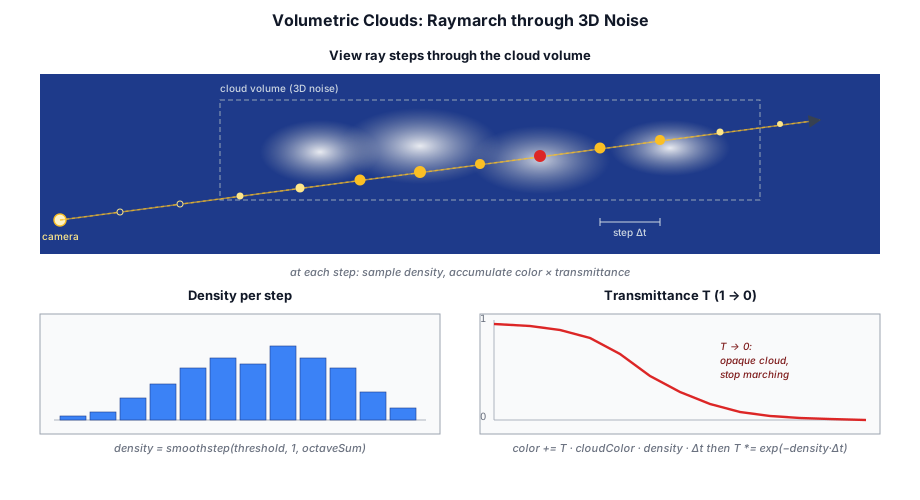
The CloudPass (src/renderer/render_graph/passes/cloud_pass.ts) renders volumetric clouds by raymarching a horizontal cloud slab bounded by two altitudes (cloudBase, cloudTop). The view ray is clipped to the slab and to scene geometry, then walked in CLOUD_MARCH_STEPS steps (a pipeline-overridable constant, default 48). At each step the shader samples cloud density, marches a short ray toward the sun for self-shadowing, and accumulates color and transmittance with Beer's law:
for (var i = 0; i < CLOUD_MARCH_STEPS; i++) {
  let t = t_start + f32(i) * step_size;
  let p = camera.position + ray_dir * t;

  let dens = cd_sample_density(p, /* cloud params */, base_noise, detail_noise, noise_samp);
  if (dens < 0.001) { continue; }

  let shadow_t = light_march(p, sun_dir);       // transmittance toward the sun
  let opt      = dens * cloud.extinction * step_size;
  let t_step   = exp(-opt);                     // Beer's law for this step

  cloud_color += (sun_energy + amb_energy) * (1.0 - t_step) * total_trans;
  total_trans *= t_step;
}
A coarse march leaves visible banding — the slab is sliced into a few dozen flat shells, and their edges read as concentric rings or a stair-stepped gradient through the soft, low-opacity parts of the cloud. The fix is the same dither trick the god-ray march uses (§10.9): jitter the start of each pixel's march by a fraction of a step, so the shell boundaries land at different depths from pixel to pixel and the banding dissolves into noise.
let jitter  = hash12(vec2<f32>(f32(coord.x), f32(coord.y)));  // white noise, [0,1)
let t_start = slab.x + jitter * step_size;
The choice of dither matters. A structured pattern such as interleaved gradient noise (IGN) produces a lower-variance result when it is averaged across frames by TAA — but CloudPass has no temporal resolve, so IGN's regular diagonal weave stays frozen on screen as a visible cross-hatch. A plain white-noise hash12 instead reads as fine, unstructured grain, which the eye accepts far more readily in a still frame. Pairing it with the bumped step count (48 vs. the old 24) shrinks the per-step density jump the dither has to hide, so the residual grain is fainter too. A caller that does run TAA can override CLOUD_MARCH_STEPS back to 24 — the per-frame jitter then averages away cleanly and the cheaper march suffices.
In overlay mode the pass outputs premultiplied (cloud_color, 1 - total_trans) and blends over the already-lit HDR scene, so clouds obscure the geometry behind them.
Lighting and Multiple Scattering#
Real clouds scatter light many times — a single-scattering model alone renders them as flat gray volumes because it ignores the light that bounces between droplets. Taos Engine approximates that missing energy with two cheap tricks instead of explicit secondary marches.
A dual-lobe phase function. The directional sun_energy term is weighted by dual_phase, a blend of two Henyey-Greenstein lobes — a strong forward lobe (the bright silver lining seen looking toward the sun) plus a weak, slightly backward lobe standing in for light that has scattered around inside the cloud and lost most of its directionality:
fn dual_phase(cos_theta: f32, g: f32) -> f32 {
  return 0.7 * hg_phase(cos_theta, g) + 0.3 * hg_phase(cos_theta, -0.25);
}
A height-varying ambient term. amb_energy adds isotropic skylight — light multiply-scattered to the point it no longer has a direction. It is scaled by the sample's height within the slab, so the brighter cloud tops receive more of it than the shaded undersides:
let sun_energy = light.color * light.intensity * shadow_t * phase;
let amb_energy = cloud.ambientColor * mix(0.5, 1.0, height_frac);
cloud_color += (sun_energy + amb_energy) * (1.0 - t_step) * total_trans;
Together these give the characteristic bright, fluffy cumulus look that pure single scattering misses — the cloud interior glows instead of reading as a dark gray mass. ambientColor is supplied per-frame by the game and tinted by time of day (see §10.6).
Cloud Noise Texture Generation#
The cloud density textures are generated on the CPU at startup by src/assets/cloud_noise.ts. Two tileable 3D textures are created:
| Texture | Size | Channels | Content |
|---|---|---|---|
baseNoise | 64×64×64 | R | 4-octave Perlin FBM — cloud bulk shape |
| G/B/A | Worley cellular noise at 2×, 4×, 8× frequency — erosion layers | ||
detailNoise | 32×32×32 | R/G/B | Worley noise at 4×, 8×, 16× frequency — fine edge detail |
Tileable Perlin Noise#
The Perlin implementation wraps lattice coordinates via modular arithmetic so the noise tiles seamlessly at the texture boundaries. Gradient vectors are drawn from the classic 12-edge set stored as parallel Int8Arrays to avoid heap allocation on the hot path:
const GRAD3_X = new Int8Array([ 1, -1,  1, -1,  1, -1,  1, -1,  0,  0,  0,  0]);
const GRAD3_Y = new Int8Array([ 1,  1, -1, -1,  0,  0,  0,  0,  1, -1,  1, -1]);
const GRAD3_Z = new Int8Array([ 0,  0,  0,  0,  1,  1, -1, -1,  1,  1, -1, -1]);

function gradDot(lx, ly, lz, period, seed, dx, dy, dz) {
  const wx = ((lx % period) + period) % period;
  const wy = ((ly % period) + period) % period;
  const wz = ((lz % period) + period) % period;
  const gi = Math.floor(hashS(wx, wy, wz, seed) * 12) % 12;
  return GRAD3_X[gi] * dx + GRAD3_Y[gi] * dy + GRAD3_Z[gi] * dz;
}
Trilinear interpolation uses a quintic smoothstep (6t⁵ - 15t⁴ + 10t³) to eliminate second-order discontinuities at lattice boundaries:
function smoothstep5(t: number): number {
  return t * t * t * (t * (t * 6 - 15) + 10);
}
Fractal Brownian Motion#
Four octaves of Perlin noise are summed with halved amplitude and doubled frequency per octave, then remapped from the approximate range ±0.7 to [0, 1] for storage as unorm8:
function perlinGradFbmTile(px, py, pz, octaves, baseFreq, seed) {
  let v = 0, a = 0.5, f = 1, tot = 0;
  for (let i = 0; i < octaves; i++) {
    v += perlinGradTile(px * f, py * f, pz * f, baseFreq * f, seed + i * 17) * a;
    tot += a;
    a *= 0.5;  f *= 2;
  }
  return Math.max(0, Math.min(1, v / tot * 0.85 + 0.5));
}
Tileable Worley Noise#
Worley (cellular) noise measures the distance to the nearest randomly-placed feature point in a 3D grid. Each cell contains one point at a hash-derived offset within the cell, and the search covers the 27-cell neighborhood. The modulo-wrapped cell coordinates ensure seam-free tiling:
function worleyTile(px, py, pz, freq, seed) {
  const fx = px * freq, fy = py * freq, fz = pz * freq;
  const ix = Math.floor(fx), iy = Math.floor(fy), iz = Math.floor(fz);
  let minD2 = Infinity;
  for (let dz = -1; dz <= 1; dz++) {
    for (let dy = -1; dy <= 1; dy++) {
      for (let dx = -1; dx <= 1; dx++) {
        const cx = ix + dx, cy = iy + dy, cz = iz + dz;
        const wcx = ((cx % freq) + freq) % freq;
        const wcy = ((cy % freq) + freq) % freq;
        const wcz = ((cz % freq) + freq) % freq;
        const fpx = cx + hashS(wcx, wcy, wcz, seed);
        const fpy = cy + hashS(wcx, wcy, wcz, seed + 1);
        const fpz = cz + hashS(wcx, wcy, wcz, seed + 2);
        const d2 = (fx - fpx) ** 2 + (fy - fpy) ** 2 + (fz - fpz) ** 2;
        if (d2 < minD2) minD2 = d2;
      }
    }
  }
  return 1.0 - Math.min(Math.sqrt(minD2), 1.0);
}
Texture Upload#
The generated noise arrays are uploaded to the GPU as rgba8unorm 3D textures with a single queue.writeTexture() call — no staging buffer needed for a one-time upload:
function make3dTexture(device, label, size, data) {
  const tex = device.createTexture({
    label, dimension: '3d',
    size: { width: size, height: size, depthOrArrayLayers: size },
    format: 'rgba8unorm',
    usage: GPUTextureUsage.TEXTURE_BINDING | GPUTextureUsage.COPY_DST,
  });
  device.queue.writeTexture(
    { texture: tex },
    data.buffer,
    { bytesPerRow: size * 4, rowsPerImage: size },
    { width: size, height: size, depthOrArrayLayers: size },
  );
  return tex;
}
The four-channel packing means a single texture sample fetches both the bulk density (R) and three erosion frequencies (GBA) simultaneously. cd_sample_pw() combines them — the Perlin shape in R eroded by the Worley channels — to carve realistic cloud shapes with wispy edges:
fn cd_sample_pw(base_noise: texture_3d<f32>, noise_samp: sampler, samp_uv: vec3<f32>) -> f32 {
  let s = textureSampleLevel(base_noise, noise_samp, samp_uv, 0.0);
  let w = s.g * 0.5 + s.b * 0.35 + s.a * 0.15;     // Worley erosion weight
  return cd_remap(s.r, 1.0 - w, 1.0, 0.0, 1.0);    // Perlin shape eroded by Worley
}
cd_sample_pw and the full cd_sample_density it feeds live in the shared module src/shaders/modules/cloud_density.wgsl, which both clouds.wgsl and the godray shader pull in with #import "cloud_density.wgsl". A single definition of "where the clouds are" drives both the cloud render and the godray shadowing — see §10.10.
This CPU-generation approach was chosen over GPU compute for simplicity — the noise is generated once at boot and needs no runtime modification. For a 64³ base texture and a 32³ detail texture, the total generation time is ~5 ms on a modern CPU.
Volumetric Fog#
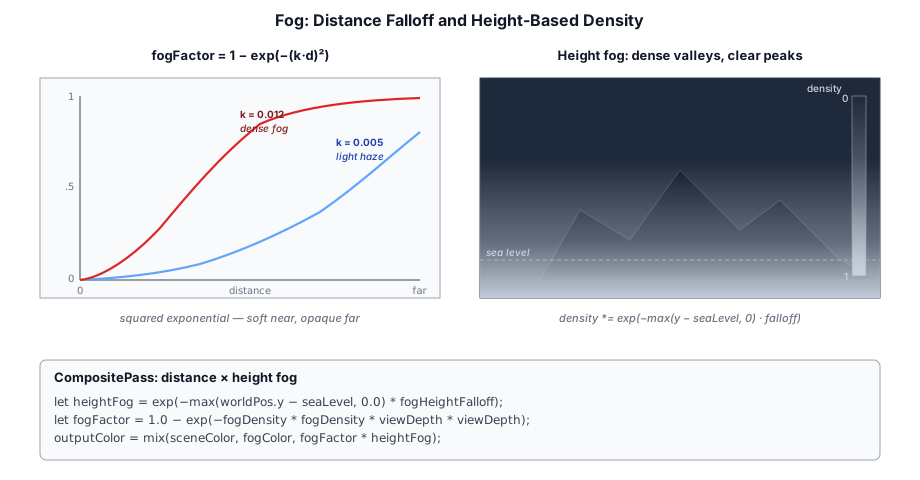
Fog is rendered as part of the final CompositePass. The fog density is computed from the fragment depth and mixed with the scene color:
let fogFactor = 1.0 - exp(-fogDensity * fogDensity * viewDepth * viewDepth);
outputColor = mix(sceneColor, fogColor, fogFactor);
Height-based fog varies the density with altitude, creating mist in valleys and clear air at higher elevations:
let heightFog = exp(-max(worldPos.y - seaLevel, 0.0) * fogHeightFalloff);
fogDensity *= heightFog;
10.9.1 Aerial Perspective: The Froxel Volume#
The CompositePass fog above is a screen-space color tweak. Aerial perspective is the real thing: the atmosphere between the camera and each surface, extinguishing the surface's radiance and adding in-scattered sunlight in its place, so a distant ridge physically fades into the sky it sits against. Taos Engine used to compute it with a closed-form exponential integral per pixel; it now marches a small camera-aligned 3D texture instead, because the analytic form has a structural flaw: with the whole path collapsed into one formula there is no per-sample sun visibility and no altitude profile along the ray, so a high camera looking down through thin air gets the same haze as one looking across dense air, and the integral saturates in ways that had to be faked with altitude fades.
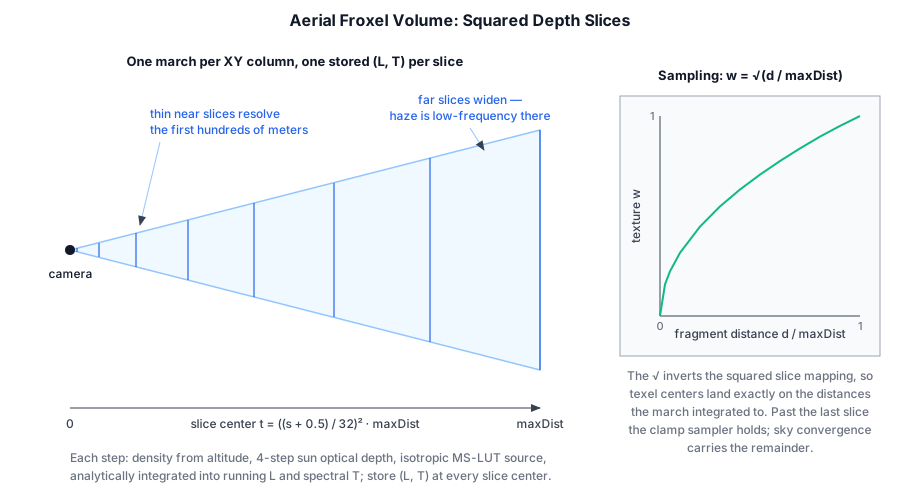
AerialVolumePass (src/renderer/render_graph/passes/aerial_volume_pass.ts + src/shaders/aerial_volume.wgsl) dispatches a 32 × 32 compute grid; each thread reconstructs its screen column's view ray and walks outward through 32 depth slices, two substeps per slice. Slice s's texel center sits at t = ((s + 0.5)/32)² · volumeMaxDist (default 128 km) — squared, so the first hundreds of meters get fine slices while the far field, where haze is low-frequency, gets wide ones. At every substep the shader evaluates the actual Rayleigh/Mie densities at that sample's altitude, marches a 4-step optical depth toward the sun (with the planet-blocked guard from §10.2, so haze correctly dies at sunset), adds the isotropic multi-scatter source from the MS LUT, and integrates with an energy-conserving analytic per-step form (exact when source and extinction are constant across the step):
let sigma_e = (u.betaR * dR + vec3<f32>(u.betaM * 1.1 * dM)) * u.fogScale;
let od      = ap_sun_optical_depth(atm_p, pos_rel, u.sunDir);
let sun_t   = exp(-(u.betaR * od.x + u.betaM * 1.1 * od.y));
var S = u.sunIntensity * sun_t * day * (pR * sigma_s_r + vec3<f32>(pM) * sigma_s_m);
S += u.sunIntensity * ms * (sigma_s_r + sigma_s_m);      // isotropic multi-scatter

let step_t = exp(-sigma_e * dt);
L += T * (S - S * step_t) / max(sigma_e, vec3<f32>(1e-9)); // exact for constant S, σe
T *= step_t;
The running (L, T) pair is stored at every slice into two 3D textures — in-scattered luminance and spectral transmittance. A single texture with transmittance packed into alpha would halve the storage, but collapsing T to grey throws away wavelength-dependent extinction; keeping T per-channel means blue extinguishes faster than red along a long path, so distant unlit geometry reddens physically instead of just dimming. Total cost: 32×32 columns × 64 substeps × a 4-step sun march — well under 300 K lightweight iterations, a rounding error next to one G-buffer fill, re-marched every frame.
Consumers sample with w = sqrt(dist / volumeMaxDist) — the inverse of the squared slice mapping, so texel centers land exactly on the distances the march integrated to. Past the last slice the clamp sampler holds the final value, and the sky-convergence blend below carries the remainder. fogScale (the artist's game-scale density multiplier) and maxOpacity survive from the analytic era as the two authoring knobs; what died was the altitude-fade hack — with real per-sample densities, a 4 km camera looking down crosses a short dense-air path (crisp city below) while its horizon rays keep their long hazy path, which is exactly the behavior the fade used to approximate.
10.9.2 The Composite: Floor, Cap, and Sky Convergence#
Applying the volume is one trilinear tap plus some care. All of it lives in a single shared function:
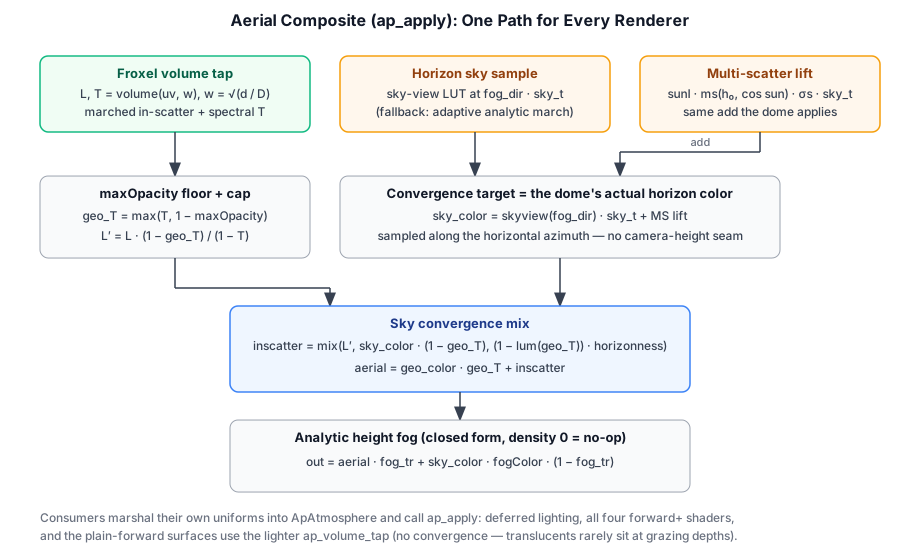
let w     = sqrt(saturate(dist / max(atm.volumeMaxDist, 1.0)));
let vol_L = textureSampleLevel(vol_l, vol_samp, vec3<f32>(uv, w), 0.0).rgb;
let vol_T = textureSampleLevel(vol_t, vol_samp, vec3<f32>(uv, w), 0.0).rgb;

// maxOpacity floor — and the matching cap on the in-scatter.
let geo_T = max(vol_T, vec3<f32>(1.0 - atm.maxOpacity));
let cap   = min((vec3<f32>(1.0) - geo_T) / max(vec3<f32>(1.0) - vol_T, vec3<f32>(1e-4)),
                vec3<f32>(1.0));
let vol_L_capped = vol_L * cap;
The cap deserves a paragraph, because omitting it produces a spectacular failure. maxOpacity floors the transmittance so haze can never fully swallow geometry — but the march accumulated L for the true opacity 1 − vol_T. If the floor clamps the haze to a lower opacity while L stays at full strength, capped pixels receive full-strength in-scatter on top of the geometry the floor just preserved, and the frame washes to white. Scaling L by (1 − geo_T)/(1 − vol_T) keeps light and opacity consistent — the analytic path used to get this for free by construction (fog_color · (1 − geo_T)), and losing it "for free" was the first bug the volume conversion hit.
Beyond the volume's range — and wherever the path grows optically thick — the haze must converge to the sky itself, or the last sliver of far terrain meets the horizon at a subtly different color and reads as a band. The convergence target is sampled along the horizontal azimuth of the view ray (matching what the dome shows at the true horizon, and avoiding a seam at camera height), from the best source available: the per-frame sky-view LUT when the dome bakes one — the dome's exact single-scatter, Oren-Nayar ground bounce included — with a fallback to an adaptive analytic march; then lifted by the same multi-scatter add the dome applies:
var sky_color: vec3<f32>;
if (skyview_mode != 0u) {
  sky_color = textureSampleLevel(skyview, vol_samp, sv, 0.0).rgb * sky_t;
} else {
  sky_color = ap_sky_scatter(atm, sky_ro, fog_dir, sun_dir);   // adaptive fallback
}
sky_color += atm.sunIntensity * ms * sigma_s * sky_t;          // MS lift, as the dome does

let horizonness = smoothstep(0.0, 0.2, length(h2));  // → 0 looking straight down
let inscatter = mix(vol_L_capped, sky_color * (vec3<f32>(1.0) - geo_T),
                    (1.0 - clamp(gT, 0.0, 1.0)) * horizonness);
let aerial = geo_color * geo_T + inscatter;
horizonness handles the nadir singularity: a ray pointing straight down has no defined horizontal azimuth, so the convergence fades out and the pixel keeps its own (stable) volume in-scatter — which is also physically right, since no horizon is visible looking straight down. The three-source construction (volume near, dome-matching sky far, MS lift on both) is what finally removed the geo scenes' horizon seam entirely: every term the dome adds to its horizon pixels, the geometry converging into those pixels now adds too.
10.9.3 One Module, Every Render Path#
Aerial perspective is worthless if only some pixels get it — a hazed mountain behind an un-hazed glass canopy breaks the illusion instantly. The entire composite above lives in src/shaders/modules/aerial_perspective.wgsl as parameter-passing functions (ap_apply, and a lighter ap_volume_tap without the convergence blend), deliberately self-contained: ap_-prefixed symbols, its own AP_PI, textures and samplers as function arguments, because the engine's #import mechanism is textual insertion with no deduplication — a module that imported another would double-define symbols in any shader that also imported it directly.
Every renderer marshals its own uniform layout into the shared ApAtmosphere struct through a ~10-line adapter: the deferred lighting pass, all four forward+ shaders (which previously carried a copy of the old analytic aerial — the copy had already drifted a full technique behind when the volume landed, which is the whole argument for the module), and the plain-forward PBR/OpenPBR/MaterialX surface shaders, whose transparent draws tap the same volume so glass hazes exactly like the opaques behind it. With standard alpha blending the tap composes correctly for free: the fragment's hazed radiance is multiplied by its own alpha, while the background keeps its full-path aerial for the uncovered fraction. aerialMaxDist = 0 disables the tap, so forward-only pipelines that never wire an atmosphere are byte-for-byte unchanged.
10.9.4 Analytic Height Fog#
Layered on top of the aerial composite is an analytic exponential height fog — ground/valley fog whose density falls off exponentially with altitude above fog_height. Because the profile is a simple exponential, the optical depth along the view ray has a closed form, so no marching is needed:
fn ap_height_fog_t(atm: ApAtmosphere, vcoord: f32, vrate: f32, dist: f32) -> f32 {
  let d0 = atm.fogDensity * exp(-atm.fogFalloff * (vcoord - atm.fogHeight));
  let k  = atm.fogFalloff * vrate;
  var integral: f32;
  if (abs(k) > 1e-6) { integral = (1.0 - exp(-k * dist)) / k; }  // ∫ exp(-k·t) dt
  else               { integral = dist; }                        // horizontal ray
  return exp(-clamp(d0 * integral, 0.0, 32.0));
}
Crucially, the fog in-scatters the same horizon-sky color the convergence blend computes (warm toward the sun, cool away), tinted by a near-white fogColor, instead of a flat constant — so ground fog matches the sky behind it rather than washing distant geometry to a uniform gray:
let fog_tr = ap_height_fog_t(atm, fog_vcoord, fog_vrate, dist);
return aerial * fog_tr + sky_color * atm.fogColor * (1.0 - fog_tr);
Height fog defaults off (density 0) so existing scenes are visually unchanged; DeferredLightingPass.setAerialAtmosphere({ fogDensity, fogFalloff, fogHeight, fogColor }) enables and tunes it (the same call carries the aerial parameters — fogScale, maxOpacity, volumeMaxDist, radii, and scattering coefficients). In planet mode the fog's vertical coordinate becomes radial altitude, so fogHeight reads as height above the surface. The atmosphere_test sample (samples/atmosphere_test.ts) exposes all of these — sun/moon angles, scattering strengths, flare, and height fog — as live sliders for tuning.
God Rays (Crepuscular Rays)#
The GodrayPass (src/renderer/render_graph/passes/godray_pass.ts) renders volumetric light shafts — the bright rays that appear where sunlight streams past occluders. Taos Engine does not use the cheap screen-space radial blur. It marches a real 3D ray from the camera through the world and asks at each step "is this parcel of air lit by the sun?" Air the cascade shadow map reports as shadowed scatters no light toward the viewer; lit air does. The visible shafts are the shadow pattern carved into the haze.
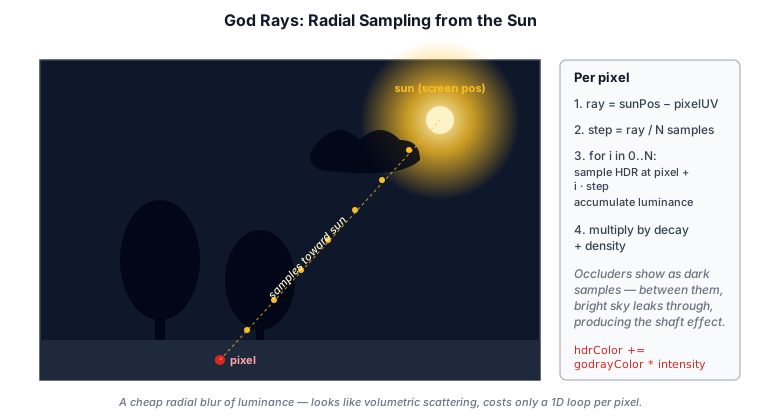
The effect is five sub-passes — the first four run at low or half resolution to keep the march cheap:
- Cloud-shadow LUT (
fs_main,cloud_shadow_lut.wgsl, baked by the standaloneCloudShadowLutPass) — a 2D top-down cloud transmittance texture (default 256×256, world-XZ-aligned, centered on the camera). One bilinear fetch from this replaces a per-step vertical column integral in the march. The LUT is deliberately its own pass rather than part ofGodrayPass: the deferred lighting pass multiplies the same texture into the sun's direct term (clouds darken the terrain they shade) and the froxel volumetric fog attenuates its sun in-scatter with it, so all three consumers stay coupled to one cloud field. - March (
fs_march,godray_march.wgsl) — accumulate scattered light along each view ray. - Blur H / Blur V (
fs_blur,godray_composite.wgsl) — a depth-aware bilateral Gaussian that cleans up the noisy half-res result. - Composite (
fs_composite) — depth-aware upsample to full resolution, then additively blend the shaft color onto the HDR target.
Why a Cloud-Shadow LUT#
A naïve march integrates the cloud column straight up at every march step — 16 steps × 4 vertical sub-steps × 3 3D-noise fetches per density sample = 192 noise fetches per pixel, and the cloud-shadow term dominates the per-frame cost (the pass was running ~1.5 ms at 1080p). But the column is sampled at the march step's world-XZ, and that integral is purely a function of XZ — every march step at the same column re-computes the same value, and so do all the neighboring pixels marching through the same column.
The fix is to evaluate the integral once per (world XZ) cell at low resolution, store it in a texture, and let the march sample it with bilinear filtering. A 256×256 LUT covering a 1200-unit-square region around the camera (4.7 world units per texel — well below the cloud features' ~83-unit wavelength) replaces ~190 noise fetches per march pixel with one 2D texture fetch:
let world_xz = lut_params.origin + in.uv * lut_params.extent;
var opt_depth = 0.0;
for (var i = 0u; i < num_steps; i++) {
  let y = cloud_density.cloudBase + (f32(i) + 0.5) * step_size;
  opt_depth += cd_sample_density(
    vec3<f32>(world_xz.x, y, world_xz.y),
    /* cloud params */, base_noise, detail_noise, noise_samp,
  ) * step_size;
}
let trans = exp(-opt_depth * cloud_density.extinction);
The LUT bake uses cd_sample_density — the same field clouds.wgsl raymarches — not the cheaper cd_coverage. The two functions differ in two ways that matter: cd_sample_density double-rotates XZ before sampling and subtracts the detail-noise erosion, while cd_coverage single-rotates and skips the detail layer. Using cd_coverage would place the cloud-shadow pattern at different world-XZ positions than the visible clouds (so shafts would get shadowed in clear sky and pass through visible clouds) and would over-estimate density everywhere (washing out the directional sun shafts). The shadow has to match the cloud render pixel-for-pixel; only the spatial sampling cadence changes.
The Ray March#
For each pixel the march reconstructs the world position behind it from the depth buffer and steps from the camera toward that point (sky pixels march to the far plane). A per-pixel dither offsets the start of the march, trading banding for noise that the blur removes:
let phase = henyey_greenstein(cos_theta, march_params.scattering);

var accum = 0.0;
for (var i = 0u; i < steps; i++) {
  let shad  = shadow_at(pos);            // cascade shadow map (PCF)
  let trans = cloud_shadow_lookup(pos);  // 1 bilinear fetch from the LUT
  accum += phase * shad * trans;
  pos   += ray_dir * step_len;
}
let fog = clamp(accum / f32(steps), 0.0, 1.0);
Three terms shape each sample:
phase— the Henyey-Greenstein phase function. Forward-scattering haze throws far more light toward the viewer near the sun, so shafts are brightest around the sun and fade off-axis.shadow_at— samples the same cascade shadow map the deferred lighting uses. This is what carves the shaft shape: geometry that shadows the ground also shadows the air in front of it.cloud_shadow_lookup— one bilinear fetch from the cloud-shadow LUT, so shafts dim under clouds and brighten in the gaps. Above the cloud slab the lookup short-circuits to transmittance 1.0 (the LUT stores a full-column integral, which would otherwise apply as a phantom shadow to march steps that have already exited the slab):
fn cloud_shadow_lookup(p: vec3<f32>, lut: texture_2d<f32>, samp: sampler,
                       params: CloudShadowLutParams) -> f32 {
  if (params.extent <= 0.0 || p.y >= params.cloudTop) { return 1.0; }
  let lut_uv = (p.xz - params.origin) / params.extent;
  // ... outer-10% fade to unshadowed, then one bilinear fetch ...
  let t = textureSampleLevel(lut, samp, lut_uv, 0.0).r;
  return mix(1.0, t, fade);
}
The lookup lives in modules/cloud_shadow.wgsl and is #imported by all three consumers (godray march, deferred lighting, volumetric fog). lut_params (origin, extent, cloudTop) is rewritten each frame from CloudShadowLutPass.updateLutParams(ctx) — origin tracks the camera so the LUT rect re-centers on every frame; samples past the rect fade to unshadowed over the outer 10% (clamping to the edge texel would smear a dark edge value across everything beyond the rect under dense coverage).
Texel-Snapping the LUT Origin#
Tracking the camera continuously is wrong — as the camera moves sub-texel amounts each frame, every LUT texel covers a slightly different world XZ region, and the bake re-evaluates each texel against that shifted world position. A fixed march sample point lands at a different sub-texel UV every frame, so the bilinear interpolation reads a different blend of four slightly different source values. The march sees a per-pixel jitter that the bilateral blur doesn't fully smooth out, and as the player walks the shafts visibly warble.
The fix is to snap the LUT origin to a texel-aligned world XZ:
const texel = this.lutExtent / Math.max(1, this.lutResolution | 0);
data[0] = Math.floor((pos.x - half) / texel) * texel;
data[1] = Math.floor((pos.z - half) / texel) * texel;
The grid now jumps in discrete texel steps as the camera crosses a texel boundary instead of sliding continuously. Two consecutive frames behave like this:
- Camera moves less than one texel.
Math.floor((pos.x - half) / texel)returns the same integer, so the origin is identical and every texel's covered world XZ is identical. The bake produces an identical LUT. The march's lookup at any fixed world point is bit-exact stable. - Camera crosses a texel boundary. The origin jumps by exactly one texel. Texel
iin the new frame now covers the world XZ that texeli+1covered in the previous frame — so its baked value matches the previous frame's neighbor (modulo cloud wind, which is the intended per-frame change). The march's lookup at any stationary world point lands at the newlut_uvshifted by1/N, sampling a window of source texels whose values were shifted by one to compensate. The interpolated result is unchanged.
In both cases stationary world geometry stays bit-stable in the godray output across camera motion — exactly the temporal property the continuous-tracking version lacked.
Shafts Shadowed by the Clouds You See#
cd_sample_density is the one source of truth for "where the clouds are" — clouds.wgsl raymarches it, and the godray LUT bake integrates it. Both shaders #import "cloud_density.wgsl", so a hole in the rendered clouds is a hole in the godrays: a shaft shines through a visible gap and is cut off under a visible cloud. The LUT is the cadence at which that field is sampled, not a separate model of it.
Blur and Composite#
The half-res fog texture is noisy from the dither and aliased along depth edges. fs_blur runs a 7-tap bilateral Gaussian (once horizontal, once vertical) that weights each tap by exp(-|Δdepth| · 1000), so the blur stops at silhouettes instead of smearing shafts across them.
fs_composite upsamples to full resolution — picking, for each pixel, the half-res neighbor closest in depth to avoid edge bleed — applies a pow(fog, fogCurve) contrast curve, fades the effect out as the sun crosses the horizon, and adds the result to the HDR buffer:
fog = pow(max(fog, 0.0), params.fog_curve);
let horizon_fade = smoothstep(-0.05, 0.05, -light.direction.y);
let fog_color    = light.color * light.intensity * fog * horizon_fade;
return vec4<f32>(fog_color, 0.0); // additive (one + one) blendscattering, fogCurve, and maxSteps are tunable fields on the pass, uploaded by updateParams. lutResolution (default 256) and lutExtent (default 1200 world units) on CloudShadowLutPass tune the cloud-shadow LUT — raise the resolution for sharper cloud-edge shadows, widen the extent to cover farther horizon rays. The godray pass runs before the cloud overlay, so a cloud both dims a shaft from above (via the LUT lookup) and then occludes it from the front when the overlay blends the cloud in.
pow(fog, fogCurve) applied at composite. Turn the god rays off to see the scene without the marched air.Compositing with the Cloud Overlay#
The naive composite order above has a subtle artifact: the godray pass writes the full fog_color onto every sky pixel (depth = 1.0), and the cloud overlay that runs afterward blends premultiplied-alpha cloud onto the HDR with one + (one - src.alpha). The (one - src.alpha) factor occludes the underlying sky glow proportional to cloud opacity — which is correct for the sky behind the cloud, but it also means the bright shaft simply vanishes the instant it crosses a cloud's silhouette. Visually the rays appear "behind" the clouds even when the shaft should be lighting the cloud's front face.
The fix is a small piece of plumbing between the godray pass and the cloud passes:
GodrayPassexports its half-res fog texture. A newfogTexture: ResourceHandlefield onGodrayOutputsreturns the post-blur, pre-compositefogtexture (the single-channel sun-shaft accumulation). The pass still composites the fog into HDR as before — the texture is exported for downstream consumers, not as a replacement.GodrayFeaturepublishes the fog texture and the activefogCurvevalue intoFrame.extrasunderGODRAY_FOG_TEXTURE_KEY/GODRAY_FOG_CURVE_KEY(src/renderer/features/godray_feature.ts). The fog-curve number is published duringupdate()so cloud features can read it on the same frame; the texture handle is published duringaddPasses()so cloud features running after the godray feature can wire it into their pass deps.CloudFeaturepicks both up. It looks the keys up inframe.extrasand forwards the texture into the cloud pass'saddToGraphdeps; it callsupdateGodrayFogCurve(fogCurve)so the cloud shader's brightness shaping matches the sky composite'spow(fog, fog_curve).
The cloud shader (clouds.wgsl overlay branch) then re-evaluates the same horizon-faded, curve-shaped glow term and adds it to the cloud's premultiplied color, scaled by cloud opacity:
let opacity        = 1.0 - total_trans;
let fog_raw        = textureSampleLevel(fog_tex, fog_samp, in.uv, 0.0).r;
let fog            = pow(max(fog_raw, 0.0), max(light.godray_fog_curve, 1e-3));
let horizon_fade   = smoothstep(-0.05, 0.05, -light.direction.y);
let godray_glow    = light.color * light.intensity * fog * horizon_fade;
let glow_on_cloud  = godray_glow * opacity * step(1e-3, light.godray_fog_curve);
return vec4<f32>(cloud_color + glow_on_cloud, opacity);
The arithmetic is the conservation trick: the sky HDR already carries glow * 1.0 at every pixel, and the cloud overlay's (one - src.alpha) factor attenuates that by (1 - opacity), leaving glow * (1 - opacity). Adding glow * opacity back through the cloud's premultiplied color brings the per-pixel total back to exactly glow * 1.0 regardless of cloud thickness — the shaft brightness is identical across sky and cloud, no double-illumination, no missing glow on the cloud face.
The coupling is opt-in, gracefully degrades:
- When godrays are off, the host binds a 1×1 zero-fill dummy fog texture and writes
godray_fog_curve = 0into the cloud-shader light uniforms. Thestep(1e-3, light.godray_fog_curve)gate zeroes the contribution, so the shader path is a no-op and there is no need to compile a separate variant. - When the godray feature is registered after a cloud feature, the cloud feature reads zero from
extrason its first frame (the godray feature hasn't published yet) and the contribution stays off — which is the right behavior when the pipeline order doesn't match. GodrayPassis unchanged for callers that don't read the newfogTexturefield; the existing additive composite into HDR still runs.
Planetary Atmospheres and the Curved Horizon#
Everything so far assumes a flat world: the ground is the plane y = 0, "up" is world +Y, and the camera's altitude is just cameraPos.y. That is the right model for a walkable level, but it breaks down for a planet — fly high enough and the horizon should curve, the sky should thin to black, and eventually you should see the whole globe hang in space. Taos Engine supports this with a planet mode in the atmosphere pass, plus a set of sample-side helpers that drive it from a real WGS84 globe (used by the Cesium geospatial samples — see Chapter 16's deep dives).
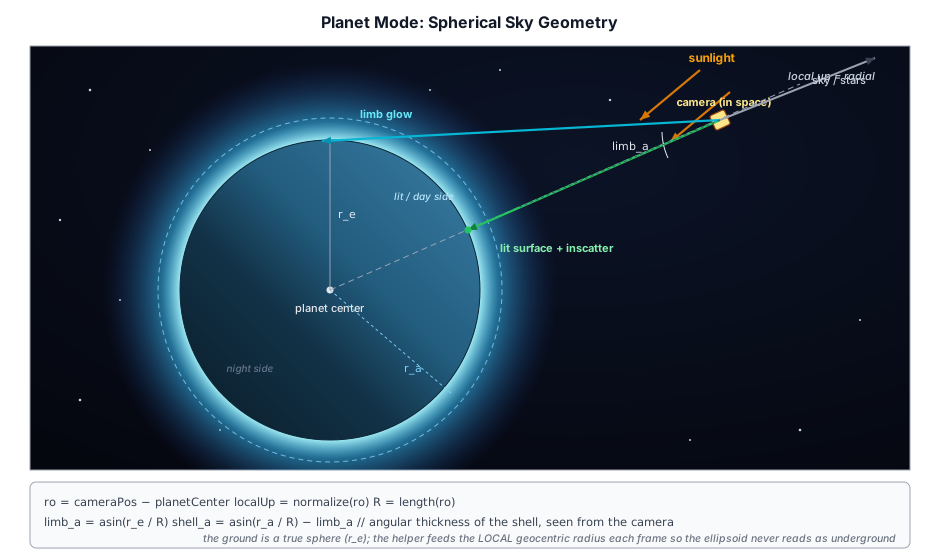
10.11.1 Planet Mode#
AtmospherePass.setPlanet(...) switches the shader from the flat-world integral to a spherical one. The key difference is the ray origin: instead of parking the camera at (0, r_e + camH, 0) on the world-Y axis, planet mode treats the camera as a real position relative to the planet center, and "up" becomes the radial direction — so every point on the globe gets its own local horizon and day/night transition as the camera flies around it:
var ro: vec3<f32>;
if (u.mode == 0u) {
  let camH = max(u.cameraPos.y, 1.0);
  ro = vec3<f32>(0.0, atm.r_e + camH, 0.0);   // flat world: altitude on +Y
} else {
  ro = u.cameraPos - u.planetCenter;          // planet: real position vs. center
}
let localUp = select(vec3<f32>(0.0, 1.0, 0.0), normalize(ro), u.mode == 1u);
The scattering coefficients, scale heights, ozone layer and ground-bounce falloff are all altitudes-above-a-surface quantities, so they have to scale with the planet's atmosphere thickness. planetAtmosphereParams stretches Earth's values proportionally to the requested shell thickness (relative to Earth's 60 km), so a thin-shelled small moon or a thick-shelled gas giant both scatter plausibly:
const thickness = opts.atmosphereHeight ?? radius * 0.16;
const s = thickness / 60000.0;                 // scale relative to Earth's shell
const scaleBeta = (e: number): number => e / s;   // thinner shell → denser scatter
10.11.2 The Floating-Origin Planet Center#
A real geospatial scene can't put the planet center at the world origin: Earth's radius is ~6.37 Mm, far past where f32 matrices stay precise, so those scenes render in a floating origin — a local tangent frame near the camera, with Earth's center millions of meters "below" (see Chapter 16). AtmospherePass.setPlanetCenter(world) tells the dome where the center sits in that frame; it is refreshed every frame because the origin re-anchors as the camera roams:
ro = u.cameraPos - u.planetCenter; // planet center is wherever the floating frame put it(0,0,0) reproduces the legacy center-at-origin behavior, so non-geospatial planet samples (e.g. Terranaut) need not set it.
10.11.3 Coordinating the Curved Horizon#
Planet mode is only half the picture — for the horizon to read as curved, the aerial-perspective fog (§10.9) and the starfield (§10.6) have to be rebased onto the same globe, and they have to track the camera's true altitude. The Cesium samples wrap that bookkeeping in a small CurvedHorizonSky helper (samples/lib/geo_sky.ts). Toggling it on puts the dome and the aerial fog onto the globe; toggling it off restores the flat-world path tuned for the ground/city view:
setEnabled(on: boolean): void {
  if (on) {
    this._atmosphere.pass!.setPlanet({ radius: WGS84_A, atmosphereHeight: ATMOSPHERE_SHELL_M });
    this._aerial.rE = WGS84_A;
    this._aerial.rA = WGS84_A + ATMOSPHERE_SHELL_M;
  } else {
    this._atmosphere.pass!.setEarth();   // flat-world scattering
  }
  this._atmosphere.pass!.setGroundSurface(on);   // §10.11.4
}
Each frame it does one subtle but essential correction. The atmosphere's ground is a true sphere of radius r_e, but the planet is an ellipsoid whose surface is ~21 km closer to the center at the poles. Feeding a fixed equatorial radius would read a mid-latitude camera as kilometers underground, and the in-scatter integral would crater to black. So the helper derives the local geocentric ground radius from the camera's geodetic altitude and overrides r_e/r_a with it:
const camRadius  = Math.hypot(dx, dy, dz);              // camera distance to center
const groundR    = camRadius - ecefToGeodetic(ec).height;  // local ground radius
const camAltitude = camRadius - groundR;
this._atmosphere.pass!.setOverrides({ rE: groundR, rA: groundR + ATMOSPHERE_SHELL_M });
The helper also feeds the starfield (which fades in with altitude through the shell, §10.6) and is written against a small CelestialBodyView abstraction, so the same code drives an Earth flyover or an airless body like the Moon (where the scattering shell collapses to a near-zero thickness, giving a black sky with stars from the ground up).
10.11.4 Aerial Fog That Knows Its Altitude#
Aerial perspective (§10.9) is a regional effect — it makes a distant ridge fade into the sky. Within the flying-altitude range the froxel volume needs no help at all: because it marches real per-sample densities, a 4 km camera looking down crosses a short dense-air path (the city below stays crisp) while its horizon rays keep their long hazy path — the old analytic implementation needed a hand-tuned altitude fade here, and the volume made it obsolete.
At the orbital "blue-marble" level a framing choice remains. The physically correct answer — a limb-hugging haze band and a planet surface seen through the full air column — is not always the wanted answer for a stylized globe view, so the curved-horizon helper fades the aerial contribution out between 50 km and 150 km of altitude, applied to a copy of the params so the user's fog sliders keep their authored values:
const aerialFade = 1 - smoothstep01(AERIAL_FADE_LO_M, AERIAL_FADE_HI_M, camAltitude);
this._lighting.pass!.setAerialAtmosphere({
  ...this._aerial,
  maxOpacity: (this._aerial.maxOpacity ?? 1) * aerialFade,  // → 0 disables extinction + in-scatter
  fogDensity: (this._aerial.fogDensity ?? 0) * aerialFade,  // → 0 drops the height fog
});
Recall from §10.9.2 that geo_T = max(vol_T, 1 - maxOpacity) and that the in-scatter is capped by the same floor, so driving maxOpacity to 0 floors the transmittance at 1, zeroes the in-scatter with it, and the aerial composite collapses cleanly back to the unfogged geometry. By ~150 km the planet is crisp against space.
10.11.5 The Lit Planet Surface (Blue Marble)#
A geospatial scene only streams terrain tiles in a patch around the camera; from orbit the rest of the globe would be an empty void between the loaded patch and the atmosphere limb. To make the planet read as a sphere, the atmosphere shader can paint a stylized lit globe wherever a view ray strikes the ground sphere — opt-in via AtmospherePass.setGroundSurface(true) (flags bit 3), planet mode only, off by default so every other sample is unaffected.
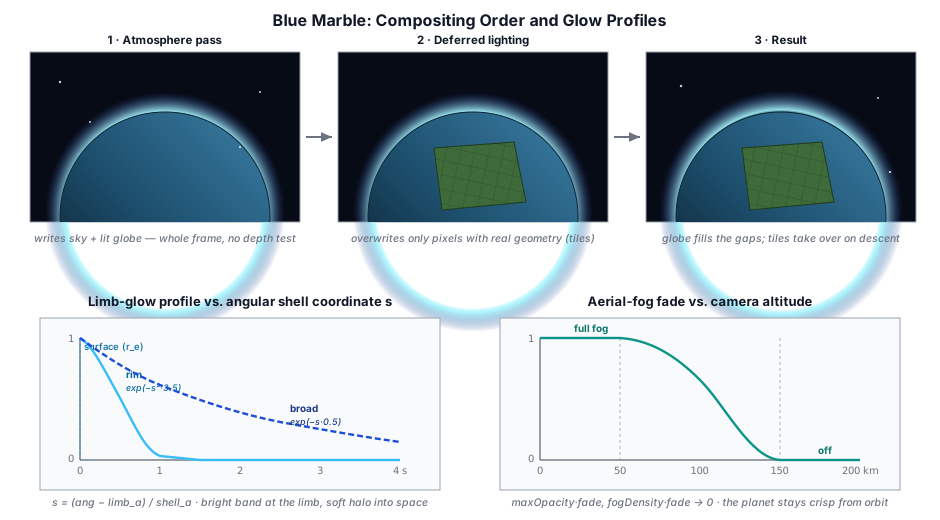
This works because of the pipeline order: the atmosphere pass runs after the geometry/G-buffer fill but before deferred lighting, and writes the HDR target with no depth test. So it fills the whole frame with sky + planet body, and the deferred lighting pass (which loads that HDR and overwrites only pixels that have real geometry) paints the streamed high-resolution terrain on top. The procedural globe shows exactly in the un-streamed gap and at the limb, and the real tiles take over seamlessly as you descend.
The surface itself is shaded as a sun-lit sphere with a soft day/night terminator and procedural continents (value-noise fBm over the surface direction — ocean / vegetation / arid / snow — not geographically accurate, but it reads as a planet), then composited under the in-scatter the spherical integral already produced for the camera→ground segment — the standard aerial-perspective surface·T + inscatter, which gives the blue limb haze for free:
if (u.mode == 1u && render_ground && !horizonless) {
  let tg = raySphere(ro, rd, atm.r_e);
  if (tg.x > 0.0) {
    let p   = ro + rd * tg.x;                 // ground hit, planet-centered
    let n   = normalize(p);
    let alb = planetAlbedo(n);                // procedural ocean / land / snow
    let ndl = dot(n, u.sunDir);
    let sunGroundT = transmittanceP(n * atm.r_e, u.sunDir, ozone, atm);
    let direct  = alb * atm.sun_intensity * max(ndl, 0.0) * sunGroundT * (1.0 / PI);
    let surf    = direct + alb * vec3<f32>(0.015, 0.025, 0.05);   // + faint night-side fill
    color += surf * transmittanceP(p, -rd, ozone, atm);          // attenuate back to the camera
  }
}
A ground hit also gates off the sun disk, moon and stars for that pixel — they are behind the planet.
10.11.6 The Atmosphere Limb Glow#
The single-scatter integral already brightens the limb where a grazing ray passes through a long column of air, but from orbit it reads as a thin line. A dedicated limb-glow term widens it into the recognizable blue-marble airglow — a bright band hugging the surface fading through sky-blue into a soft halo that bleeds into space. It is parameterized by the view ray's angle off the planet-center direction (not a screen-space distance), which makes it altitude-correct and, crucially, naturally zero when looking away from the planet — so it never washes the star field:
let ang     = acos(clamp(dot(rd, -ro / R), -1.0, 1.0));   // ray angle off center
let limb_a  = asin(clamp(atm.r_e / R, 0.0, 1.0));          // angle to the surface limb
let shell_a = asin(clamp(atm.r_a / R, 0.0, 1.0)) - limb_a; // shell's angular thickness
let s = (ang - limb_a) / max(shell_a, 1e-5);              // 0 at surface, 1 at shell top
let ring  = smoothstep(-0.2, 0.05, s);                     // suppress over the solid disk
let rim   = exp(-s * s * 3.5);                             // bright thin band at the limb
let broad = exp(-max(s, 0.0) * 0.5);                       // wide soft glow into space
The two lobes are tinted (white-blue rim → deep blue halo), weighted to the sunlit limb only, brightened toward the sun by a forward-Mie term, and faded in with altitude (smoothstep(30 km, 120 km)) so ground views are untouched.
10.11.7 Flying to Space#
One last piece lets you actually reach the blue-marble view: the camera's far plane has to grow with altitude. A city-scale 200 km far plane clips the ~6371 km planet, so the geospatial sample fits the far plane to the visible tangent-limb distance and lifts the near plane to keep depth precision once nothing is close:
const limb = Math.sqrt(Math.max(camRadius * camRadius - WGS84_A * WGS84_A, 0));
camera.far  = Math.max(FAR, limb * 1.15 + 100_000);
camera.near = Math.min(Math.max(NEAR, camAlt * 0.0005), camera.far * 0.02);
Climb out, and the aerial fog melts away (§10.11.4), the lit globe fills the gaps the streamed tiles leave (§10.11.5), the limb glow rings the day side (§10.11.6), and the starfield fades up around a curved Earth.
Summary#
The atmosphere system combines several layered techniques:
- HDR environment maps: RGBE decoding and equirectangular-to-cubemap conversion on GPU
- Atmospheric scattering: Rayleigh and Mie single scattering, ozone absorption, and an Oren-Nayar ground bounce
- Dynamic sky texture: the shared atmosphere model baked to an equirectangular HDR panorama on the GPU and convolved into IBL, rebaked as the sun moves
- Day/night cycle: Sun position skew with color intensity ramping, a two-lobe sun-flare halo, and a phase-shaded moon with earthshine driven by its own (sun-independent) direction
- Atmosphere LUT family: transmittance and multi-scattering tables (baked once, with exact sub-UV endpoints and a ground-bounce term in the MS bake), plus a per-frame sky-view LUT (whole-sky single scatter, one tap replaces the dome march), a 2×1 distant-skylight LUT (integrated sky ambient for the cloud probe), and an opt-in coupling that drives all of their
sunIntensityfrom the scene sun for physical-unit workflows - Volumetric clouds: raymarching a noise-defined density slab with a dual-lobe phase function and a height-varying ambient multi-scatter term
- Aerial perspective: a 32³ froxel volume marched per frame (squared depth slices, per-sample sun visibility, spectral transmittance, energy-conserving analytic step integration, isotropic MS source), composited by one shared module across the deferred, forward+, and plain-forward paths — including transparents — with a maxOpacity floor + matching in-scatter cap and a sky-convergence blend that samples the sky-view LUT so far geometry melts into the dome's exact horizon color
- Volumetric fog: depth/height composite haze, plus an analytic exponential height fog in the same module that in-scatters the live horizon-sky color so ground fog matches the sky behind it
- God rays: a half-resolution 3D ray-march shadowed by the cascade maps and the shared cloud-density field. The cloud-shadow term is precomputed once per frame as a low-res 2D top-down LUT (one bilinear fetch per march step instead of a per-step vertical column integral), then bilateral-blurred and composited onto the HDR target. Exports its half-res fog texture so the cloud overlay can add the sun-tinted glow to its premultiplied output proportional to cloud opacity — rays appear on cloud surfaces instead of behind them
- Planetary atmospheres: a spherical "planet mode" (camera as a real position relative to a floating-origin planet center, radial up), Earth-scaled scattering, a curved-horizon helper that rebases the dome + aerial fog onto the WGS84 ellipsoid and tracks the local ground radius, altitude-faded aerial perspective, a stylized sun-lit "blue marble" ground term that fills the gaps streamed terrain leaves, and an angular limb-glow halo — together giving a fly-to-space globe view
Further reading:
src/renderer/render_graph/passes/sky_texture_pass.ts— HDR cubemap skysrc/renderer/render_graph/passes/atmosphere_pass.ts— Procedural atmospheric skysrc/renderer/render_graph/passes/atmosphere_luts_pass.ts— Transmittance + multi-scattering LUT bakesrc/shaders/atmosphere_skyview_lut.wgsl/src/shaders/atmosphere_skylight_lut.wgsl— Per-frame sky-view + distant-skylight bakes (inside AtmospherePass)src/renderer/render_graph/passes/aerial_volume_pass.ts+src/shaders/aerial_volume.wgsl— Aerial-perspective froxel volume (32³ compute march)src/shaders/modules/aerial_perspective.wgsl— The shared aerial composite (ap_apply/ap_volume_tap) every render path adapts intosrc/renderer/render_graph/passes/cloud_pass.ts— Volumetric cloudssrc/renderer/render_graph/passes/godray_pass.ts— Volumetric god rayssrc/shaders/sky.wgsl— Sky shadersrc/shaders/atmosphere.wgsl— Atmosphere scattering shader (screen-space sky dome)src/shaders/modules/atmosphere_model.wgsl— Shared single-scattering model (screen sky + dynamic bake), sun-flare, moon-phase, and analytic height-fog helperssamples/atmosphere_test.ts— Live atmosphere-settings sandbox (sun/moon, scattering, flare, height fog)samples/lib/geo_sky.ts— Curved-horizon helper: rebases dome + aerial fog onto the globe, tracks the local ground radius, altitude-fades aerial perspective, drives the starfield (Earth/airless-body aware)samples/planet_explorer.ts— Geospatial blue-marble sample: planet-mode sky, lit-globe ground, limb glow, and altitude-scaled far plane (fly to space)src/shaders/sky_panorama.wgsl— Dynamic sky panorama bake shadersrc/assets/dynamic_sky.ts— Dynamic sky: panorama render, mip chain, and IBL rebakingsrc/shaders/clouds.wgsl— Cloud raymarching shadersrc/shaders/cloud_shadow_lut.wgsl— 2D top-down cloud transmittance LUT (per-frame bake byCloudShadowLutPass; shared by godrays, deferred sun lighting, and volumetric fog viamodules/cloud_shadow.wgsl)src/shaders/godray_march.wgsl,godray_composite.wgsl— God-ray march, blur and compositesrc/shaders/modules/cloud_density.wgsl— Cloud-density field shared by clouds and god rays