Taos Engine supports multiplayer through a WebSocket-based server written in Node.js. The protocol is minimal and message-oriented.
WebSocket Fundamentals#
WebSocket provides a persistent, full-duplex connection between the browser and the server. One server process hosts multiple games, routed by the URL path (see §16.4), so the client works with a base address (ws://localhost:8787) plus a game id and lets the transport append the path. That transport is a small shared class, GameSocket, which every game's client composes — it owns the socket, builds the path-routed URL, and JSON-frames messages both ways:
export class GameSocket {
  private readonly _ws: WebSocket;

  constructor(baseUrl: string, gameId: string, handlers: GameSocketHandlers) {
    // gameServerUrl('ws://localhost:8787', 'crafty') -> 'ws://localhost:8787/crafty'
    this._ws = new WebSocket(gameServerUrl(baseUrl, gameId));
    this._ws.addEventListener('open', () => handlers.onOpen?.());
    this._ws.addEventListener('message', (ev) => handlers.onMessage(JSON.parse(ev.data)));
    // ... error / close ...
  }

  /** JSON-encode and send. No-op if the socket isn't open. */
  send(msg: unknown): void { /* readyState-guarded ws.send(JSON.stringify(msg)) */ }
}
Crafty's client (crafty/game/network_client.ts) composes one of these and sends its hello the moment the socket opens:
connect(url: string, playerKey: string, name: string): Promise<WorldSummary[]> {
  return new Promise((resolve, reject) => {
    this._pendingHello = { resolve, reject };
    this._socket = new GameSocket(url, 'crafty', {
      onOpen: () => this._send({ t: 'hello', playerKey, name, version: PROTOCOL_VERSION }),
      onMessage: (msg) => this._dispatch(msg as S2C),
      // ... onError / onClose reject any pending request ...
    });
  });
}Message Protocol Design#
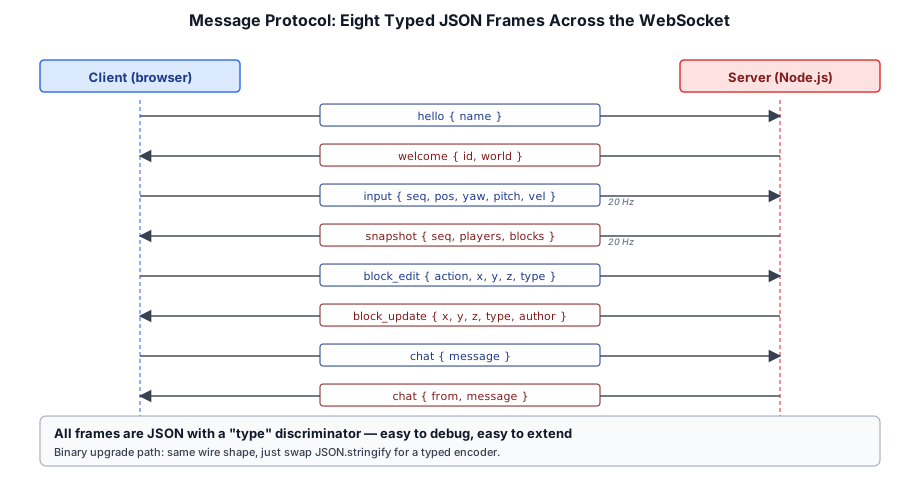
Messages are JSON objects with a type field and type-specific payload. All messages are one of:
| Direction | Type | Payload | Purpose |
|---|---|---|---|
| C2S | hello | { name } | Join request |
| S2C | welcome | { id, world } | Accepted, world state |
| C2S | input | { seq, position, yaw, pitch, ... } | Player input/state |
| S2C | snapshot | { seq, players[], blocks[] } | World state broadcast |
| C2S | block_edit | { action, x, y, z, type } | Block place/break |
| S2C | block_update | { x, y, z, type, author } | Block change broadcast |
| C2S | chat | { message } | Send chat message |
| S2C | chat | { from, message } | Broadcast chat message |
Connection Lifecycle#
Client                    Server
  │                         │
  │────── hello ──────────►│  Authenticate, assign ID
  │◄───── welcome ────────│  Send world state
  │                         │
  │◄───── snapshot ───────│  Periodic state broadcast (20 Hz)
  │────── input ─────────►│  Client sends player state
  │                         │
  │────── block_edit ─────►│  Block modification request
  │◄───── block_update ───│  Broadcast to all clients
Buffering Events During Bootstrap#
The client is two-phase: a lobby phase (pick or create a world) and an in-game phase, with the welcome message as the transition. But welcome resolving does not mean the game is ready — crafty/main.ts still has a multi-second async bootstrap ahead of it (WebGPU context creation, HDR/IBL precompute, texture loads) before it can install its in-game callbacks. Those callbacks close over scene, world, and the remote-player registry, none of which exist until bootstrap finishes, so they genuinely cannot be wired any earlier.
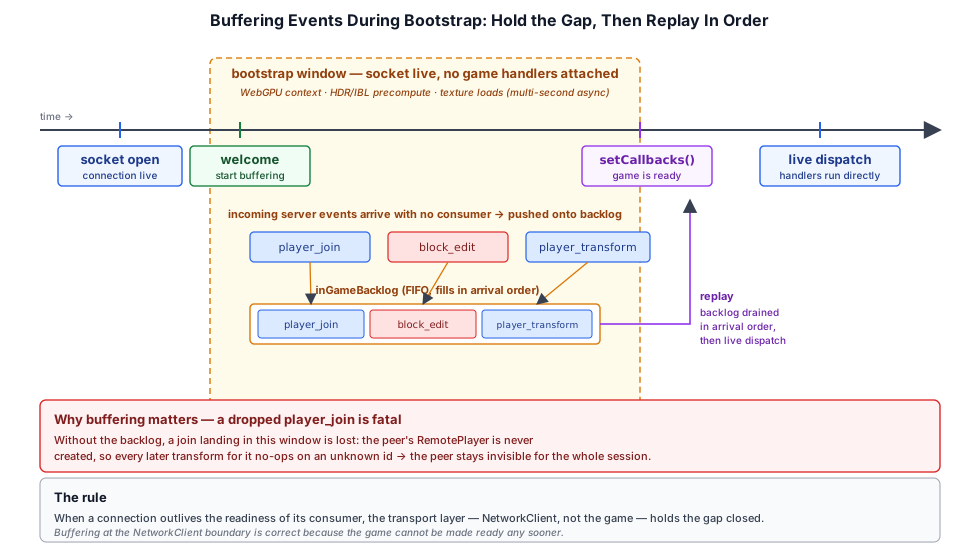
That leaves a window where the socket is live and receiving but the game has no handlers attached. One-shot server events that land in this window are easy to lose permanently:
- A missed
player_joinmeans the peer'sRemotePlayeris never created. Every later position update for that peer is then discarded too, because the transform handler no-ops on an unknown player id — so the peer stays invisible for the rest of the session. - A missed
block_editis gone for good: it is not part of the joining client'swelcomeedit backlog, because it happened after that snapshot was taken.
The fix is to make NetworkClient buffer in-game events itself. From the moment welcome arrives until the game calls setCallbacks, live events (player_join, player_leave, player_transform, block_edit) are pushed onto a backlog instead of dispatched. Installing the callbacks replays the backlog in arrival order, so a buffered join is always processed before the transforms that followed it:
setCallbacks(cb: NetworkCallbacks): void {
  this._callbacks = cb;
  // The game wires its callbacks only after welcome + a long bootstrap.
  // Replay anything that arrived in the meantime so a peer who joined (or
  // edited a block) during bootstrap isn't lost forever.
  if (this._bufferingInGame) {
    this._bufferingInGame = false;
    const backlog = this._inGameBacklog;
    this._inGameBacklog = [];
    for (const msg of backlog) this._dispatch(msg);
  }
}
The lesson generalizes: when a connection outlives the readiness of its consumer, the transport layer — not the application — must hold the gap closed. Buffering at the NetworkClient boundary is correct precisely because the game cannot be made ready sooner.
player_join, a block_edit, and that peer's stream of transforms arrive while the game is still bootstrapping. With buffering on they wait in _inGameBacklog and replay in arrival order at setCallbacks; turn it off and the dropped join makes every later transform hit an unknown player id, so the peer never appears. Shorten the bootstrap until it ends before the join arrives and both modes behave the same.The Server Architecture#
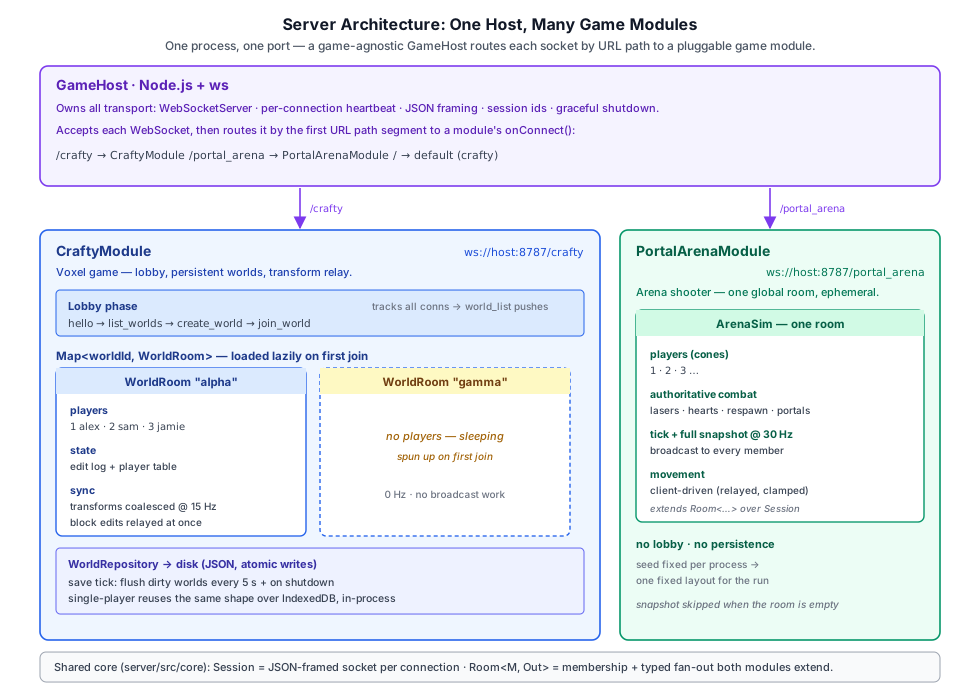
One server process hosts every game as a pluggable module, selected by the connection's URL path. A game-agnostic GameHost (server/src/core/game_host.ts) owns all the transport — the WebSocketServer, TLS, heartbeat, JSON framing, session ids, and graceful shutdown — and routes each new socket to a GameModule by its first path segment: /crafty → the voxel module, /portal_arena → the arena shooter, / → the default (crafty). Neither game's wire protocol changes; the path picks the module, then raw messages flow straight through to it.
export class GameHost {
  private readonly _modules = new Map<string, GameModule>();   // keyed by url path

  private _onConnection(ws: WebSocket, req: IncomingMessage): void {
    const module = this._moduleForPath(req.url);          // first path segment
    if (module === null) { ws.close(1008, 'unknown game path'); return; }
    const session = new WsSession(this._nextSessionId++, ws);
    const handler = module.onConnect(session);            // the module owns messages
    ws.on('message', (data) => handler.onMessage(JSON.parse(data.toString())));
    ws.on('close', () => handler.onClose());
    // ... shared heartbeat ping/pong ...
  }
}
The voxel game is the CraftyModule (server/src/modules/crafty/crafty_module.ts): it owns the lobby state machine (hello → list_worlds → create_world → join_world), a Map of live WorldRooms loaded lazily on first join, the transform/save ticks, and disk persistence. The Portal Arena shooter is the PortalArenaModule — a single PortalArenaSim room ticked and broadcast at 30 Hz, with no lobby and no persistence. Both share a small Room base that owns membership and fan-out, sending through the Session the host handed each connection:
export abstract class Room<M extends RoomMember, Out = unknown> {
  protected readonly members = new Map<number, M>();

  broadcast(msg: Out, exceptId?: number): void {
    for (const [id, m] of this.members) {
      if (id === exceptId) continue;
      m.session.send(msg);            // Session JSON-encodes + guards readyState
    }
  }
}

// ── from server/src/world_room.ts ──
export class WorldRoom extends Room<PlayerConn, S2C> {
  readonly state: WorldState;
  /** True when in-memory state has changed since the last successful save. */
  dirty = false;

  /** Emit `player_transform` for every player whose transform changed since the last call. */
  broadcastTransforms(): void {
    for (const p of this.members.values()) {
      if (!p.dirty) continue;
      p.dirty = false;
      this.broadcast(
        { t: 'player_transform', playerId: p.sessionId, x: p.x, y: p.y, z: p.z, yaw: p.yaw, pitch: p.pitch },
        p.sessionId,
      );
    }
  }
}WorldRooms are loaded lazily on the first join_world for a world id; the crafty module also tracks all connections separately so the lobby can broadcast world_list updates to clients that haven't joined a room yet. Transform broadcasts run on a fixed cadence (TRANSFORM_TICK_HZ = 15): clients may send transform updates at any rate, but the room coalesces them and emits the latest-per-player once per tick. Block edits are broadcast immediately as they happen.
RemotePlayer does (exponential smoothing at 12/s), trading a little extra lag for steady motion.Server-Side Authorization#
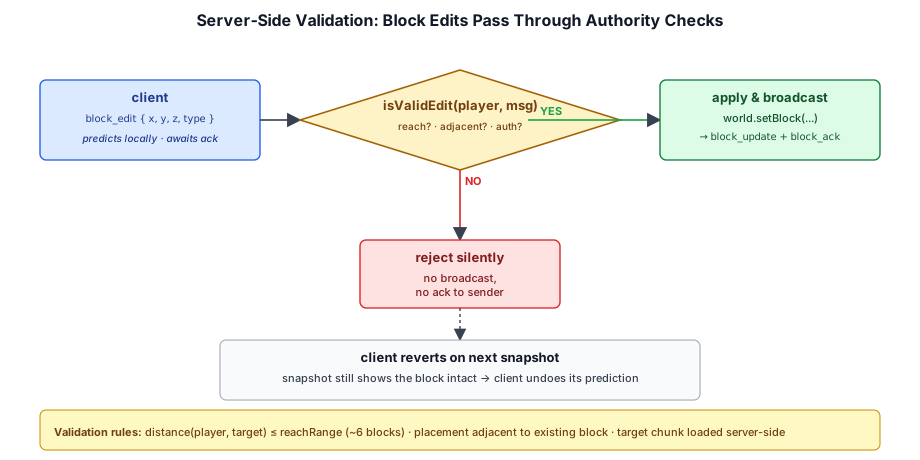
Block edits are validated on the server to prevent cheating. The server checks that the block being broken is within the player's reach distance and that the block being placed is adjacent to an existing block and within reach.
World State Persistence#
Local worlds are saved to IndexedDB in the browser. Server-side worlds are persisted to disk as JSON or a simple binary format:
export class WorldRepository
{
  constructor(dataDir: string) { this._dataDir = dataDir; }

  async save(state: WorldState): Promise<void>
  {
    await this.init();
    const target = this._pathFor(state.id);
    const tmp = `${target}.tmp`;
    const json = JSON.stringify(state.toJSON());
    await fs.writeFile(tmp, json, 'utf8');
    await fs.rename(tmp, target);
  }

  async load(id: string): Promise<WorldState | null> { /* ... */ }
  async list(): Promise<WorldState[]>             { /* ... */ }
}
Each world is one JSON file at <dataDir>/<worldId>.json. Saves are atomic — write .tmp, then rename over the target — so a crash mid-write can never leave a half-written file. The server save tick (SAVE_INTERVAL_MS = 5000) walks every room whose in-memory state has dirty === true and serializes it.
Per-Player State#
A serialized world holds more than the edit log: it also carries the world's gameMode (fixed at creation) and a per-player table keyed by the client-provided playerKey. Each SavedPlayer records the last-known position and — for survival worlds — that player's inventory (the same { stacks, hotbar } shape the local client persists to IndexedDB, Crafty Chapter 9):
export interface SavedPlayer {
  name: string;
  x: number; y: number; z: number;
  yaw: number; pitch: number;
  lastSeen: number;
  /** Survival inventory at last save. Absent for creative worlds. */
  inventory?: InventoryState;
}
The client pushes its inventory to the server with a coalesced inventory message (one send per ~500 ms, plus an immediate flush on tab close); the server validates and caps the payload, stores it on the live PlayerConn, and snapshots it into SavedPlayer on the save tick and on disconnect. When that player rejoins, the welcome payload replays their saved position and inventory along with the world's gameMode, so a survival player resumes exactly where they left off — on any machine, since the state lives on the server rather than in the browser. Incoming inventory is ignored for creative worlds so a misbehaving client can't bloat the save file.
16.6 Summary#
The multiplayer architecture uses WebSockets with a dedicated Node.js server:
- Unified host: one process, one port; a game-agnostic
GameHostroutes each socket to a pluggableGameModuleby URL path (/crafty,/portal_arena) - Message protocol: typed JSON frames covering connection, input, block edits, and chat — each game owns its own protocol
- Server architecture: per-game modules over a shared
Roombase; the crafty module holds aWorldRoomper world with player list and state - Authorization: Server-side reach distance checks, adjacency validation, rate limiting
- Persistence: IndexedDB for client, JSON disk for the crafty module, 5 s autosave; per-world game mode and per-player position + survival inventory keyed by
playerKey, replayed inwelcomeon rejoin
Further reading:
server/src/core/game_host.ts— transport host + path routing (GameHost,Session,GameModule)server/src/modules/crafty/crafty_module.ts— voxel game module: lobby, rooms, persistenceserver/src/world_room.ts— per-world room over the sharedRoombaseshared/game_socket.ts— client WebSocket transportcrafty/game/network_client.ts— Client-side networking