Taos Engine includes several tools and conventions for development, testing, and debugging.
The Sample Framework#
Self-contained samples in samples/ demonstrate individual features in isolation. Each sample has an HTML file and a TypeScript entry point:
samples/
├── rg_forward_simple.html
├── rg_forward_simple.ts        — Forward renderer, render graph wired by hand
├── crafty_entity_viewer.html
├── crafty_entity_viewer.ts     — Preview crafty NPCs and procedural trees
├── shadows_test.html
└── shadows_test.ts             — Shadow test bed (all light types, live controls)
Samples share no state with each other or with the main game. Each creates its own RenderContext and PhysicalResourceCache, constructs the persistent pass instances it needs, and on each frame builds a fresh RenderGraph from those instances. This makes them ideal for testing specific features in isolation.
To add a new sample, create two files. A typescript file:
// samples/my_feature.ts — minimal new-sample skeleton
import { RenderContext } from '../src/renderer/index.js';
import { RenderGraph, PhysicalResourceCache } from '../src/renderer/render_graph/index.js';

async function main() {
  const canvas = document.getElementById('canvas') as HTMLCanvasElement;
  const ctx = await RenderContext.create(canvas);
  const cache = new PhysicalResourceCache(ctx.device);

  // Build persistent pass instances once.
  // const myPass = MyPass.create(ctx);

  function frame() {
    const graph = new RenderGraph(ctx, cache);
    const backbuffer = graph.setBackbuffer('canvas');
    // myPass.addToGraph(graph, { ..., backbuffer });
    const compiled = graph.compile();
    void graph.execute(compiled);
    requestAnimationFrame(frame);
  }
  requestAnimationFrame(frame);
}

main();
With an associated html:
<!DOCTYPE html>
<html lang="en">
<head>
  <meta charset="UTF-8">
  <meta name="viewport" content="width=device-width, initial-scale=1.0">
  <title>Test My Feature</title>
  <link rel="icon" href="../favicon.svg" type="image/svg+xml">
</head>
<body>
  <canvas id="canvas"></canvas>
  <script type="module" src="./my_feature.ts"></script>
</body>
</html>Testing Strategy#
Taos Engine uses Vitest for unit testing. Tests live in tests/ and cover mathematical correctness, data structure invariants, and component behavior:
describe('cross', () => {
  it('should compute cross product', () => {
    const v1 = new Vec3(1, 0, 0);
    const v2 = new Vec3(0, 1, 0);
    const result = v1.cross(v2);
    expect(result.x).toBe(0);
    expect(result.y).toBe(0);
    expect(result.z).toBe(1);
  });

  it('should be anti-commutative', () => {
    const v1 = new Vec3(1, 2, 3);
    const v2 = new Vec3(4, 5, 6);
    const c1 = v1.cross(v2);
    const c2 = v2.cross(v1);
    expect(c1.x).toBe(-c2.x);
    expect(c1.y).toBe(-c2.y);
    expect(c1.z).toBe(-c2.z);
  });
});
Tests are run with:
| Command | Purpose |
|---|---|
npm test | Single run |
npm run test:watch | Watch mode (re-run on change) |
npm run test:coverage | Single run with coverage report |
WebGPU-dependent features cannot be tested in Node.js. Those are tested via sample pages and visual inspection.
Debugging WebGPU#
Validation Errors#
WebGPU validation errors are the primary debugging tool. With enableErrorHandling: true, Taos Engine wraps each pass in error scopes:
ctx.pushPassErrorScope('frame');
// ... build the graph, compile, execute ...
await ctx.popPassErrorScope('frame');
pushPassErrorScope pushes the three scope types WebGPU exposes (validation, out-of-memory, internal); popPassErrorScope awaits all three and prints the first non-null one with the label, so an error inside the frame is always tied to a named scope rather than a global unhandledrejection.
Shader Debugging#
WGSL compilation errors are reported through getCompilationInfo():
// Illustrative — drop-in helper around the standard WebGPU API:
const info = await shaderModule.getCompilationInfo();
for (const msg of info.messages) {
  if (msg.type === 'error') {
    console.error(`${msg.lineNum}:${msg.linePos}: ${msg.message}`);
    // ... show the surrounding source line for context ...
  }
}
WebGPU Inspector (Chrome Extension)#
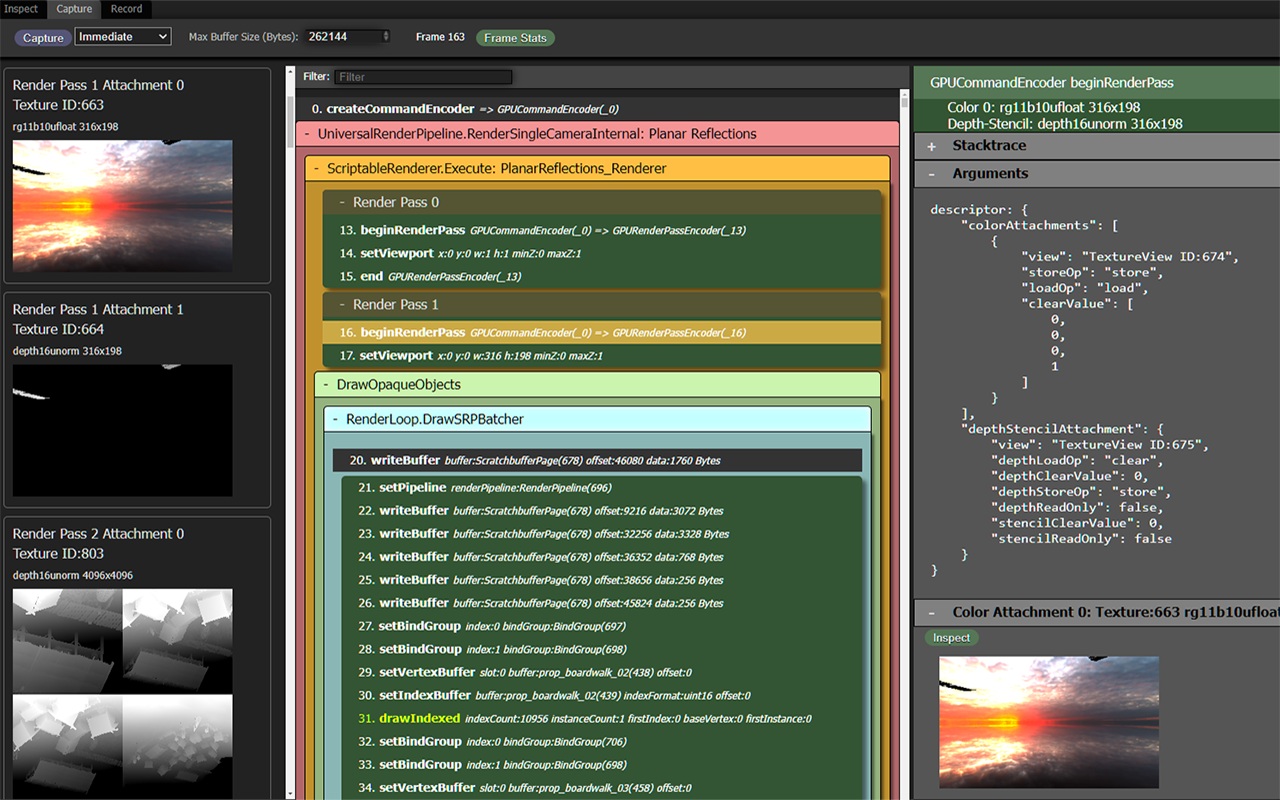
The WebGPU Inspector is a Chrome extension that provides GPU debugging capabilities. Its source is at https://github.com/brendan-duncan/webgpu_inspector. It shows:
- Active pipelines, bind groups, and resources.
- Texture and buffer contents (viewable as images/hex).
- GPU command traces.
- Validation error messages with backtraces.
Render Graph Visualizer#
General-purpose tools like the WebGPU Inspector are invaluable, but they don't know anything about your abstractions. Once a codebase grows a non-trivial structure of its own — the render graph being the obvious example — it's often worth writing a small custom tool that speaks that abstraction's language directly. A built-in debug overlay that shows passes and virtual resources as you actually think about them is usually a few hundred lines of vanilla DOM and pays for itself the first time you have to chase a culled pass or a misrouted texture.
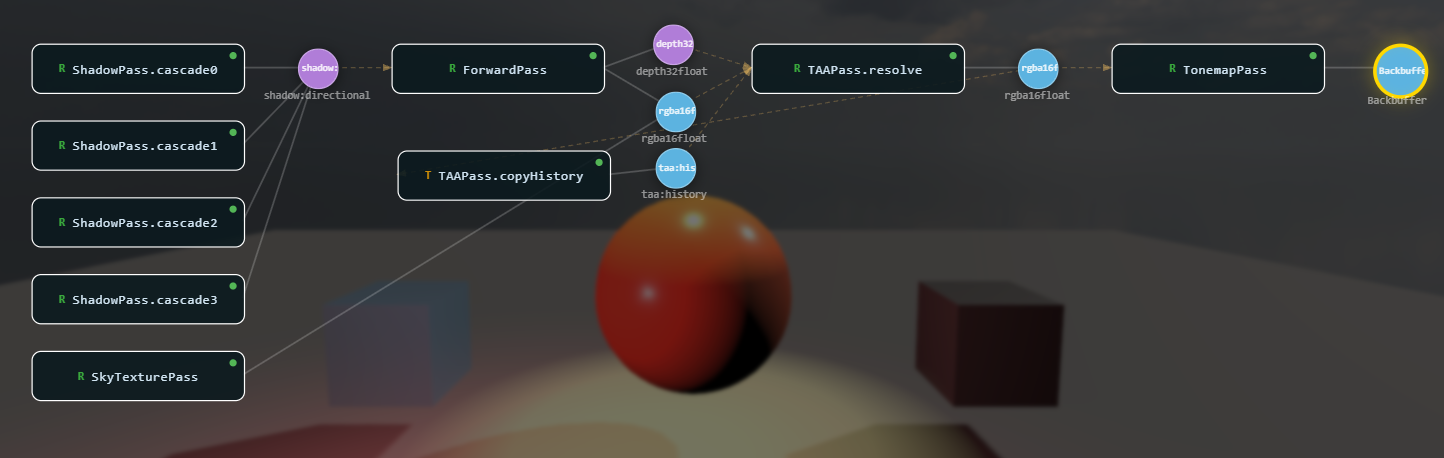
Taos Engine ships one such tool: the Render Graph Viz at src/renderer/render_graph/ui/render_graph_viz.ts. It renders the compiled graph as a node-and-edge diagram — passes as labeled boxes, virtual textures and buffers as circles/squares, write edges in white, read edges in dashed amber — with the layout derived from the pass topological levels.
Wiring it into a sample or the main game is one call:
import { createRenderGraphViz } from '../src/renderer/render_graph/ui/render_graph_viz.js';

const graphViz = createRenderGraphViz(null).attach();   // adds the G hotkey

engine.afterFrame(() => {
  if (engine.currentGraph && engine.currentCompiled) {
    graphViz.setGraph(engine.currentGraph, engine.currentCompiled);  // snapshot for the overlay
  }
});
What it gives you:
- Press G to toggle the overlay. Pan with drag, zoom with scroll, drag individual nodes, press A to frame all.
- Hover a pass or texture to highlight its inputs (blue) and outputs (amber), with a tooltip listing format, resolution, producers, and consumers.
- Culled passes (passes that don't reach the backbuffer) show with a red border and tag, so removed work is obvious.
- Right-click a texture node → "Show Texture" does a GPU readback (
textureLoadblit into an RGBA8 target, thencopyTextureToBuffer+mapAsync) and displays the result in a draggable panel. HDR formats are Reinhard-tonemapped; depth formats are visualized aspow(d, 8)grayscale. The canvas backbuffer is skipped because its texture is only valid duringexecute().
The viz is intentionally framework-free — no React, no canvas library, just SVG + absolute-positioned divs built from the graph snapshot. That kind of "small custom tool for one specific abstraction" is worth reaching for whenever a system gets complex enough that generic tooling stops answering the questions you actually have.
Asset Pipeline#
Taos Engine leans on load-time processing rather than a mandatory offline cook. A sample can point the engine at a .glb, a .hdr, or a PNG and get working GPU resources: glTF compression decoders are fetched only when a model uses them, KTX2 textures are transcoded to whatever block format the device supports, mip chains are generated on upload, and image-based lighting is prefiltered on the GPU from the sky. Offline tooling exists where it pays for itself — compressing textures, packaging downloads, and baking expensive or external data into compact files the runtime simply fetches.
Compressed Textures (KTX2 / Basis)#
The runtime half lives in src/assets/gltf_decoders.ts. transcodeKtx2() parses a Basis-supercompressed KTX2 file (ETC1S or UASTC) and transcodes it to the best format the device's features allow:
  // Pick a transcode target from device features (BC > ETC2 > ASTC > rgba32).
  const f = device.features;
  let basisFormat: number;
  let gpuFormat: GPUTextureFormat;
  const hasAlpha = isUASTC || container.supercompressionScheme !== 0; // ETC1S may carry alpha
  if (f.has('texture-compression-bc')) {
    if (isUASTC) {
      basisFormat = BASIS_FORMAT.BC7_RGBA; gpuFormat = srgb ? 'bc7-rgba-unorm-srgb' : 'bc7-rgba-unorm';
    } else if (hasAlpha) {
      basisFormat = BASIS_FORMAT.BC3_RGBA; gpuFormat = srgb ? 'bc3-rgba-unorm-srgb' : 'bc3-rgba-unorm';
    } else {
      basisFormat = BASIS_FORMAT.BC1_RGB; gpuFormat = srgb ? 'bc1-rgba-unorm-srgb' : 'bc1-rgba-unorm';
    }
  } else if (f.has('texture-compression-etc2')) {
  // ── ... ETC2, then ASTC 4×4, then uncompressed RGBA8 ... ──
The transcoded mip levels are uploaded by Texture.fromCompressed() in src/assets/texture.ts, which computes row strides from the 4×4 block size. One compressed source therefore serves desktop (BC) and mobile (ETC2 / ASTC) GPUs alike.
The authoring half lives in the editor. Each texture asset carries import settings in its .meta sidecar: a content type (color, normal, linear, grayscale, hdr) that seeds sRGB, green-flip, max-size, power-of-two, mipmap, and compression defaults, plus built-in presets such as Albedo / Color and Normal Map (editor/src/shared/textureImport.ts). The texture processor (editor/src/renderer/src/editor/textureProcessor.ts) decodes the source, applies those settings, and encodes KTX2 with a baked mip chain through a vendored WASM Basis encoder — ETC1S for small color maps, UASTC for normals and hero art. Artifacts land in the project's Cache/textures/ folder as <guid>.<key>.ktx2, where the key folds a hash of the settings together with the source file's modification time, so a cache hit is a filename check and either kind of change re-bakes. When the editor builds a project for the web (editor/src/core/build_core.ts), any texture with a fresh artifact ships as .ktx2 in place of its source, with its guid remapped so the player's loader transcodes it. HDR sources pass through unprocessed.
Compressed glTF#
src/assets/gltf_loader.ts understands three compression extensions: EXT_meshopt_compression, KHR_draco_mesh_compression, and KHR_texture_basisu. The decoder runtimes are vendored under src/third_party/ (meshopt, draco, basis, ktx-parse) and are initialized lazily and memoized in gltf_decoders.ts, so an uncompressed model pays nothing for them. The Emscripten decoders load as classic scripts in a document, or through importScripts inside a Worker, which lets tile-decode workers run them off the main thread. Models are compressed with standard external glTF tooling; the engine does not ship its own mesh encoder.
For one-off asset surgery, tools/ holds Node scripts that edit .glb files directly. tools/optimize_level_textures.mjs downsizes and re-encodes embedded images with sharp (JPEG for color maps, lossless PNG for data maps), and tools/inject_gltf_textures.mjs bakes external PBR maps into a model as standard glTF material textures. They are written for specific content, but they show the pattern: rewrite the GLB's JSON and binary chunks in place, and keep the result loadable by any glTF-correct loader.
Bundles#
Shipping hundreds of small files costs a round trip each. A bundle (src/assets/bundles/) is a single-file .bundle archive: entry blobs concatenated and each compressed on its own, a gzipped JSON table of contents, and a fixed 32-byte footer (magic TAOSBNDL) at the end. Per-entry compression lets a reader pull one asset out of a large remote archive with a single HTTP Range request, and the footer-last layout means the reader fetches the last 32 bytes, then just the TOC. buildBundle() in bundle_builder.ts is isomorphic — the same code runs in the desktop editor, the browser-based editor, and tests — and it stores a blob raw whenever gzip fails to shrink it (already-compressed PNG, KTX2, or .glb data).
A project describes its bundle groups in bundles.json (include paths, labels, or keys; dependencies on other groups; compression). The editor publishes them with publishBundles() (bundle_publish.ts), and scripts/build_bundles.mjs is the headless path for CI:
npm run build-bundles -- [projectDir] [--out <dir>] # .bundle files + catalog.json → Builds/At runtime, BundleManager (bundle_manager.ts) loads the catalog.json, loads a bundle together with its dependency closure, and picks a variant for the device's runtime profile (bundle_profile.ts). A device that exposes ASTC or ETC2 but not BC is treated as mobile, so a build can carry smaller mobile textures alongside the desktop set.
Environment Lighting#
HDR environments need no offline step. loadEnvironmentTexture() in src/assets/environment_texture.ts dispatches on extension to the Radiance .hdr parser (hdr_loader.ts) or the OpenEXR parser (exr_loader.ts). src/assets/ibl.ts then derives the image-based-lighting set on the GPU with compute shaders: a 32×32 irradiance cube, a 128×128 GGX-prefiltered specular cube with one mip per roughness level, order-3 SH diffuse coefficients, and a 64×64 split-sum BRDF lookup table cached per device. computeIblGpu() does this once; IblBaker re-records it into stable textures when the sky changes. Procedural MaterialX graphs get similar treatment: materialx_bake.ts renders a generated WGSL module into a mipmapped texture once at load.
Baked Data and Code Generation#
Some inputs are too expensive to compute in the browser, or come from outside sources, so a script bakes them into a committed file:
| Script | Input → output |
|---|---|
| scripts/build_star_catalog.mjs | Yale Bright Star Catalog → src/assets/star_catalog_data.ts, a base64 Float32Array of RA, Dec, magnitude, and color temperature per star |
scripts/build_materialx_manifest.mjs (npm run materialx:manifest) | .mtlx files under assets/materialx/ → manifest.json, so samples fetch each material lazily instead of bundling the folder |
scripts/bake_cluster_terrain.mjs (npm run bake-terrain) | High-density terrain mesh → a serialized cluster DAG (flat, or paged for streaming), so the expensive cluster build never runs in the browser |
| scripts/vdb/bake_vdb.mjs | OpenVDB grids → fixed-resolution, quantized .vol volumes plus a manifest, read by samples/vdb/vol_loader.ts |
tools/geo/ (bake_sst.mjs, bake_topo.mjs, …) | Remote geoscience datasets → small equirectangular value textures plus JSON metadata under assets/geo/ |
Other shipped data is vendored rather than generated: the LTC area-light fit tables in src/assets/ltc_tables.ts, and the precomputed cloud-noise volumes in src/assets/textures/, stored as flipbook-strip PNGs and loaded as 3D textures by cloud_noise_baked.ts.
Shaders are assets too. WGSL files are imported as strings with Vite's ?raw suffix, so they ship inside the JavaScript bundle and hot-reload in development. Shared WGSL is spliced in with #import "name.wgsl" by ShaderBlockManager, and #define / #ifdef / #if / #elif variants are resolved by preprocessShader() before the source reaches createShaderModule.
Games add their own pipelines on top. Crafty's block textures, for example, go from a texture pack through an atlas packer and a code generator that emits the BlockType enum — see Crafty §2.13.
Continuous Integration#
Taos Engine does not currently ship a hosted CI workflow. Its quality gates are the package scripts, which any CI runner (or a developer before committing) can run in sequence:
- Install dependencies with
npm ci. - Type-check with
npx tsc --noEmit. There is no separate lint step: the strict compiler settings (strict,noUnusedLocals,noUnusedParameters,noImplicitReturns) turn the most common lint findings into build errors. - Run unit tests with
npm test(a single Vitest run). - Build with
npm run build, which type-checks again, bundles with Vite, and builds the standalone player, the book site, and the docs site.
None of these run WebGPU, because headless environments usually lack a GPU. GPU-dependent tests run separately on a machine with a GPU through npm run test:gpu, and visual regression testing is done manually through the sample framework.
19.6 Summary#
The tooling and workflow infrastructure includes:
- Sample framework: Self-contained demos for isolated feature testing
- Testing strategy: Vitest for unit tests, sample pages for visual regression
- Debugging: WebGPU validation errors with per-pass error scopes, WGSL compilation info, Chrome extension
- Asset pipeline: Load-time processing by default — KTX2/Basis transcoding to the device's block format, lazily loaded meshopt/Draco decoders, GPU-prefiltered IBL — plus editor texture compression to KTX2,
.bundlearchives with per-device variants, and offline bakes for expensive or external data - Quality gates: type-check (strict compiler settings standing in for a linter), unit tests, and a full build, all runnable from
package.jsonscripts
Further reading:
tests/— Unit test directorysrc/assets/gltf_decoders.ts— Lazy meshopt / Draco / KTX2 decoders andtranscodeKtx2()src/assets/bundles/—.bundleformat, builder, catalog, andBundleManagerscripts/build_bundles.mjs— Headless bundle builder for CIsrc/assets/ibl.ts— GPU irradiance / prefiltered-specular / BRDF-LUT generationeditor/src/shared/textureImport.ts— Texture import settings, presets, and KTX2 cache keyssamples/— Self-contained demos