Taos Engine Chapter 14 built the engine audio subsystem — AudioEngine, buses, spatial voices, music, effects. This chapter is the other side: how Crafty uses that API. The game's audio needs are modest and specific — surface-aware footsteps, digging, landing thuds, and a looping ambient track — so the game layer is deliberately thin. It owns only the things that are about Crafty (which sound plays for grass vs. stone) and delegates everything about audio (the context, spatial panning, the listener, music) to the engine.
The Game Audio Layer#
crafty/game/audio_manager.ts is that layer. AudioManager holds an AudioEngine and adds only the surface-keyed sound pools on top of it. Its constructor sets the per-bus mix the game wants and leaves the rest to the engine:
export class AudioManager {
  readonly engine = new AudioEngine();

  private _stepClips = new Map<string, AudioClip[]>();
  private _fallClips = new Map<string, AudioClip>();
  private _digClips  = new Map<string, AudioClip[]>();

  constructor() {
    this.engine.bus('sfx').volume = 0.7;     // SFX a touch under unity
    this.engine.bus('music').volume = 0.4;   // music well below SFX
    this.engine.masterVolume = 0.5;          // overridden by saved settings
  }
}
Everything the game already used — playStep, playLand, playDig, playMusic, updateListener, masterVolume, muted — keeps the same shape, so crafty/main.ts is unchanged across the refactor. The methods just forward to the engine.
Surface Sound Groups#
Footstep and dig sounds depend on what the player is standing on or breaking. crafty/game/audio_surface.ts collapses the ~30 BlockTypes into four surface groups that map to sound folders:
export type SurfaceGroup = 'grass' | 'sand' | 'stone' | 'wood';

export function blockTypeToSurface(bt: BlockType): SurfaceGroup {
  switch (bt) {
    case BlockType.GRASS:
    case BlockType.DIRT:
    case BlockType.SNOW: /* … leaves, grassy props … */
      return 'grass';
    case BlockType.SAND:
      return 'sand';
    case BlockType.TRUNK:
    case BlockType.SPRUCE_PLANKS:
      return 'wood';
    default:
      return 'stone';   // hard, unclassified blocks
  }
}
The player controller (Chapter 3) samples the block underfoot, maps it through blockTypeToSurface, and hands the group to the audio manager.
Loading the Sound Pools#
The footstep, dig, and landing samples live under assets/sounds/player/{step,dig,fall}/ named {surface}{N}.ogg (e.g. grass1.ogg, stone3.ogg). Vite's import.meta.glob resolves them all to URLs at build time; AudioManager.init() then decodes them through the engine loader (which caches by URL) into surface → clip-pool maps:
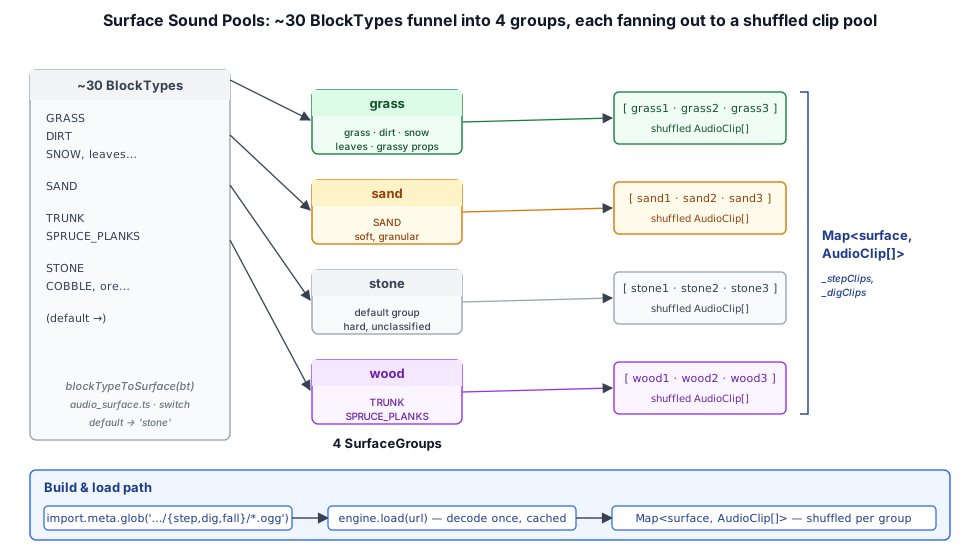
private async _loadSurfacePool(glob: Record<string, string>): Promise<Map<string, AudioClip[]>> {
  const bySurface = new Map<string, AudioClip[]>();
  for (const [path, url] of Object.entries(glob)) {
    const parsed = _parseStepPath(path);          // → { surface, variant }
    if (!parsed) { continue; }
    const clip = await this.engine.load(url);      // decode-once, cached
    (bySurface.get(parsed.surface) ?? setDefault(bySurface, parsed.surface)).push(clip);
  }
  for (const [, list] of bySurface) {
    list.sort(() => Math.random() - 0.5);          // shuffle for variety
  }
  return bySurface;
}
init() is called from the first user gesture (it resume()s the context and loads the pools), satisfying the browser autoplay policy.
Triggering Footsteps, Digging, and Landings#
Each play method picks a random clip from the surface pool and fires a spatial one-shot through the engine's sfx bus at the event's world position:
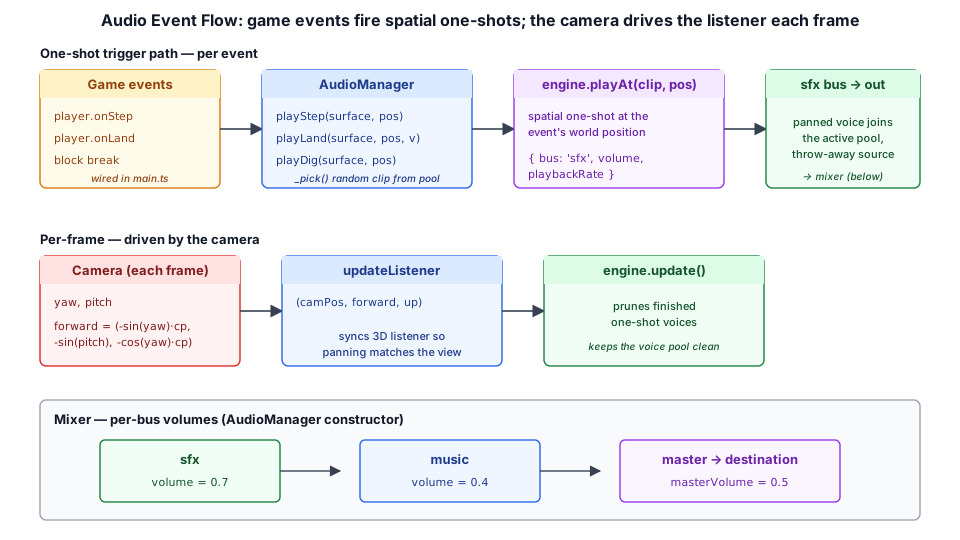
playStep(surface: SurfaceGroup, pos: Vec3, volume = 1, pitch = 1): void {
  const clip = _pick(this._stepClips.get(surface));
  if (clip) {
    this.engine.playAt(clip, pos, { bus: 'sfx', volume, playbackRate: pitch });
  }
}

playLand(_surface: SurfaceGroup, pos: Vec3, fallSpeed: number): void {
  const clip = this._fallClips.get(fallSpeed > 15 ? 'fallbig' : 'fallsmall');
  if (clip) {
    this.engine.playAt(clip, pos, { bus: 'sfx', volume: 0.6 + Math.min(fallSpeed / 30, 0.4) });
  }
}
The game loop wires these to player events in crafty/main.ts — the player controller fires onStep/onLand, and block breaking calls playDig:
player.onStep = (surface) => audio.playStep(surface, cameraGO.position, 0.5);
player.onLand = (surface, fallSpeed) => {
  const pos = cameraGO.position.clone();
  pos.y -= 1.62;                       // shift from eye height to the feet
  audio.playLand(surface, pos, fallSpeed);
};
// on block break:
audio.playDig(surface, new Vec3(x + 0.5, y + 0.5, z + 0.5));
Landing volume scales with impact speed, and fallbig swaps in for hard landings — the same fallSpeed also drives the fall-damage gamepad rumble.
Ambient Music and Context Unlock#
Crafty plays one looping ambient track (assets/sounds/ambiente.ogg). Because browsers block audio before a gesture, the game defers both context resume and music start to the first click/touch:
const initAudio = async (): Promise<void> => {
  await audio.init();                 // resume + load SFX pools
  await audio.playMusic(ambientMusicUrl);
};
canvas.addEventListener('click', initAudio, { once: true });
playMusic forwards to AudioEngine.playMusic, which loops the track through the music bus — already turned down to 0.4 so the ambience sits under the footsteps and effects.
The Listener and Volume Settings#
Each frame the game syncs the 3D listener to the camera so panning matches what the player sees, deriving forward from the player's yaw/pitch:
const cp = Math.cos(pitch);
forward.set(-Math.sin(yaw) * cp, -Math.sin(pitch), -Math.cos(yaw) * cp);
audio.updateListener(camPos, forward, upVec);
AudioManager.updateListener forwards to the engine and then calls engine.update(), which prunes finished one-shot voices — so the game's existing once-per-frame call keeps the voice pool clean for free.
Master volume and mute are persisted in crafty/config/game_settings.ts and restored at startup; the settings panel (Chapter 5) drives them through audio.masterVolume / audio.muted, which are now just pass-throughs to the master bus. Muting preserves the per-bus volumes, so toggling it back restores the full mix.
Summary#
Crafty's audio is a small game-specific shell over the engine subsystem:
AudioManager: owns anAudioEngine, sets the SFX/music mix, exposes the game's existing play/volume methods as pass-throughs.- Surface groups:
blockTypeToSurfacefolds block types intograss/sand/stone/wood, selecting which footstep/dig pool to draw from. - Sound pools:
import.meta.glob+ the cached engine loader build shuffled per-surface clip pools; one-shots fire spatially on thesfxbus. - Events: player
onStep/onLandand block breaking trigger spatial sounds at world positions; landing volume scales with impact. - Music & listener: a single looping ambient track on the
musicbus; the listener tracks the camera and the per-frame call doubles as voice cleanup.
Further reading:
crafty/game/audio_manager.ts— the thin game audio layercrafty/game/audio_surface.ts— block type → surface group mapping- Taos Engine Chapter 14 — the engine
AudioEngineAPI this builds on