Non-playable characters (NPCs) bring the world to life. Crafty's NPC system uses lightweight state-machine components that attach to GameObject entities, driving movement, rotation, and animation. This chapter covers the built-in NPC types — ducks, ducklings, pigs, creepers, bees, fireflies, and cats and kittens — and shows how the pattern can be extended for more complex behaviors.
NPC Architecture#
Every NPC is a GameObject with a MeshRenderer for its visual representation and an AI component that implements the Component interface:
abstract class Component {
  readonly gameObject: GameObject;
  start?(): void;
  update?(dt: number): void;
  destroy?(): void;
}
The AI component owns the NPC's internal state, movement velocity, yaw rotation, and references to child GameObject nodes (such as the head) for animation. It reads the World for ground and water collision and accesses DuckAI.playerPos — a static field written once per frame by the game loop — to sense the player's position.
All NPC components share common infrastructure:
- Gravity — constant
-9.8 m/s²acceleration applied each frame. - Ground collision — samples
World.getTopBlockY()to find the solid surface below the NPC. - Yaw rotation — computed from movement direction and applied via
Quaternion.fromAxisAngle. - Head animation — sinusoidal bob on a named child
GameObject.
The AI State Machine#
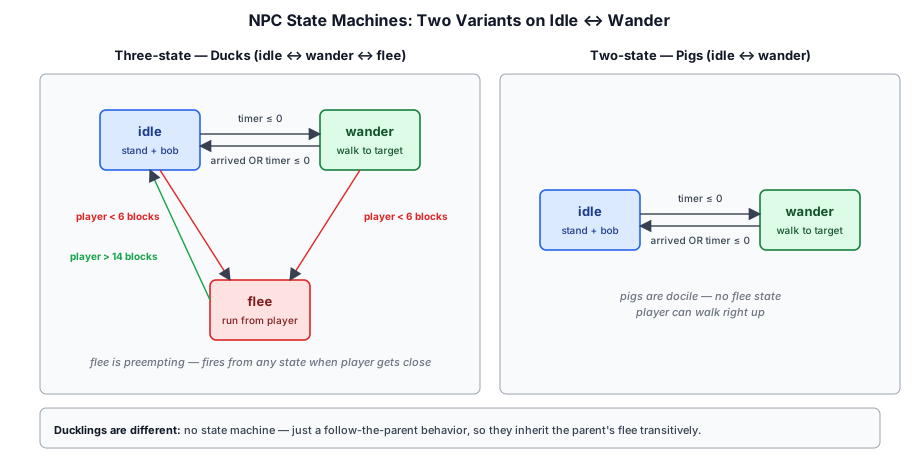
The three NPC types implement one of two state-machine patterns:
| Pattern | States | Used by |
|---|---|---|
| Stateless | drift | Fireflies |
| Single-state | follow | Ducklings |
| Two-state | idle ↔ wander | Pigs |
| Three-state | idle ↔ wander ↔ flee | Ducks |
| Four-state (hostile) | idle ↔ wander → chase → detonate | Creepers |
| Four-state (friendly) | idle ↔ wander → follow → sit | Cats, kittens |
Idle#
The NPC stands still, bobbing gently. A random timer counts down; when it expires, the NPC transitions to wander. In the three-state variant, the NPC also checks player distance each frame and enters flee immediately if the player comes within a threshold radius.
case 'idle': {
  this._timer -= dt;
  if (playerDist2 < 36) {           // 6 blocks — flee radius
    this._enterFlee();
  } else if (this._timer <= 0) {
    this._pickWanderTarget();
  }
  break;
}Wander#
The NPC picks a random target position within a distance range and walks toward it at a constant speed:
private _pickWanderTarget(): void {
  const angle = Math.random() * Math.PI * 2;
  const dist  = 3 + Math.random() * 8;
  this._targetX = go.position.x + Math.cos(angle) * dist;
  this._targetZ = go.position.z + Math.sin(angle) * dist;
  this._hasTarget = true;
  this._state = 'wander';
  this._timer = 6 + Math.random() * 6;
}
Movement toward the target uses simple direct steering — the NPC moves in a straight line to the waypoint at a fixed speed:
const dx = this._targetX - gx;
const dz = this._targetZ - gz;
const dist = Math.sqrt(dist2);
go.position.x += (dx / dist) * 1.5 * dt;
go.position.z += (dz / dist) * 1.5 * dt;
this._yaw = Math.atan2(-(dx / dist), -(dz / dist));
The yaw is updated each frame so the NPC's model faces the direction of travel. When the NPC arrives within 0.5 blocks of the target, or when a wander timer expires, it returns to idle.
Flee#
Ducks flee from the player when within detection range (6 blocks). The flee behavior moves the duck directly away from the player at a higher speed (4.0 m/s vs 1.5 m/s wander). Once the distance exceeds 14 blocks, the duck returns to idle:
case 'flee': {
  if (playerDist2 > 196) {         // 14 block safe distance
    this._enterIdle();
    break;
  }
  const nx = dist > 0 ? -dpx / dist : 0;
  const nz = dist > 0 ? -dpz / dist : 0;
  go.position.x += nx * 4.0 * dt;
  go.position.z += nz * 4.0 * dt;
  this._yaw = Math.atan2(-nx, -nz);
  break;
}
Pigs are docile — they never flee and remain in the two-state cycle indefinitely.
Follow#
Ducklings use a single-state follow behavior instead of the idle/wander pattern. Rather than selecting random targets, each duckling tracks its parent duck's position and maintains a polar offset so the brood spreads naturally around the parent:
case 'follow': {
  this._offsetAngle += dt * 0.25;
  const tx = this._parent.position.x + Math.cos(this._offsetAngle) * this._followDist;
  const tz = this._parent.position.z + Math.sin(this._offsetAngle) * this._followDist;
  // steer toward target position
  const dx = tx - go.position.x;
  const dz = tz - go.position.z;
  const dist = Math.sqrt(dx * dx + dz * dz);
  const speed = dist > 2.5 ? 3.5 : 1.8;
  go.position.x += (dx / dist) * speed * dt;
  go.position.z += (dz / dist) * speed * dt;
  break;
}
The duckling does not check player distance directly — it inherits the parent's flee behavior automatically by following the parent.
Chase#
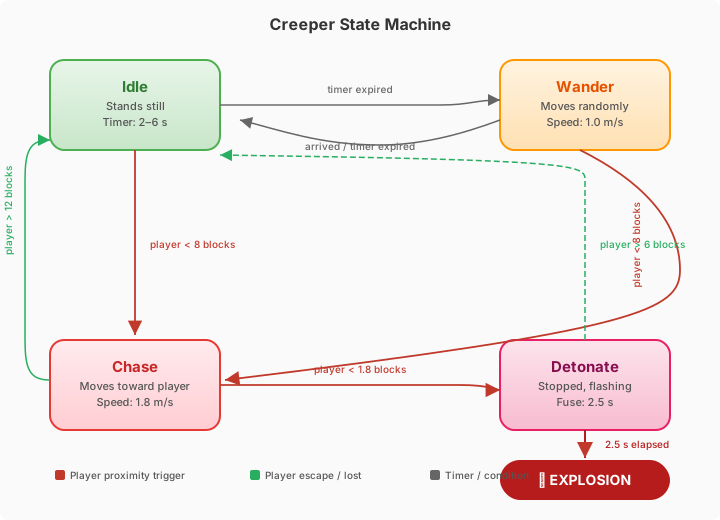
Creepers (and future hostile mobs) add a chase state that preempts idle and wander when the player enters the detect radius (8 blocks). The creeper moves toward the player at a higher speed (1.8 m/s) and faces the player directly:
case 'chase': {
  const dx = playerPos.x - go.position.x;
  const dz = playerPos.z - go.position.z;
  const dist = Math.sqrt(dx * dx + dz * dz);
  if (dist > 12) { this._state = 'idle'; break; }           // lose interest
  if (dist < 1.8) { this._state = 'detonate'; break; }       // close enough
  go.position.x += (dx / dist) * 1.8 * dt;
  go.position.z += (dz / dist) * 1.8 * dt;
  this._yaw = Math.atan2(-dx / dist, -dz / dist);
  break;
}
Hysteresis between the detect radius (8 blocks) and lose radius (12 blocks) prevents the creeper from rapidly flickering between chase and idle when the player is at the boundary.
Detonate#
When the creeper reaches touching distance (1.8 blocks), it enters detonate — it stops moving and begins a 2.5-second fuse countdown. The creeper's body flashes between green and white at an accelerating rate:
case 'detonate': {
  this._detonateElapsed += dt;
  if (playerDist2 > 36) { this._exitDetonate(); break; }     // player escaped
  if (this._detonateElapsed >= 2.5) { this._explode(); break; }
  const flashInterval = Math.max(0.08, 0.5 - this._detonateElapsed * 0.18);
  const on = Math.floor(this._detonateElapsed / flashInterval) % 2 === 0;
  this._setColor(on ? CREEKER_GREEN : WHITE);
  break;
}
If the player retreats beyond 6 blocks during the fuse, the creeper cancels detonation and returns to idle. If the full 2.5 seconds elapse, the creeper explodes — destroying blocks within a 4-block spherical radius and emitting an 80-particle fire burst. See §4.6 for the full explosion mechanics.
Follow (seek) and Sit#
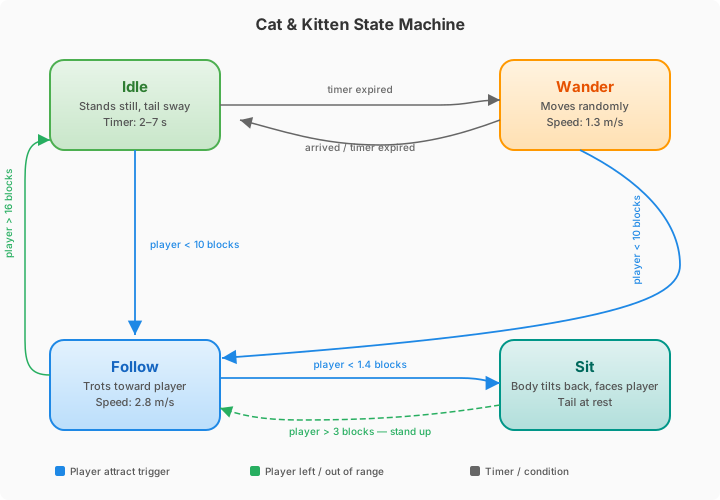
Cats and kittens share the creeper's "preempt idle/wander when the player is near" structure, but with a friendly outcome. The follow state steers toward the player rather than away, and once the cat is close enough it transitions to sit instead of attacking. Hysteresis between the attract radius (10 blocks) and the lose radius (16 blocks) keeps the cat committed once it starts approaching:
case 'follow': {
  if (playerDist2 > LOSE_SQ) {        // gave up — player out of range
    this._enterIdle();
    break;
  }
  if (playerDist2 < SIT_SQ) {         // reached the player — sit down
    this._state = 'sit';
    break;
  }
  const dist = Math.sqrt(playerDist2);
  const nx = dpx / dist;
  const nz = dpz / dist;
  this._yaw = Math.atan2(-nx, -nz);   // face the player
  moving = this._tryStep(go, nx, nz, FOLLOW_SPEED, dt);
  break;
}
The sit state stops all movement, keeps the cat facing the player, and stands the cat back up (follow) only when the player walks away. The seated pose is produced by smoothly tilting the body backward — see §4.9.
case 'sit': {
  if (playerDist2 > STAND_SQ) {       // player left — stand and follow again
    this._state = 'follow';
    break;
  }
  const dist = Math.sqrt(playerDist2);
  if (dist > 0.001) {
    this._yaw = Math.atan2(-dpx / dist, -dpz / dist);   // keep facing the player
  }
  break;
}Duck AI#
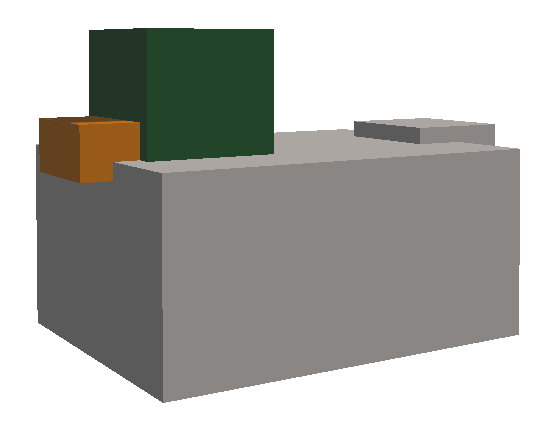
DuckAI (crafty/game/components/duck_ai.ts) implements the full three-state machine. Ducks are amphibious — they walk on land and float on water:
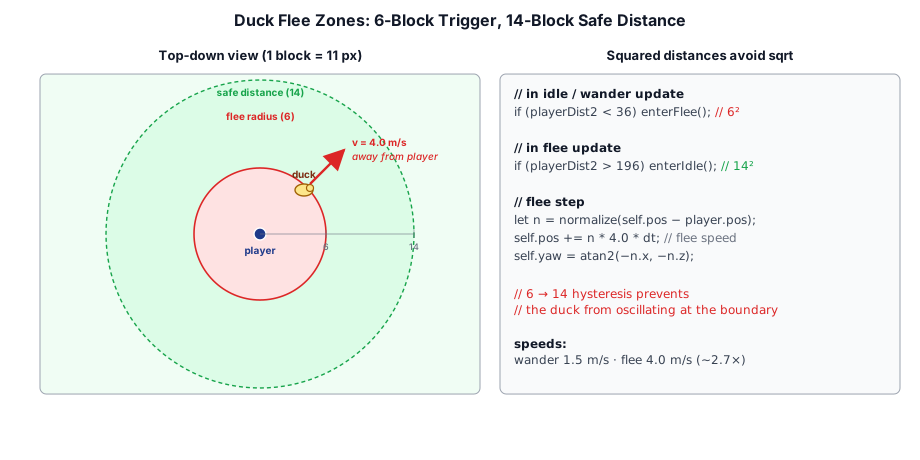
// If the block below is water, float on the surface
const blockBelow = this._world.getBlockType(
  Math.floor(gx), Math.floor(groundY - 1), Math.floor(gz));
if (blockBelow === BlockType.WATER) {
  go.position.y = groundY;  // float on water surface
} else {
  go.position.y = groundY;  // stand on solid ground
}
The duck's model has a child GameObject named Duck.Head which is animated with a sinusoidal bob. The bob frequency and amplitude differ between idle and wander states:
this._bobPhase += dt * (this._state === 'wander' ? 6 : 2);
const bobAmp = this._state === 'wander' ? 0.018 : 0.008;
this._headGO.position.y = this._headBaseY + Math.sin(this._bobPhase) * bobAmp;
Player position is fed to ducks via a static field DuckAI.playerPos, written once per frame by the game loop. This avoids coupling the AI to a specific player component.
Duckling AI#
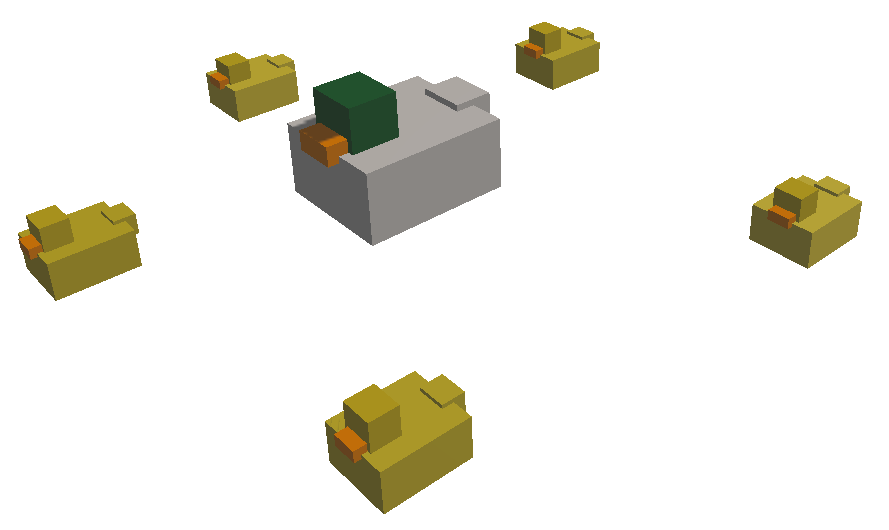
DucklingAI (crafty/game/components/duckling_ai.ts) implements a follow behavior rather than the idle/wander/flee pattern. Each duckling tracks its parent duck's world position and maintains a personalised polar offset so the brood spreads naturally:
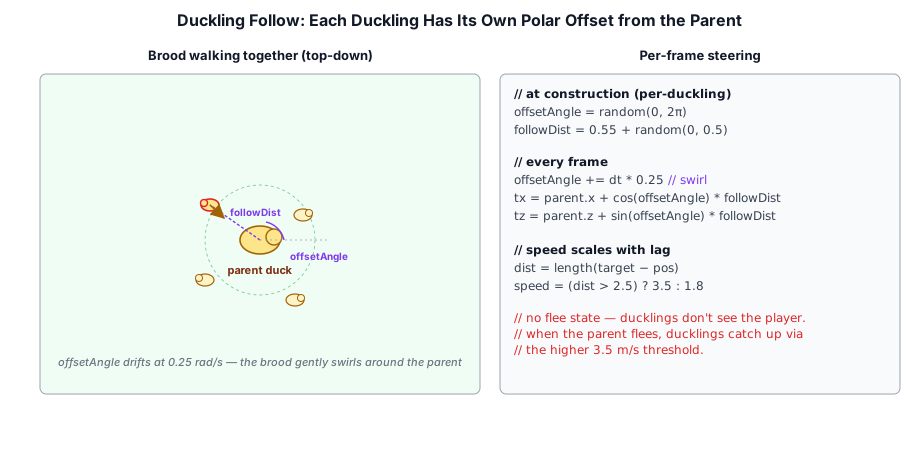
constructor(parent: GameObject, world: World) {
  this._parent = parent;
  this._offsetAngle = Math.random() * Math.PI * 2;
  this._followDist  = 0.55 + Math.random() * 0.5;
}
Each frame, the duckling computes its target position as the parent's position plus the polar offset, then steers toward it:
this._offsetAngle += dt * 0.25;  // gentle swirl
const tx = this._parent.position.x + Math.cos(this._offsetAngle) * this._followDist;
const tz = this._parent.position.z + Math.sin(this._offsetAngle) * this._followDist;
The duckling adjusts its speed based on distance — faster when lagging behind, creating a realistic catching-up motion:
const speed = dist > 2.5 ? 3.5 : 1.8;
go.position.x += nx * speed * dt;
go.position.z += nz * speed * dt;
Ducklings do not check for the player directly — they simply follow their parent, so they inherit the parent's flee behavior automatically.
Pig AI#
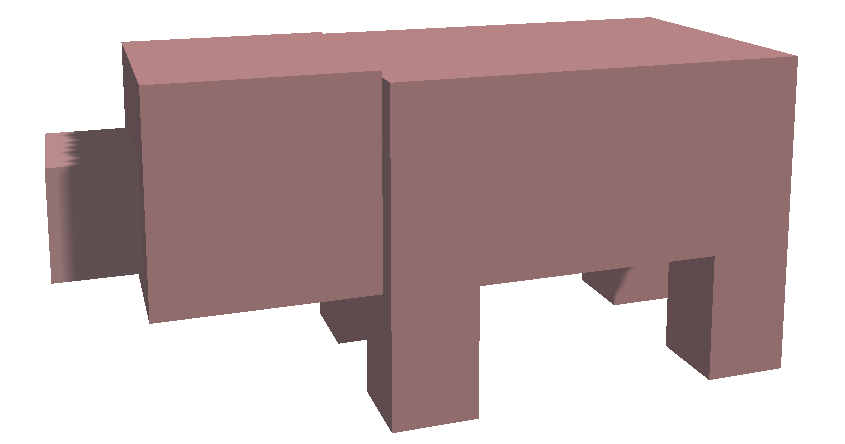
PigAI (crafty/game/components/pig_ai.ts) implements a simpler two-state machine (idle ↔ wander) with no flee response. Pigs are larger and slower than ducks:
| Property | Duck | Duckling | Pig | Bee | Creeper | Firefly | Cat |
|---|---|---|---|---|---|---|---|
| States | idle/wander/flee | follow | idle/wander | idle→approach→hover | idle/wander/chase/detonate | drift (stateless) | idle/wander/follow/sit |
| Wander speed | 1.5 m/s | 1.8–3.5 m/s | 1.2 m/s | 2.5 m/s | 1.0 m/s | 0.9 m/s (3D) | 1.3 m/s |
| Player speed | 4.0 m/s (flee) | — | — | — | 1.8 m/s (chase) | — | 2.8 m/s (follow) |
| Idle bob | 0.008 @ 2 Hz | 0.004 @ 2 Hz | 0.005 @ 1.5 Hz | 0.15 vert. @ 2.5 Hz | — | — (glow pulse) | 0.006 @ 2 Hz |
| Wander bob | 0.018 @ 6 Hz | 0.012 @ 7 Hz | 0.014 @ 4 Hz | 0.15 vert. @ 2.5 Hz | — | — (glow pulse) | 0.016 @ 7 Hz |
| Hover bob | — | — | — | 0.15 vert. @ 7.5 Hz | — | — | — |
| Water | Yes (float) | No* | Avoids | No (flies) | Avoids | No (flies) | Avoids |
| Gravity | Yes | Yes | Yes | No | Yes | No | Yes |
*Ducklings use ground collision only — they do not float on water. Avoids means the land animal refuses to step onto or spawn on a water surface — see §4.10. Kittens share the cat's CatAI verbatim (only the mesh scale and color differ), so the Cat column applies to both.
The pig's wander behavior is identical in structure to the duck's but uses slightly different parameters: slower speed, longer wander distances, and a different head bob signature.
Creeper AI#
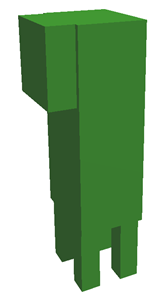
CreeperAI (crafty/game/components/creeper_ai.ts) implements a hostile four-state machine that introduces the first truly threatening NPC in Crafty. Creepers spawn in any biome (unlike passive mobs which are restricted to GrassyPlains) and are distinguished by their tall green silhouette and explosive demise.
| Property | Value |
|---|---|
| States | idle / wander / chase / detonate |
| Wander speed | 1.0 m/s |
| Chase speed | 1.8 m/s |
| Detect radius | 8 blocks |
| Lose radius | 12 blocks (hysteresis) |
| Touch radius | 1.8 blocks (triggers detonate) |
| Detonate cancel radius | 6 blocks |
| Detonate fuse | 2.5 seconds |
| Explosion radius | 4 blocks (spherical) |
| Biome | Any |
Four-State Machine#
Idle → Wander. The creeper stands still or wanders aimlessly at 1.0 m/s, using the same timer-based target selection as pigs. Both states preemptively transition to chase if the player comes within the detect radius (8 blocks).
Chase. The creeper moves toward the player at 1.8 m/s. If the player moves beyond 12 blocks the creeper loses interest and returns to idle. If the player comes within touching distance (1.8 blocks), the creeper enters the detonate state.
Detonate. The creeper stops moving and begins flashing between green and white at an accelerating rate — the flash interval starts at 0.5 s and decreases by 0.18 s per second elapsed, capped at 0.08 s:
const flashInterval = Math.max(0.08, 0.5 - this._detonateElapsed * 0.18);While detonating, the creeper checks whether the player has retreated beyond the cancel radius (6 blocks). If so, it restores its green color and returns to idle with a short cooldown timer:
if (playerDist2 > DETONATE_CANCEL_RADIUS_SQ) {
  this._exitDetonate();
  break;
}
If the full 2.5-second fuse elapses without the player escaping, the creeper explodes.
Explosion#
The explosion has two phases:
Particle burst — a
static onExplodecallback fires at the creeper's position, triggering an 80-particle burst via the game'sexplosionPass. The explosion config uses fire-colored particles withcolor_over_lifetime(orange → dark transparent) andsize_over_lifetime(grow → shrink) modifiers.Block destruction — all blocks within a 4-block spherical radius are destroyed via
world.mineBlock(). For each destroyed block, astatic onBlockDestroyedcallback fires, routing the edit through the game's persistence and synchronization system:
                ┌─ Local mode → dedup against savedWorld.edits[]
CreeperAI       │                → push to edit log
  └─ mineBlock ─┤                → stash for chunk re-entry
  └─ onBlockDestroyed ─┤         → mark save dirty
└─ Network mode → stash + sendBlockBreak to server![Each block a creeper destroys fires onBlockDestroyed, which branches on multiplayer mode: local saves dedup against savedWorld.edits[], push to the edit log, and mark the world dirty; network mode stashes the edit and sends a block-break to the authoritative server](../illustrations/04-creeper-explosion-flow.svg)
This ensures creeper explosions are persisted in local saves and replicated to all players in multiplayer games. The explosion respects the break→place dedup rule — if a player placed a block and a creeper later destroys it, both edits remain in the log so replay clears the placed block first.
Flash Visual#
The color change is applied directly to the child MeshRenderer materials at runtime:
private _setColor(color: [number, number, number, number]): void {
  for (const child of go.children) {
    const renderer = child.getComponent(MeshRenderer);
    if (renderer && renderer.material instanceof PbrMaterial) {
      renderer.material.albedo = color;
      renderer.material.markDirty();
    }
  }
}
The creeper uses a single CREEPER_GREEN color for both body and head (unlike earlier NPCs which use different colors for different body parts).
Spawning#
Creepers spawn during chunk generation with an 8% probability per XZ chunk column, using the same AnimalMeshes interface as passive mobs. Unlike ducks and pigs, they have no biome filter — they can appear in any biome:
if (Math.random() < CREEPER_CHANCE) {
  const wx = Math.floor(baseX + Math.random() * CHUNK_SIZE);
  const wz = Math.floor(baseZ + Math.random() * CHUNK_SIZE);
  spawnCreeper(wx, wz, world, scene, meshes.creeperBody, meshes.creeperHead);
}
The mesh stands twice as tall as a pig, with a body half-height of 0.60 and leg half-height of 0.20, giving the creeper its distinctive towering silhouette.
Bee AI#
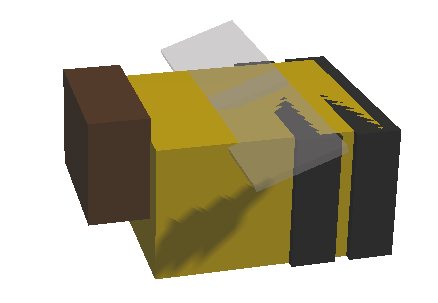
BeeAI (crafty/game/components/bee_ai.ts) implements a flying NPC with a three-state machine — idle, wander, and hover — that drifts through GrassyPlains biomes and periodically investigates nearby flowers. Unlike ground NPCs, bees have no gravity; they fly at a fixed altitude above the terrain.
Flight Mechanics#
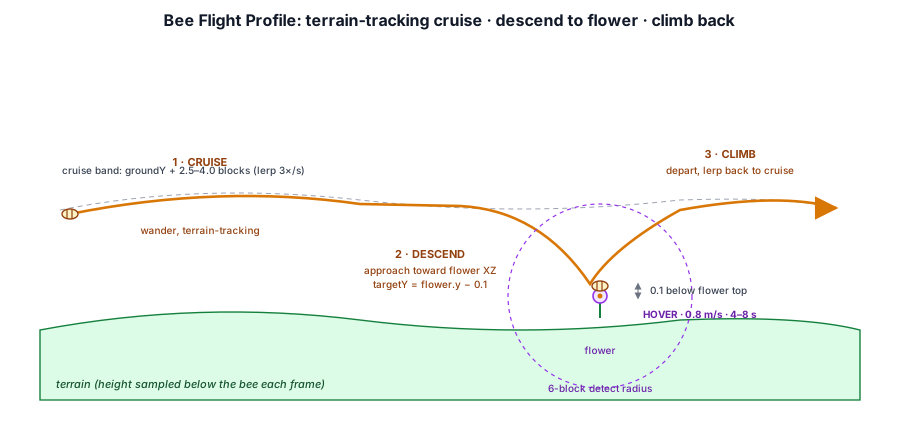
Bees maintain altitude via terrain tracking rather than gravity. Each frame the ground height below the bee is sampled, and the bee's Y position is lerped toward the target height at 3× per second, giving smooth transitions:
this._verticalPhase += dt * 2.5;
const hoverOffset = Math.sin(this._verticalPhase) * 0.15;
const targetBase = this._flowerTarget
  ? this._flowerTarget.y - 0.1         // just above flower
  : groundY + this._flightAltitude;     // normal cruising
go.position.y += (targetBase + hoverOffset - go.position.y) * Math.min(1, 3.0 * dt);
The _verticalPhase oscillates all parts (body bob, wing flap) and runs continuously in every state. When the bee acquires or loses a _flowerTarget, the lerp carries it smoothly between cruising altitude (2.5–4.0 blocks above ground) and the hover height (0.1 blocks below the flower block center, i.e. resting on the flower's visual top).
State Machine#
idle → (flower found) → approach (wander toward flower XZ)
idle → (no flower)    → wander (random direction)
approach → (arrived)  → hover (fine 3D positioning on flower)
hover → (timer done)  → wander (fly away, clear flower target)
wander → (done) → idleIdle#
The bee hovers in place with a vertical bob. A random timer (3–6 seconds) counts down. When it expires, the bee scans for nearby flower blocks (6-block radius). If found, it enters the approach sub-mode: the wander target is set to the flower's XZ coordinates and the state switches to wander, causing the bee to fly toward the flower at 2.5 m/s. If no flower is found, a random wander target is picked instead:
case 'idle': {
  this._timer -= dt;
  if (this._timer <= 0) {
    if (this._findNearestFlower()) {
      this._enterApproachFlower();
    } else {
      this._pickWanderTarget();
    }
  }
  break;
}private _enterApproachFlower(): void {
this._targetX = this._flowerTarget.x;
this._targetZ = this._flowerTarget.z;
this._hasTarget = true;
this._state = 'wander';
this._timer = 6;
}During the approach flight the terrain tracking targets _flowerTarget.y - 0.1 instead of the normal cruising altitude, so the bee smoothly descends to just above the flower as it flies toward it. By the time it arrives, the Y is already correct — no pop.
Wander#
The bee flies toward a target position at 2.5 m/s. Directional yaw is computed from the movement vector:
private _pickWanderTarget(): void {
  const angle = Math.random() * Math.PI * 2;
  const dist  = 8 + Math.random() * 8;
  this._targetX = go.position.x + Math.cos(angle) * dist;
  this._targetZ = go.position.z + Math.sin(angle) * dist;
  this._hasTarget = true;
  this._state = 'wander';
  this._timer = 8 + Math.random() * 4;
  this._flowerTarget = null;
}
Steering uses direct-to-target movement. When the target is reached (within 1.0 block in XZ), the bee checks whether a _flowerTarget is set — if so, it transitions to hover for fine positioning; otherwise it returns to idle:
case 'wander': {
  ...
  if (dist2 < 1.0) {
    if (this._flowerTarget) {
      this._enterHover();
    } else {
      this._enterIdle();
    }
    break;
  }
  go.position.x += (dx / dist) * 2.5 * dt;
  go.position.z += (dz / dist) * 2.5 * dt;
  this._yaw = Math.atan2(-(dx / dist), -(dz / dist));
  break;
}
If the wander timer expires before reaching the target, the bee idles in place.
Hover#
When the bee reaches the flower's XZ position (approach completed), it enters hover — a fine 3D positioning mode that steers toward the flower at a reduced speed (0.8 m/s). The hover Y targets _flowerTarget.y - 0.1, placing the bee's body center right at the flower's visual top:
case 'hover': {
  this._hoverElapsed += dt;
  if (this._hoverElapsed >= this._hoverDuration) {
    this._pickWanderTarget();     // fly away after hovering
    break;
  }
  const targetY = this._flowerTarget.y - 0.1 + Math.sin(this._verticalPhase * 3) * 0.15;
  const dx = this._flowerTarget.x - gx;
  const dz = this._flowerTarget.z - gz;
  const dy = targetY - go.position.y;
  const dist = Math.sqrt(dx * dx + dz * dz + dy * dy);
  if (dist > 0.01) {
    go.position.x += (dx / dist) * 0.8 * dt;
    go.position.z += (dz / dist) * 0.8 * dt;
    go.position.y += (dy / dist) * 0.8 * dt;
  }
  this._yaw = Math.atan2(-dx, -dz);
  break;
}
After 4–8 seconds the hover timer expires, and instead of idling in place the bee calls _pickWanderTarget(). This clears _flowerTarget and sets a random wander destination, causing the bee to fly away. The terrain tracking lerp smoothly carries it back up to cruising altitude. Once it reaches the wander target, it idles and may find a different flower — this prevents the bee from getting stuck re-hovering the same flower.
If the flower is broken during hover, _flowerTarget becomes stale (the key is removed from flowerPositions), and on the next frame the null check transitions to _pickWanderTarget() immediately.
Flower Detection#
Flower positions are cached in a shared static Set<string>, keyed as "x:y:z". The cache is populated when chunks are generated (scanning each new chunk for BlockType.FLOWER) and updated in real-time via World.onBlockSet / World.onBlockBeforeRemove callbacks wired in main.ts:
// main.ts
world.onBlockSet = (wx, wy, wz, blockType) => {
  if (blockType === BlockType.FLOWER) {
    BeeAI.flowerPositions.add(`${wx}:${wy}:${wz}`);
  }
};
world.onBlockBeforeRemove = (wx, wy, wz, blockType) => {
  if (blockType === BlockType.FLOWER) {
    BeeAI.flowerPositions.delete(`${wx}:${wy}:${wz}`);
  }
};
The bee iterates this set to find the nearest flower within 6 blocks, using squared-distance comparison:
private _findNearestFlower(): boolean {
  let nearestDist2 = FLOWER_DETECT_RADIUS_SQ;
  let found = false;
  for (const key of BeeAI.flowerPositions) {
    const [fx, fy, fz] = key.split(':').map(Number);
    const dx = fx + 0.5 - go.position.x;
    const dy = fy + 0.5 - go.position.y;
    const dz = fz + 0.5 - go.position.z;
    const d2 = dx * dx + dy * dy + dz * dz;
    if (d2 < nearestDist2) { /* record nearest */ }
  }
  ...
}Parameters#
| Property | Value |
|---|---|
| States | idle → approach (wander) → hover |
| Wander speed | 2.5 m/s |
| Hover speed | 0.8 m/s |
| Flight altitude | 2.5–4.0 blocks above ground |
| Vertical bob (idle/wander) | 0.15 @ 2.5 Hz |
| Vertical bob (hover) | 0.15 @ 7.5 Hz |
| Flower detect radius | 6 blocks |
| Wander distance | 8–16 blocks |
| Idle duration | 3–6 seconds |
| Hover duration | 4–8 seconds |
| Wander timer | 8–12 seconds |
| Y lerp rate | 3× per second |
| Biome | GrassyPlains only |
| Spawn probability | 0.10 per column |
| Clearance required | 3 blocks above spawn |
Model#
The bee GameObject hierarchy consists of nine child nodes, each with its own MeshRenderer and material:
| Child | Mesh | Material | Position |
|---|---|---|---|
Bee.Body | Yellow body box (0.24×0.18×0.30) | Yellow, rough | Root center |
Bee.Stripe1 | Black stripe band (0.26×0.18×0.06) | Black, rough | (0, 0, +0.06) |
Bee.Stripe2 | Black stripe band | Black, rough | (0, 0, +0.14) |
Bee.Head | Brown head box (0.18×0.14×0.08) | Brown, rough | (0, +0.05, −0.19) |
Bee.EyeL | Tiny black eye (0.04×0.04×0.02) | Black, rough | (−0.045, +0.05, −0.22) |
Bee.EyeR | Tiny black eye | Black, rough | (+0.045, +0.05, −0.22) |
Bee.WingL | Translucent wing (0.24×0.01×0.12) | White, 45% alpha | (−0.10, +0.10, 0) |
Bee.WingR | Translucent wing | White, 45% alpha | (+0.10, +0.10, 0) |
Both wings are animated identically with a fast sinusoidal flap (18 Hz, ±0.4 rad) that runs continuously across all states:
this._wingPhase += dt * 18;
const wingAngle = Math.sin(this._wingPhase) * 0.4;
const q = Quaternion.fromAxisAngle(new Vec3(1, 0, 0), wingAngle);
this._wingL.rotation = q;
this._wingR.rotation = q;Spawning#
Bees spawn during chunk generation with 10% probability per column in GrassyPlains biomes, using the same onChunkAdded mechanism described in §4.14. Unlike ducks (which may spawn ducklings), bees always spawn as solitary individuals with a 3-block vertical clearance check:
if (Math.random() < BEE_CHANCE) {
  const wx = Math.floor(baseX + Math.random() * CHUNK_SIZE);
  const wz = Math.floor(baseZ + Math.random() * CHUNK_SIZE);
  const topY = world.getTopBlockY(wx, wz, 200);
  if (topY > 0 && world.getBiomeAt(wx, topY, wz) === BiomeType.GrassyPlains) {
    if (world.getBlockType(wx, topY + 1, wz) !== BlockType.NONE) return;
    if (world.getBlockType(wx, topY + 2, wz) !== BlockType.NONE) return;
    if (world.getBlockType(wx, topY + 3, wz) !== BlockType.NONE) return;
    spawnBee(wx, wz, world, scene, body, stripe, head, eye, wing);
  }
}Firefly AI#
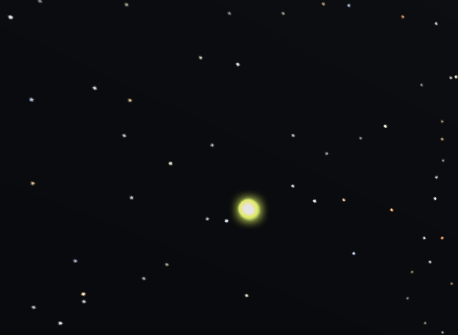
Fireflies are Crafty's first ambient NPC — tiny self-illuminating cubes that only appear at night, drift aimlessly a few blocks above the terrain, and fade away at sunrise. They are unusual in two ways: they have no state machine (just a continuous drift), and they are not spawned by chunk generation. Instead a dedicated swarm manager keeps a small population alive around the player and recycles instances as the player moves and as night falls and lifts.
Stateless Drift#
FireflyAI (crafty/game/components/firefly_ai.ts) has no FSM. Each firefly continuously drifts toward a randomly chosen wander point a few blocks away — in all three axes, staying in a band above the ground — and repicks the point on arrival or after a short timer:
private _pickTarget(): void {
  const angle = Math.random() * Math.PI * 2;
  const dist = 2 + Math.random() * 5;
  const tx = go.position.x + Math.cos(angle) * dist;
  const tz = go.position.z + Math.sin(angle) * dist;
  const ground = this._world.getTopBlockY(Math.floor(tx), Math.floor(tz), 200);
  const baseY = ground > 0 ? ground : go.position.y - 2;
  this._target.set(tx, baseY + 1.5 + Math.random() * 3.5, tz);
  this._timer = 1.5 + Math.random() * 3;
}
Movement is a normalized step toward the target — the same direct steering the ground NPCs use for wander, but applied in full 3D rather than just XZ:
const dist = Math.hypot(dx, dy, dz);
if (dist > 0.001) {
  const step = Math.min((0.9 * dt) / dist, 1);
  go.position.x += dx * step;
  go.position.y += dy * step;
  go.position.z += dz * step;
}
if (this._timer <= 0 || dist < 0.4) {
  this._pickTarget();
}
A slow tumble rotates the cube around a random fixed axis so the spark is never perfectly static:
this._spinAngle += this._spinRate * dt;
go.rotation = Quaternion.fromAxisAngle(this._spinAxis, this._spinAngle);
Glow Pulse#
In place of a head bob, the firefly animates the intensity of its PointLight. A sine pulse is multiplied by the owner's glow field — a 0–1 master fade the swarm manager drives across sunset and sunrise (§4.8) — so the light both flickers softly and fades in/out with the night:
this._pulse += dt * 3.0;
const pulse = 0.6 + 0.4 * Math.sin(this._pulse);
this._light.intensity = BASE_INTENSITY * go.glow * pulse;
Emissive Body + Point Light#
The Firefly entity (crafty/game/entities/firefly_entity.ts) owns three things: a tiny emissive cube MeshRenderer, a short-range PointLight, and the FireflyAI component. The cube's emissive factor is pushed well above 1 so it reads as a bright self-lit spark in the HDR pipeline (and blooms):
const GLOW_EMISSIVE: [number, number, number] = [3.4, 4.0, 1.0];
...
const mat = new PbrMaterial({
  albedo: [0.04, 0.05, 0.02, 1],
  emissiveFactor: GLOW_EMISSIVE,
  emissiveMap: Firefly._emissiveTex!,   // white 1×1 — lets the factor through
  roughness: 0.6,
});

const light = f.addComponent(new PointLight());
light.color = new Vec3(0.85, 1.0, 0.4);   // greenish-yellow
light.radius = 1.8;                        // a small pool of glow around the spark
light.castShadow = false;
The deferred GBuffer computes emission as emissiveMap.rgb × emissiveFactor, so a non-black emissive map is required for the factor to produce any glow at all — hence the white 1×1 texture. The cube is tiny (0.03 blocks) and its PointLight casts no shadow, giving each firefly a small local pool of greenish light without the cost of a shadow map.
Night-Only Swarm Management#
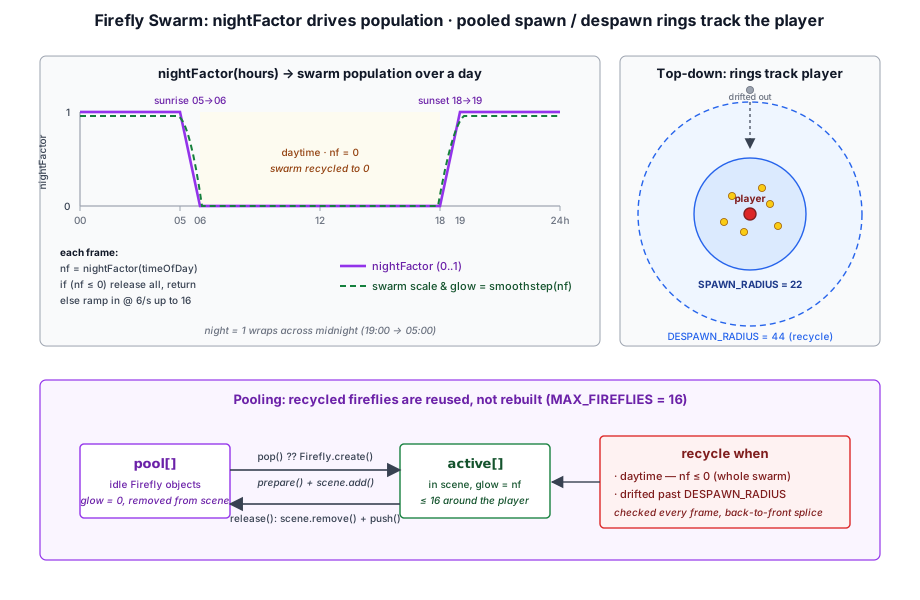
The swarm manager (crafty/game/firefly_spawner.ts) is what makes fireflies an ambient, time-of-day effect rather than a static mob. It computes a smooth nightFactor in [0, 1] — 0 during the day, 1 in full night, ramping over the hour around sunset (18:00→19:00) and sunrise (05:00→06:00):
function nightFactor(hours: number): number {
  const h = wrapHours(hours);
  if (h >= 19 || h < 5) {
    return 1;
  }
  if (h >= 18) {
    return h - 18;   // sunset ramp 18→0 .. 19→1
  }
  if (h < 6) {
    return 6 - h;    // sunrise ramp 5→1 .. 6→0
  }
  return 0;          // daytime
}
Each frame the manager recycles fireflies that the player has outrun or that should not exist by day, gradually populates the swarm near the player at a fixed ramp rate, then drives the per-firefly glow and scale from the night factor (smoothstepped) so the whole swarm fades in at dusk and out at dawn:
const nf = nightFactor(timeOfDay);

// Recycle by day, or once a firefly drifts past the despawn radius.
for (let i = active.length - 1; i >= 0; i--) {
  const f = active[i];
  const dx = f.position.x - px, dz = f.position.z - pz;
  if (nf <= 0 || dx * dx + dz * dz > DESPAWN_RADIUS * DESPAWN_RADIUS) {
    release(f);
    active.splice(i, 1);
  }
}
if (nf <= 0) { spawnAccum = 0; return; }

// Ramp the swarm in near the player.
spawnAccum += SPAWN_PER_SEC * dt;
while (active.length < MAX_FIREFLIES && spawnAccum >= 1) {
  spawnAccum -= 1;
  /* pick a point in the spawn ring, sample ground, reuse a pooled firefly */
}

// Sunset/sunrise fade: smoothstep the scale and drive the light glow.
const s = nf * nf * (3 - 2 * nf);
for (const f of active) {
  f.glow = nf;
  f.scale.set(s, s, s);
}
Pooling#
Because the swarm is constantly created and destroyed — every night, and continuously as the player walks — recycled fireflies are pushed onto a pool and reused rather than rebuilt. This avoids churning the GPU material and light buffers each time a firefly despawns:
const release = (f: Firefly): void => {
  scene.remove(f);
  f.glow = 0;
  pool.push(f);
};
...
const f = pool.pop() ?? Firefly.create(world);
f.prepare(sx, sy, sz);
scene.add(f);
active.push(f);Parameters#
| Property | Value |
|---|---|
| Behavior | Stateless 3D drift |
| Drift speed | 0.9 m/s |
| Wander distance | 2–7 blocks (3D) |
| Repick timer | 1.5–4.5 seconds (or on arrival) |
| Tumble rate | 0.4–1.2 rad/s (random fixed axis) |
| Glow pulse | 0.6 ± 0.4, base intensity 1.4 |
| Light | greenish-yellow, radius 1.8, no shadow |
| Max swarm size | 16 |
| Spawn radius | 22 blocks (ring around player) |
| Despawn radius | 44 blocks |
| Spawn ramp | 6 per second |
| Active window | Night only (fade over sunset/sunrise hour) |
| Gravity | No (free-floating) |
Cat and Kitten AI#
CatAI (crafty/game/components/cat_ai.ts) is Crafty's first friendly NPC — a passive land animal that idles and wanders like a pig, but is drawn toward the player when nearby and sits down once it reaches them. The same component drives both the full-size cat and the smaller kitten; the two entities (crafty/game/entities/cat_entity.ts) differ only in mesh scale and color, so a kitten behaves exactly like a cat.
| Property | Value |
|---|---|
| States | idle / wander / follow / sit |
| Wander speed | 1.3 m/s |
| Follow speed | 2.8 m/s |
| Attract radius | 10 blocks (enter follow) |
| Lose radius | 16 blocks (give up — hysteresis) |
| Sit radius | 1.4 blocks (enter sit) |
| Stand radius | 3.0 blocks (leave sit) |
| Sit pitch | 0.55 rad body tilt, lerped at 6×/s |
| Idle bob | 0.006 @ 2 Hz |
| Wander bob | 0.016 @ 7 Hz |
| Tail swish | ±0.5 rad @ 6 Hz moving, ±0.3 rad @ 3 Hz resting |
| Biome | GrassyPlains only (never on water — §4.10) |
| Spawn probability | 0.12 per column |
| Kitten litter | 50% chance of 3 kittens (scale 0.6) |
| Gravity | Yes |
Four-State Machine#
Idle → Wander. Identical in structure to the pig: a random timer drives aimless wandering at 1.3 m/s. Both states preemptively transition to follow the moment the player comes within the attract radius (10 blocks).
Follow. The cat trots toward the player at 2.8 m/s, facing them directly. It gives up and returns to idle if the player gets more than 16 blocks away (the gap between the 10-block attract radius and the 16-block lose radius is hysteresis, preventing flicker at the boundary). When the cat closes within the sit radius (1.4 blocks), it transitions to sit.
Sit. The cat stops moving, keeps turning to face the player, and tilts its body back into a seated pose. If the player walks beyond the stand radius (3.0 blocks), the cat stands up and resumes follow — so it will trail the player around, sitting whenever they pause and rising whenever they move on. The full follow and sit case bodies are shown in §4.2.
The Sit Pose#
Rather than a skeletal animation, the seated pose is a procedural body tilt. A _sit factor is lerped toward 1 while sitting and 0 otherwise, and the Cat.Body child is pitched backward about its local X axis by that fraction of SIT_PITCH. Because the lerp is frame-rate-independent (Math.min(1, dt * 6)), the cat eases smoothly into and out of the pose:
const sitTarget = this._state === 'sit' ? 1 : 0;
this._sit += (sitTarget - this._sit) * Math.min(1, dt * 6);
if (this._bodyGO) {
  this._bodyGO.rotation = Quaternion.fromAxisAngle(_X_AXIS, this._sit * SIT_PITCH);
}
The head bob is scaled by (1 - this._sit) so it fades out as the cat settles, while the tail keeps swishing in every state — brisk while moving, a slow content sway at rest:
if (this._headGO) {
  this._bobPhase += dt * (moving ? 7 : 2);
  const bobAmp = (moving ? 0.016 : 0.006) * (1 - this._sit);
  this._headGO.position.y = this._headBaseY + Math.sin(this._bobPhase) * bobAmp;
}
if (this._tailGO) {
  this._tailPhase += dt * (moving ? 6 : 3);
  const swishAmp = moving ? 0.5 : 0.3;
  this._tailGO.rotation = Quaternion.fromAxisAngle(_Z_AXIS, Math.sin(this._tailPhase) * swishAmp);
}Model#
The cat GameObject hierarchy is three procedurally-built boxes (crafty/game/assets/cat_mesh.ts), each a child node with its own MeshRenderer:
| Child | Mesh | Notes |
|---|---|---|
Cat.Body | Sleek body + four slim legs | Lifted CAT_BODY_LIFT × scale so the feet rest on the ground; pitched back for the sit pose |
Cat.Head | Head with two pointed ears + snout | Bobs while moving |
Cat.Tail | Slender box rising from a pivot at its base | Swishes side-to-side about its base |
The tail mesh extends upward from the origin so the Cat.Tail node, placed at the rear of the body, can rotate about its base to swish without drifting. The adult cat is ginger; the kitten is gray at 0.6× scale. The child node names are Cat.* for both entities, so the shared CatAI.onAttach() finds them regardless of which entity it is attached to.
Spawning#
Cats spawn during chunk generation with a 12% probability per GrassyPlains column. When a cat spawns, there is a 50% chance it brings a litter of three kittens scattered around it — each kitten runs its own CatAI, so the whole family is independently drawn to the player rather than rigidly following the parent (contrast the duckling's parent-follow in §4.4):
if (Math.random() < CAT_CHANCE) {
  const wx = Math.floor(baseX + Math.random() * CHUNK_SIZE);
  const wz = Math.floor(baseZ + Math.random() * CHUNK_SIZE);
  const parent = Cat.spawn(wx, wz, world, scene);
  if (parent && Math.random() < KITTEN_CHANCE) {
    for (let k = 0; k < KITTEN_COUNT; k++) {
      Kitten.spawn(parent, world, scene);
    }
  }
}
Like the other land animals, cats and kittens refuse to spawn on a water surface — see the next section.
Water Avoidance#
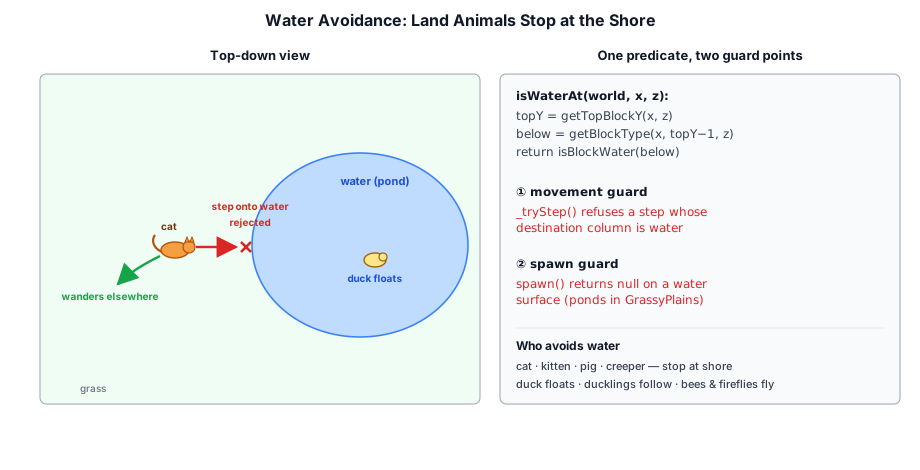
Ducks are amphibious and float on water (§4.3), but the other land animals — pigs, creepers, cats, and kittens — should stay on dry land: they neither walk onto water nor spawn on it. This is enforced by a single shared predicate and two guard points (movement and spawn).
Detecting a Water Surface#
isWaterAt() (crafty/game/terrain_query.ts) samples the top of a column and checks whether the block just beneath the surface is water — the same test the duck uses to decide when to float, factored out for reuse:
export function isWaterAt(world: BlockWorld, x: number, z: number): boolean {
  const topY = world.getTopBlockY(Math.floor(x), Math.floor(z), 200);
  if (topY <= 0) {
    return false;                 // ungenerated column — don't block movement
  }
  const below = world.getBlockType(Math.floor(x), Math.floor(topY - 1), Math.floor(z));
  return isBlockWater(below);
}
Returning false for columns with no terrain is deliberate: an animal near the edge of a not-yet-generated chunk keeps moving rather than freezing against an imaginary shoreline.
Guarding Movement#
Each walking AI moves by writing go.position.x/z directly. To block water, that write is wrapped in a _tryStep() helper that only commits the step if the destination column is dry, returning whether the move was taken:
private _tryStep(go: NPCEntity, nx: number, nz: number, speed: number, dt: number): boolean {
  const stepX = go.position.x + nx * speed * dt;
  const stepZ = go.position.z + nz * speed * dt;
  if (isWaterAt(this._world, stepX, stepZ)) {
    return false;                 // blocked by water — don't step
  }
  go.position.x = stepX;
  go.position.z = stepZ;
  return true;
}
The two movement modes respond to a blocked step differently:
- Wandering — a blocked step means the random target lies across water, so the animal abandons it (
_enterIdle()) and picks a fresh target on the next cycle, effectively turning back from the shore. - Following / chasing — the cat (or creeper) keeps facing the player but simply doesn't advance, so it waits at the water's edge and resumes the moment the player returns to land.
Guarding Spawns#
GrassyPlains columns can contain ponds and lakes, so the biome filter alone is not enough. Each land animal's spawn() adds an isWaterAt() guard after the existing ground and biome checks:
if (isWaterAt(world, wx, wz)) {
  return null;                    // never spawn on a pond or lake surface
}
Ducks and ducklings skip both guards (ducks float; ducklings follow their parent), and bees and fireflies skip them too — they fly, so being over water is harmless. The helper is also inert in the crafty_entity_viewer sample, whose MockWorld reports no water, so the demo animals roam freely.
Gravity and Ground Collision#
All NPC components share the same gravity and ground collision logic:
// Apply gravity
this._velY -= 9.8 * dt;
go.position.y += this._velY * dt;

// Sample ground height from the voxel world
const groundY = this._world.getTopBlockY(
  Math.floor(gx), Math.floor(gz), Math.ceil(go.position.y) + 4);

// Snap to ground if below surface
if (groundY > 0 && go.position.y <= groundY + 0.1) {
  go.position.y = groundY;
  this._velY = 0;
}
The +4 offset in getTopBlockY provides a search range above the NPC's current position, ensuring the function can find the ground even if the NPC fell through a hole. The small 0.1-unit tolerance prevents jittering when the NPC is exactly at ground level.
Ducks extend this with a water check — if the block directly below is BlockType.WATER, the duck floats at the water's surface instead of sinking.
Head Bob Animation#
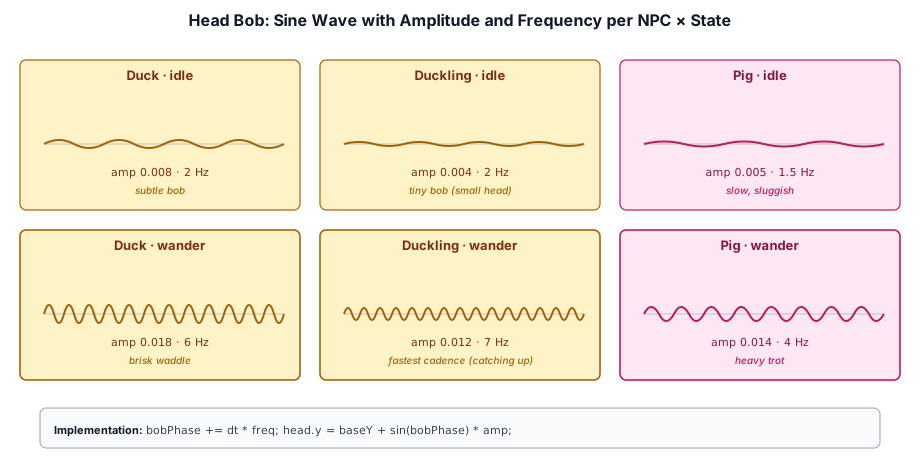
Each NPC model has a child GameObject for the head (e.g., Duck.Head, Pig.Head, Duckling.Head). The AI component finds this child in onAttach() and animates its local Y offset each frame:
onAttach(): void {
  for (const child of this.gameObject.children) {
    if (child.name === 'Duck.Head') {
      this._headGO = child;
      this._headBaseY = child.position.y;
      break;
    }
  }
}
The bob is a simple sine wave whose frequency and amplitude vary by state — faster and larger when the NPC is moving, slower and subtler when idle. This gives each NPC a distinctive gait without requiring skeletal animation.
Animated Models and Skeletal Animation#
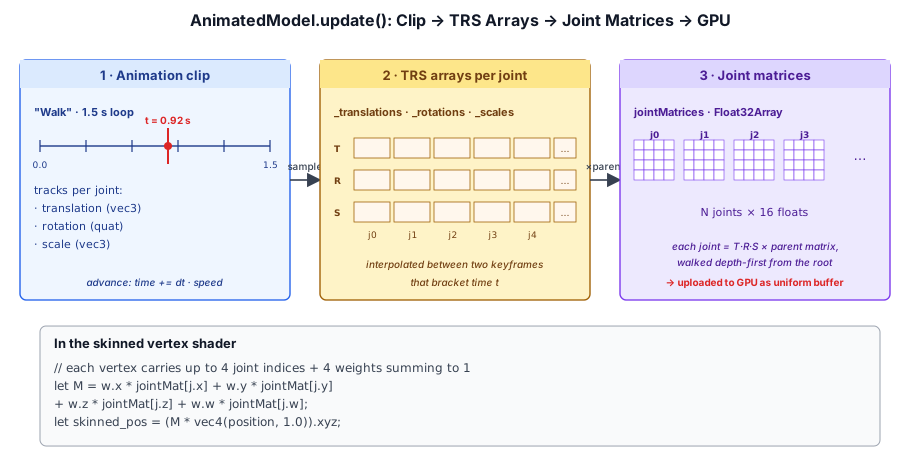
Beyond the simple head-bob NPCs, Crafty supports full skeletal animation via the AnimatedModel component (src/engine/components/animated_model.ts). This component plays GLTF animation clips on skinned meshes:
class AnimatedModel extends Component {
  readonly model: GltfModel;
  readonly skeleton: Skeleton;
  currentClip: string | null = null;
  speed: number = 1.0;
  loop: boolean = true;
  readonly jointMatrices: Float32Array;

  play(clipName: string, loop = true): void { /* ... */ }
  pause(): void { /* ... */ }
  resume(): void { /* ... */ }
  stop(): void { /* ... */ }
}
Each frame, AnimatedModel.update() advances the clip time, samples the animation at that time into per-joint TRS arrays, and recomputes the final joint matrices via the Skeleton:
update(dt: number): void {
  if (!this._clip || this._paused) return;
  this._time += dt * this.speed;
  if (this.loop) {
    this._time = this._time % this._clip.duration;
  }
  this._resetToPose();
  sampleClip(this._clip, this._time, this._translations, this._rotations, this._scales);
  this.skeleton.computeJointMatrices(this._translations, this._rotations, this._scales, this.jointMatrices);
}
The joint matrices are consumed by the skinned variant of the world geometry pass, which renders the animated mesh with GPU skinning. NPCs that need full-body animation (e.g. a character walking, waving, or performing actions) use AnimatedModel instead of the simple head-bob approach.
Mob Spawning Mechanics#
Rather than scanning the world periodically, Crafty spawns mobs as a side effect of chunk generation. The setupAnimalSpawning() function in crafty/game/animal_spawner.ts hooks into the World.onChunkAdded callback so every new chunk triggers a spawn attempt for its XZ column:
const prev = world.onChunkAdded;
world.onChunkAdded = (chunk, chunkMesh) => {
  prev?.(chunk, chunkMesh);          // preserve renderer callback
  if (chunk.aliveBlocks === 0) return;
  const key = `${cx}:${cz}`;
  if (processedColumns.has(key)) return;  // deduplicate
  processedColumns.add(key);
  _spawnInColumn(cx, cz, world, scene, meshes);
};
Column-Level Deduplication#
A chunk column covers all Y-layers for one XZ coordinate. Since Crafty generates terrain in vertical layers (chunks), the same column may trigger onChunkAdded multiple times as lower or higher layers load. The processedColumns set prevents animals from piling up:
cx:cz ──→ processedColumns Set ──→ skip if already seen
                                    add on first sight
                                    spawn all mob types once
This also covers world reload — the set is created fresh per setupAnimalSpawning() call, so re-entering the world re-rolls mob placement.
Spawn Conditions#
Each mob type has an independent spawn roll per column:
| Mob | Probability | Biome Filter | Size |
|---|---|---|---|
| Duck | 0.15 | GrassyPlains only | 1–2 adults + optional 5 ducklings |
| Pig | 0.20 | GrassyPlains only, not on water | 1–2 adults or babies (25% baby chance) |
| Bee | 0.10 | GrassyPlains only | Single (requires 3-block clearance) |
| Creeper | 0.01 | Any, not on water | Single |
| Cat | 0.12 | GrassyPlains only, not on water | 1 adult + optional 3 kittens (50% chance) |
Every spawn checks that the column has solid ground (getTopBlockY > 0). Ducks additionally check if the surface block is water — they can float on the surface or stand on solid ground — while the land animals (pig, creeper, cat, kitten) reject water columns outright via isWaterAt() (§4.10):
const topY = world.getTopBlockY(wx, wz, 200);
if (topY <= 0) {
  return null;                                       // no ground
}
const biome = world.getBiomeAt(wx, topY, wz);
if (biome !== BiomeType.GrassyPlains) {
  return null;                                       // biome filter
}
const blockBelow = world.getBlockType(Math.floor(wx), Math.floor(topY - 1), Math.floor(wz));
const spawnY = blockBelow === BlockType.WATER ? Math.floor(topY - 0.05) : topY;
Creepers have the loosest filter — any biome, 1% per column — making them a rare but universal threat.
Spawn Resolution#
The spawn functions construct GameObject hierarchies with MeshRenderer components and AI components attached, then add them to the scene. Group spawns (ducklings, baby pigs) are decided by a secondary probability roll:
// Ducks: 25% chance of 5 ducklings per spawned duck
const parent = Duck.spawn(wx, wz, world, scene);
if (parent && Math.random() < DUCKLING_CHANCE) {
  for (let d = 0; d < DUCKLING_COUNT; d++) {
    Duckling.spawn(parent, world, scene);
  }
}

// Pigs: 25% chance of baby instead of adult
Pig.spawn(wx, wz, world, scene, Math.random() < BABY_PIG_CHANCE);

// Cats: 50% chance of a litter of 3 kittens per spawned cat
const cat = Cat.spawn(wx, wz, world, scene);
if (cat && Math.random() < KITTEN_CHANCE) {
  for (let k = 0; k < KITTEN_COUNT; k++) {
    Kitten.spawn(cat, world, scene);
  }
}
Summary of Spawn Flow#
Chunk generated
  └─ onChunkAdded fires
       └─ aliveBlocks > 0?
            └─ Column already processed?
                  └─ _spawnInColumn()
                       ├─ DUCK_CHANCE  (0.15) → spawnDuck + optional ducklings
                       ├─ PIG_CHANCE   (0.20) → spawnPig (adult or baby)
                       ├─ BEE_CHANCE   (0.10) → spawnBee
                       ├─ CAT_CHANCE   (0.12) → spawnCat + optional kittens
                       └─ CREEPER_CHANCE (0.01) → spawnCreeper
Mob spawning is strictly a generation-time event — there is no respawn timer or despawn-on-distance system. Once spawned, NPCs persist in the scene until the world is unloaded.
Fireflies are the exception (§4.8). They are not tied to chunk generation at all: a per-frame swarm manager (crafty/game/firefly_spawner.ts) maintains a player-centric population that ramps in at dusk, is recycled as the player moves or as day breaks, and is pooled between nights. They are the only NPC with both a spawn-on-distance and a despawn-on-distance rule.
Extending the NPC System#
The component-based architecture makes it straightforward to add new NPC types:
- Define the NPC GameObject — create a
GameObjectwith aMeshRendererand optional child nodes. - Implement the AI component — extend
Componentwith a state machine, movement logic, and animation. - Register in the game loop — ensure
DuckAI.playerPos(or equivalent) is updated each frame.
Future NPC types could include:
- Villagers — diurnal cycle, trading, pathfinding to waypoints.
- Hostile mobs — chase, attack, patrol, and respawn behaviors.
- Fish — aquatic NPCs constrained to water volumes.
Each new type follows the same pattern: a state machine + Component.update() + World queries, with visual variety provided by different meshes, animations, and parameter tuning.
4.16 Summary#
The NPC AI system demonstrates several patterns:
- State machine design: Stateless (drift), single-state (follow), two-state (idle/wander), three-state (idle/wander/flee), and four-state variants — hostile (idle/wander/chase/detonate) and friendly (idle/wander/follow/sit)
- Implemented mobs: Duck (amphibious, 3 states), Duckling (follow parent), Pig (2 states), Creeper (4 states with explosion), Bee (flying, flower detection), Firefly (ambient night-only swarm), Cat & Kitten (player-seeking, sits on arrival)
- Visual variety: Head bobbing, wing animation, tail swish, procedural sit pose, emissive body + point light glow, skeletal animation via
AnimatedModel, mesh builders for each mob - Terrain awareness: A shared
isWaterAt()predicate keeps land animals off water at both the movement and spawn steps, while ducks float - Spawning: Integrated with chunk generation, column-level deduplication, biome filters, spawn probabilities, group litters — plus the firefly's player-centric, time-of-day swarm manager with pooling
Further reading:
crafty/game/components/duck_ai.ts— Duck AI (three-state + water float)crafty/game/components/duckling_ai.ts— Duckling AI (follow behavior)crafty/game/components/pig_ai.ts— Pig AI (two-state wandering)crafty/game/components/creeper_ai.ts— Creeper AI (four-state hostile + explosion)crafty/game/components/bee_ai.ts— Bee AI (three-state flying + flower hover)crafty/game/components/firefly_ai.ts— Firefly AI (stateless 3D drift + glow pulse)crafty/game/components/cat_ai.ts— Cat & Kitten AI (four-state player-seeking + sit pose)crafty/game/entities/cat_entity.ts— Cat and Kitten entities (shared AI, scaled mesh)crafty/game/entities/firefly_entity.ts— Firefly entity (emissive cube + point light, pooled)crafty/game/firefly_spawner.ts— Firefly swarm manager (night-only, player-centric, pooled)crafty/game/bee_spawning.ts— Bee spawn logic (biome filter + clearance check)crafty/game/terrain_query.ts—isWaterAt()shared water-surface predicatecrafty/game/assets/cat_mesh.ts— Cat body, head, and tail mesh builderscrafty/game/assets/bee_mesh.ts— Bee body, stripe, head, eye, and wing mesh builderssrc/engine/components/animated_model.ts— Skeletal animation playbacksrc/engine/components/— All component implementationssrc/engine/component.ts— BaseComponentclass