Now a standalone project. The explorer has moved out of the Taos samples into its own open source repository, Earth Explorer, built on the Taos engine code described here. The mesh (streamed-terrain) mode discussed below exists only in this historical write-up; the standalone project keeps the flat projections and the globe. File names refer to the sample as it was when it lived in this repository.
A world map that is alive. It shows sea-surface temperature, anomaly and ice back to 1981; waves, swell and wind-sea; coral heat stress and marine heatwaves; rainfall, air, skin and humidity fields; the surface radiation budget; species occurrences, tagged-animal tracks and fishing effort; true-color and geostationary imagery; radar, cyclones, wildfires, borders and cities. The data comes from real NOAA, NASA and partner feeds, streamed straight into the browser and played as a time-lapse.
You can view it in six flat projections, on a ray-marched relief globe, or on a streamed, draped terrain mesh you can fly over at treetop height. The map also answers questions about its data: click a point, draw a line or an area, compare two dates under one color scale, export any readout as CSV with a provenance header, or run a typed analysis program — written by hand, picked from a preset, or authored by an LLM from a plain-English question.
This chapter is the technical deep dive. It covers where each byte comes from, what happens to it, how it reaches the screen, and why each piece is shaped the way it is. The analysis engine has its own module reference and tutorial series, so here it appears only where it touches the explorer.
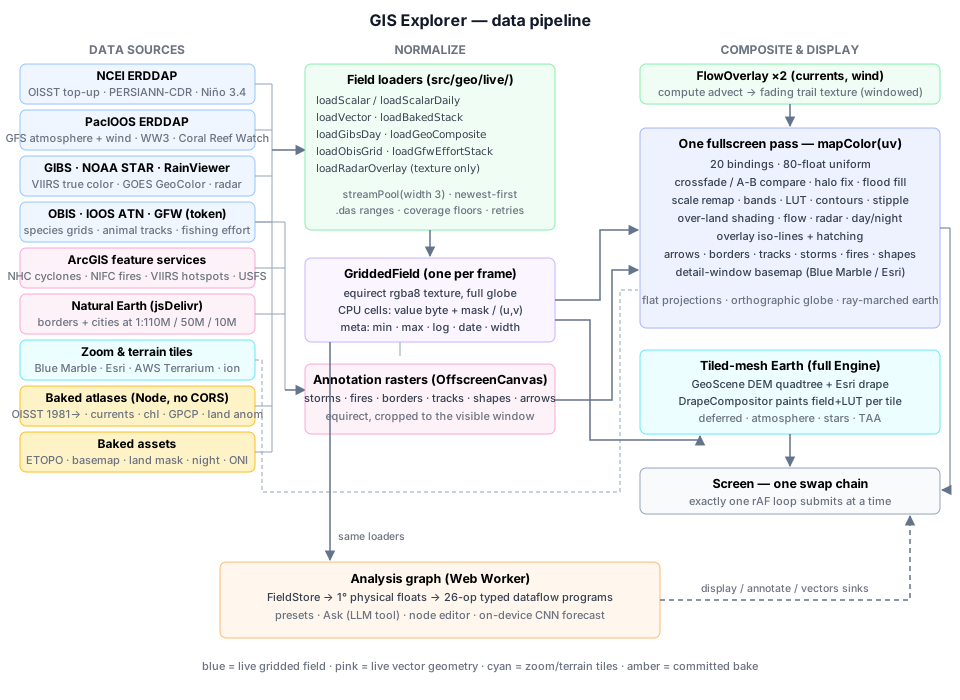
The sample is one ~8,000-line TypeScript file plus a handful of helpers:
| File | Role |
|---|---|
samples/geo_gis_explorer.ts | Layer table, loaders' orchestration, the WGSL display shader, every view mode, input, UI |
samples/geo_flow_overlay.ts | GPU particle trails for currents and wind |
samples/geo_projections.ts | CPU twins of the WGSL projections (tested in tests/samples/geo_projections.test.ts) |
samples/lib/geo_drape.ts | Paints the active data layer into terrain-tile imagery for the mesh mode |
samples/lib/geo_sky.ts | Curved-horizon atmosphere, aerial perspective and stars for the mesh mode |
samples/lib/geo_layer_info.ts | The ⓘ explanations and citations for every layer |
samples/lib/geo_reproduce_panel.ts | "Get this data": the exact request, xarray/R snippets, citation |
samples/lib/geo_import_panel.ts | "Your data": GeoJSON study areas and station-CSV match-ups |
samples/lib/analysis_panel.ts | Presets / Ask / Graph front ends to the analysis engine |
src/geo/live/ | One loader per feed, plus GriddedField, ENSO, sun, match-up and request-reproduction logic |
tools/geo/ | Node bake scripts for everything the browser cannot fetch itself |
The load-bearing decision: one sampling contract#
Every field-shaped thing the explorer shows is normalized into one shape: an equirectangular texture on a full −180..180° / +90..−90° grid, wrapped in GriddedField. Row 0 is north, column 0 is 180°W. That covers two dozen value layers, two particle overlays, radar, imagery, relief and city lights. Every downstream system is written once against that contract:
- One fullscreen fragment pass (
mapColor(uv)) composites the entire display. - Flat projections, the globe and the ray-marched earth differ only in how they produce a
uvper pixel (§6). - Particle overlays advect in uv space, so their trails work in every projection and on the globe with no re-projection (§8).
- Vector annotations (storms, fires, borders, drawn shapes) are rasterized into equirect textures and composited by uv (§9).
- The terrain-mesh mode paints the same field texture through the same colormap into tile imagery (§6.4).
- The analysis engine and every readout consume the CPU copy of the same cells (§10, §13).
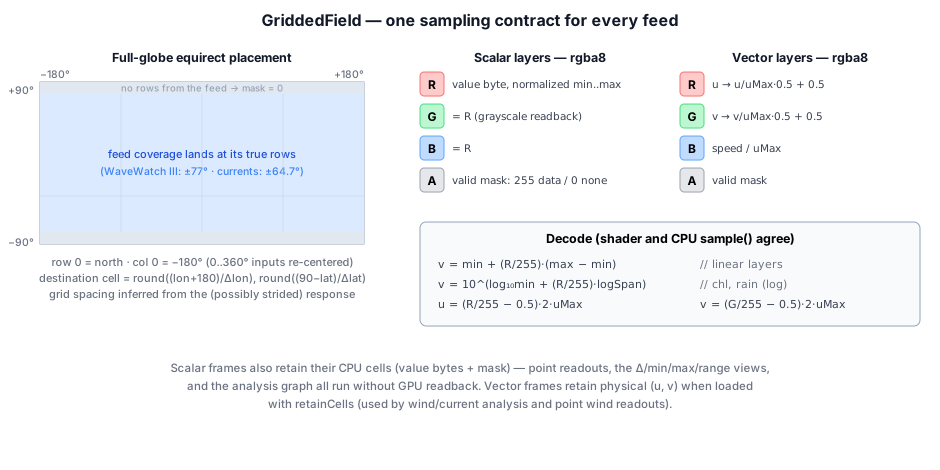
1.1 Full-globe placement#
ERDDAP answers a griddap .json request with a table of (time, [zlev,] lat, lon, value) rows. Feeds disagree on longitude convention (0..360 vs ±180), latitude order and coverage band. WaveWatch III stops at about ±77°, and the baked currents stop at ±64.7°. buildGrid infers the grid spacing from the unique sorted lats and lons in the (possibly strided) response, sizes a full-globe raster from it (width = round(360/dLon), height = round(180/dLat)), and drops every row at its true position. A partial feed lands where it belongs, and everything it did not cover stays mask = 0:
// gridded_field.ts — place one response row into the full-globe raster
const lon = raw >= 180 ? raw - 360 : raw;                                      // 0..360 → ±180
const lat = flipLat ? -r[iLat] : r[iLat];                                      // GFS archive fix, §2.4
const col = ((Math.round(((lon + 180) / 360) * width) % width) + width) % width;
const row = Math.min(height - 1, Math.max(0, Math.round(((90 - lat) / 180) * (height - 1))));
1.2 Encoding#
Scalar layers store one normalized byte per cell in R (duplicated into G and B), with the valid mask in A:
- Linear layers encode
byte = round(255·(v − min)/(max − min)). - Log layers (chlorophyll, rainfall, species counts, fishing hours) encode the same fraction of
log10. - The physical range and log flag live in
meta.
One decode function serves the shader and the CPU sample() alike:
decode(byte: number): number {
  const n = byte / 255;
  if (this.meta.isLog) {
    const l0 = Math.log10(this.meta.min);
    return Math.pow(10, l0 + n * (Math.log10(this.meta.max) - l0));
  }
  return this.meta.min + n * (this.meta.max - this.meta.min);
}
Vector layers (currents, wind) encode R = u/uMax·0.5+0.5, G the same for v, and B = speed/uMax. The B channel exists purely so the flow overlay can read speed with one fetch.
Derived fields (analysis results) are built by GriddedField.fromBytes. It accepts an optional per-cell flag and puts it in B, the one channel no value path samples. The flag means "this cell's estimate failed its significance test", and the shader draws a stipple over those cells (§5.5). The flag is zeroed outside the mask. That way, a bilinear fetch divided by alpha gives the fraction of flagged valid neighbors rather than bleeding across a no-data edge.
Scalar frames retain their CPU cells (values bytes plus mask). That is what powers hover values, point time series, transects, area means, the Δ/mean/min/max/range views, auto-fit scales, station match-ups and the whole analysis graph, all without a single GPU readback. Vector frames retain physical (u, v) floats when loaded with retainCells. stats() computes byte-level min/mean/max over valid cells once and caches it. An all-null grid returns NaN, and the explorer uses that to reject empty frames (§3.2).
1.3 Keyless and browser-direct where possible#
The NCEI and PacIOOS ERDDAP servers, NASA GIBS, NOAA STAR, RainViewer, OBIS, IOOS ERDDAP, the ArcGIS feature services and jsDelivr all send CORS headers. So nearly the whole sample runs with zero configuration and no server of its own. Two sources need credentials, and both ship with a working built-in default:
- Global Fishing Watch needs a token. A deliberately public one is compiled in, and
localStorage.taos_gfw_tokenoverrides it. - Cesium ion World Terrain is optional in the mesh mode and has a shared default token. The same
localStoragekeyplanet_exploreruses overrides it.
Feeds whose hosts send no CORS header at all are baked offline by Node scripts in tools/geo/ into committed PNG atlases:
- CoastWatch's OISST, currents and chlorophyll.
- NOAA PSL's GPCP and GHCN-CAMS.
- ETOPO relief.
- The ONI history.
The layers and their feeds#
2.1 The LAYERS table#
Every base layer is one BaseLayer record, and the whole UI — the grouped picker, the overlay picker, the legend, the ⓘ panel, the analysis catalog — is derived from that table. The fields that change behavior:
| Field | Meaning |
|---|---|
kind | oisst / live (ERDDAP stack), baked (atlas only), imagery (GIBS RGB), geo-live (GOES composite), obis, gfw |
source | a ScalarSource: servers, datasets (tried in order), variable, hasLevel, range, isLog, strideScale |
bakedStack | committed atlas prepended to the live stack |
overLand | the quantity exists over land (GFS, GPCP, land anomaly): draw data over the basemap |
sparse | the scale floor means "nothing here" (rain, heat stress, counts): render it as background, and don't flood-fill holes |
deltaRange | ± full-scale of the Δ view, in physical units |
overlayBands, overlayHatchAt | how the layer draws when it is the overlay (§5.6) |
fmt / fmtRel / fmtSpan | absolute, relative (signed, no °F offset), and span formatters |
A parallel ANALYSIS_META record gives each layer:
- its analysis unit, plus any conversion (K → °C, Pa → hPa, fraction → %, kg m⁻² s⁻¹ → mm/h);
- whether it is a relative quantity;
- a coverage floor (
start, YYYY-MM); - caveats.
The coverage floor is authoritative, and it exists because feeds advertise more time than they serve. PacIOOS's GFS aggregation claims 2022-12 onward, but its four radiation fluxes return all-null grids before about 2026-01. Clamping to the floor keeps the timeline, the calendar and the analysis store from offering empty months.
| Group | Layers | Source | Path into the browser |
|---|---|---|---|
| Ocean | SST, SST anomaly, sea ice | NOAA OISST v2.1 | 1° atlas 1981-09 → bake date, plus live NCEI ERDDAP top-up (native 0.25°) |
| Ocean | Chlorophyll-a | S-NPP VIIRS monthly (CoastWatch) | baked atlas, log10 over 0.02–20 mg/m³ |
| Coral & heat stress | Degree heating weeks, bleaching alert, marine-heatwave category | NOAA Coral Reef Watch 5 km | live PacIOOS ERDDAP, decimated ×10 (strideScale) |
| Waves | Total height, swell, wind-sea, peak period | NOAA WaveWatch III | live PacIOOS ERDDAP (2017-02 →) |
| Atmosphere | Rainfall rate, 2 m air temp, skin temp, humidity, sea-level pressure, 4 radiation fluxes | NOAA GFS | live PacIOOS ERDDAP (2022-12 →, +7-day forecast edge) |
| Atmosphere | Daily rainfall 1983 → | NOAA PERSIANN-CDR | live NCEI ERDDAP, ±60° |
| Atmosphere | Monthly rainfall 1979 → | GPCP v2.3 | baked atlas at native 2.5° |
| Atmosphere | Land temperature anomaly 1979 → | GHCN-CAMS | baked atlas, anomaly vs 1991–2020 |
| Life | Species occurrences | OBIS | live gridded endpoint (counts per cell) |
| Human activity | Apparent fishing effort | Global Fishing Watch | live vector tiles, one year → 12 monthly frames |
| Imagery | Satellite true color | NASA GIBS VIIRS | live 4326 WMTS tiles, 2012-01-19 → |
| Imagery | GOES live clouds | NOAA STAR GeoColor | live full disks, reprojected on the CPU |
The overlays and reference geometry that are not layers:
| Overlay | Source | Path |
|---|---|---|
| Surface currents (flow) | NOAA CoastWatch geostrophic (miamicurrents) | baked vector atlas, 2016-09 → |
| 10 m wind (flow) | NOAA GFS | live PacIOOS vector stack |
| Weather radar | RainViewer | live Mercator tiles, reprojected |
| Animal tracks | US IOOS Animal Telemetry Network | live IOOS ERDDAP tabledap, QARTOD-passed fixes |
| Tropical cyclones | NOAA/NWS NHC advisory feature service | live GeoJSON, six layers |
| Wildfires | NIFC/WFIGS + VIIRS hotspots + USFS forests | live GeoJSON, viewport-scoped |
| Borders, cities | Natural Earth | static GeoJSON via jsDelivr, three scales |
| Zoom detail | GIBS Blue Marble, Esri World Imagery | tile windows (§7) |
| Relief, basemap, land mask, night lights, ONI | ETOPO1, Solar System Scope, OISST | baked assets |
2.2 ERDDAP mechanics#
Every live gridded request has the same shape. GriddedField.loadScalar issues:
const q = `${src.variable}[${timeSel}]${src.hasLevel ? '[0]' : ''}[0:${stride}:last][0:${stride}:last]`;
// → `${server}/${dataset}.json?` + q, with only [ and ] percent-encoded
Details that matter:
- Fallback order. Servers form the outer loop and datasets the inner one; the first HTTP-ok answer wins.
- Routing by date.
sourceTimeRangereads each dataset's.dasonce and records itstime actual_rangeinDATASET_RANGES.routeByDatethen reorders a source's datasets so the one that covers the requested date is asked first. OISST splits its record across a finalized dataset (2020 → about two weeks ago) and a prelim one (the newest days), and without routing every historical fetch paid a 404 before falling back. - Caching. Dated requests use
cache: 'force-cache', because an archived day never changes.(last)uses'default'. - Nearest-index snapping. ERDDAP's
(time)selector snaps to the nearest index. A request past a feed's coverage silently returns an edge frame rather than failing. Loaders therefore dedupe by the returned date, and the analysis providers drop out-of-range frames. - Resolution. The explorer's
strideis 1 (native, the default), 2 or 4.strideFor(src, stride) = max(1, round(stride · strideScale))scales it per feed, so every live layer lands on a comparable cell count. Coral Reef Watch is 0.05° native (7200×3600, about 14 MB of JSON per frame), so itsstrideScale = 10puts it on a ~0.5° grid. PERSIANN uses 2. - Cost. One OISST day is about 282 KB at 1°, 1.1 MB at 0.5° and 4.4 MB at native 0.25°. The defaults — native grid, daily cadence — are deliberately the full-fidelity view. This is a data explorer, and a coarse default quietly answers questions with less than the data has. Both settings are in the gear menu.
2.3 OISST — the backbone (sst · anom · ice)#
The NCEI ERDDAP serves 0.25° daily OISST with CORS, but its aggregation only reaches back to 2020-02-28, and NCEI has dropped these datasets outright before (mid-2026). So the full record is committed:
bake_oisst_stack.mjspulls CoastWatch's fullncdcOisst21Agg_LonPM180aggregation in Node.- One request per date fetches all three variables at stride 4 (1°).
- It writes three atlases of 539 monthly frames each, 1981-09-01 → 2026-07-01, about 50 MB total. At 0.5° the anomaly atlas alone would be 87 MB, and the analysis ops and the forecaster work at 1° anyway.
- Fixed ranges: sst −2..34 °C, anom −5..5 °C, ice 0..1.
The live stream then only tops up dates newer than the bake. SINCE_YEAR = 1981 is the timeline start, because forty-five years is what makes a trend or a 30-year climatology mean anything — a decade of it is weather.
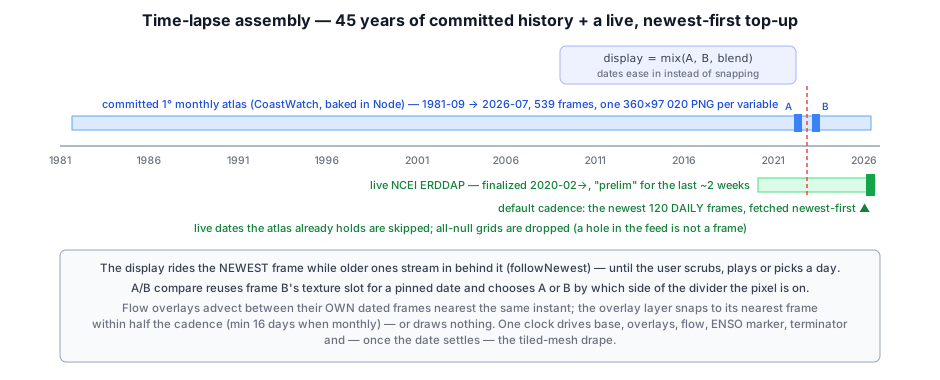
Atlas layout. A baked stack is one tall PNG per variable, with frame i in rows [i·H, (i+1)·H). A JSON sidecar carries {min, max, log?, uMax?, width, height, frames, dates[]}. loadBakedStack decodes it like this:
- It creates the image with
createImageBitmap(blob, {colorSpaceConversion: 'none'}). - It copies each kept frame into its own GPU texture with
copyExternalImageToTextureatorigin.y = i·H. - It reads the CPU bytes back through an OffscreenCanvas.
The readback has a trap. The 1° OISST atlas is 360 × 97,020 px, and a canvas past the browser's size limit does not throw — it reads back all zeros, which marks every cell invalid. So the CPU decode runs in slabs of floor(16384 / H) frames.
Atlases are baked monthly. The display cadence (4, 2 or 1 months) filters frames at load with everyMonths, keeping frame i when (monthOrd(date_i) − monthOrd(date_0)) % every == 0.
Fast first paint. Before any stack arrives, a baked single-day SST snapshot (sst_oisst.png, 720×360) is loaded as bootField. It claims the screen only if SST is still the active layer and nothing else has landed. A ?layer= deeplink races that fetch, and the snapshot must not squat on another layer's colormap.
2.4 GFS atmosphere — the latitude-flip probe and the sampling hour#
The PacIOOS ERDDAP aggregates NOAA GFS (ncep_global):
- rainfall rate;
- 2 m air temperature, skin temperature and humidity;
- sea-level pressure;
- four surface radiation fluxes;
- the 10 m wind vector.
The archive floor is about 2022-12, and the range's end is the +7-day forecast edge, so the calendar can pick a date a week in the future.
The flip probe. One upstream bug was found by staring at a Tibet warmer than the ocean: archived dates serve latitude-flipped grids, while current dates are labeled correctly. Before loading any GFS date, the explorer fetches two cells and asks a question whose answer does not depend on the season:
// The Tibetan plateau (30N/88E, ~4.7 km up) is colder than the subtropical ocean at its mirror
// point in EVERY season — if the cold end carries the −30 label, the grid is flipped.
const q = `tmp2m[(${timeISO})][(-30.0):120:(30.0)][(88.0)]`;
...
flipped = north - south > 2;   // Tibet must be the cold end (K)
The answer is cached per timestamp in gfsFlipCache and passed to the loader as flipLat. WaveWatch on the same server probes clean.
The sampling hour. GFS is 3-hourly, and the explorer's frames are daily, so it has to choose which instant represents a day. The default snapshot is 12:00 UTC, which is 06:00 in New Mexico, 13:00 in Nigeria and 21:00 in Japan. For diurnal fields that spread is larger than the geography: one high-desert cell reads 14 °C at 12 UTC and 46 °C six hours later.
The gear menu's daily max / min / mean switches to GriddedField.loadScalarDaily:
- It makes one range request per day,
(${date}T00:00:00Z):1:(${date}T21:00:00Z), which covers eight 3-hourly steps and costs about 8× the payload. - It reduces per cell on the CPU with a
Float64Arrayaccumulator and aUint16Arraycount. - The result is coherent worldwide, because every longitude passes local noon exactly once inside a UTC day.
This reduction is display-only. The analysis graph keeps reading the literal 12:00 UTC frame, because it has explicit timeReduce ops and a hidden reduction under an op called layer would be a trap. The legend title carries · daily max so a screenshot says which one it is.
Because GFS layers cover land, they are overLand and draw over the basemap (§5.4). Rain is sparse, so values at the scale floor render as background instead of smearing the colormap's bottom color across the planet.
2.5 Coral Reef Watch, WaveWatch, PERSIANN#
- Coral Reef Watch (
dhw_5kmfor degree heating weeks and bleaching alert level,mhw_5kmfor marine-heatwave category):- The 1985 record start predates every other live feed. The explorer floors it at 2016, and the heatwave product at 2024-07.
- All three are ocean-only and
sparse. Their floor means "no stress", and CRW masks every sea-ice cell, so the coastal flood fill (§5.3) is disabled for them. An 8-direction search across a genuine hole would invent star-shaped spikes of heat stress.
- WaveWatch III (
ww3_global): total significant height and period (Thgt,Tper) plus the swell (shgt) and wind-sea (whgt) split. There is no coverage poleward of ±77°; that band stays masked and renders as a deep "no coverage" tone. - PERSIANN-CDR on NCEI: satellite daily rainfall totals back to 1983. It is the only precipitation record whose daily data spans decades, though only ±60°.
2.6 The long monthly climate records#
Daily PERSIANN is far too heavy to average over decades in a browser, and GFS starts in 2022. ENSO work — regressing rainfall or temperature on the Niño index over ~45 winters — needs long monthly records. bake_climate_stacks.mjs reads NOAA PSL THREDDS OPeNDAP in Node, parsing the binary .dods response directly (big-endian XDR float32; ASCII would be ~10× the bytes):
- GPCP v2.3 precipitation, 1979-01 →, 570 frames. It stays on its native 2.5° grid (144×72), only reordered north-first and rotated to start at −180°. It is encoded log10 over 0.05–40 mm/day, because a linear 8-bit ramp flattens every desert to zero.
- GHCN-CAMS land 2 m temperature, 1979-01 →, 572 frames:
- Block-averaged 0.5° → 1°.
- Converted to an anomaly against a per-cell, per-calendar-month 1991–2020 climatology; a cell needs ≥ 24 of 30 baseline years.
- Encoded linearly over ±10 °C, about 0.08 °C per step.
- An absolute 8-bit ramp over −50..40 °C would be 0.35 °C per step — the size of the ENSO signal itself.
The layer's caveat notes that the SST anomaly uses a 1971–2000 baseline, so the two anomaly layers are offset by recent warming.
2.7 Currents and chlorophyll#
bake_currents.mjssamples CoastWatch'smiamicurrentsgeostrophic analysis (0.2°, ±64.7°) at stride 4:- 0.8° grid, 450×225.
- 30 frames every 4 months from 2016-09.
- Vector encoding with
uMax = 2.5 m/s.
bake_chlorophyll.mjssamples the S-NPP VIIRS science-quality monthly product at stride 16:- 0.6° grid, 600×300.
- 32 frames from 2016.
- log10 over 0.02–20 mg/m³.
- Two passes fill small holes with the mean of ≥ 3 valid neighbors; large cloud decks and polar night stay masked.
- It sends a custom User-Agent, because CoastWatch's firewall 403s Node's default one on that dataset.
2.8 Life: OBIS and ATN#
OBIS species occurrences are one layer with the species as a parameter rather than twelve near-identical layers, so one info entry and one citation cover every species. loadObisGrid calls api.obis.org/v3/occurrence/grid/{precision}?scientificname=…:
- Precision 3 (about 1.4°) is the default;
?obisgrid=1..4changes it. - The response is a GeoJSON cell grid carrying record counts.
- Each cell's lon/lat box is painted into a 1440×720 raster on a log scale (1 → the largest count).
- The picker offers twelve species — whales, sharks, commercial fish, loggerhead turtles — but any name OBIS indexes works via
?species=.
The ⓘ text is blunt that occurrence counts measure sampling effort as much as abundance.
ATN tracks (loadAtnTracks) read IOOS ERDDAP's atn_cacheFromUrl_collection tabledap as CSV, filtered server-side to qartod_rollup_flag=1 (QC-passed). Fixes are grouped by deployment and sorted by time. A track is split wherever consecutive fixes are more than 30 days apart or imply more than 12 km/h (a bad fix, not a fast animal), and runs shorter than 4 points are dropped. Each deployment gets its own hue (i·47 mod 360), a white dot marks where it started, and the result is rasterized into the annotation window (§9).
2.9 Human activity: Global Fishing Watch#
Apparent fishing effort comes from GFW's 4Wings heatmap API as Mapbox Vector Tiles. loadGfwEffortStack(year, zoom 2) works like this:
- It fetches all 16 tiles at z2 with
interval=MONTHand decodes them with the repo's own MVT decoder. - Each feature's numeric properties are month buckets (
bucket = year·12 + month−1), so one request per tile carries all twelve months. A scrubbable year costs exactly what one annual snapshot would. - Features are painted into a 1440×720 raster per month. Overlaps keep the max, not the sum, because one Mercator cell covers many raster cells and summing would multiply its hours by its footprint.
- All months share one log scale (1 h → peak).
- Stacks are cached forever in the loader. The explorer marks those frames
shared: trueso a layer switch never destroys textures the cache still hands out (the analysis store'ssharedFramesis the same contract). - The year defaults to the last complete one;
?year=overrides it.
2.10 Imagery: GIBS, GOES, radar#
GIBS serves pre-rendered EPSG:4326 WMTS tiles, so a global true-color day is "just" a mosaic. The catch is that the 4326 TileMatrixSet is not a power-of-two pyramid:
- Level 0 is 0.5625°/px, so a 512-px tile spans 288°, and the world occupies only the top-left of the tile grid.
- At level L the world is
640·2^L × 320·2^Lpx.loadGibsDayuses level 2 (2560×1280 from 15 tiles), fetches the ceiling number of tiles into an OffscreenCanvas, and crops to exactly 360°×180°. - Failed tiles leave alpha-0 holes, which the shader fills with a dimmed basemap.
- Imagery frames are RGB as rendered by NASA, not value fields: the imagery flag (
u.p0.w) bypasses the colormap, and imagery has no CPU cells, so no views, readouts or analysis. - VIIRS lags about a day, so the newest frame and the calendar's max are the day before yesterday.
GOES GeoColor is harder. NOAA STAR publishes each satellite's full disk (GOES-19 East at 75.2°W, GOES-18 West at 137.0°W) as a 1808² JPEG in the ABI fixed grid — a perspective "geos" projection of scan angles. loadGeoComposite walks every pixel of a 2048×1024 equirect target (about 2M pixels, CPU, one-off per load) and does the following:
- Orders the satellites nearest sub-longitude first, once per column.
- Inverse-projects the pixel into scan angles.
- Rejects anything beyond 97% of the disk radius (the smeared limb).
- Bilinearly samples the JPEG.
// geostationary.ts — geodetic lon/lat → GOES scan angles, GRS80 ellipsoid
const latC = Math.atan(((R_POL * R_POL) / (R_EQ * R_EQ)) * Math.tan(lat));   // geocentric latitude
const rc   = R_POL / Math.sqrt(1 - E2 * Math.cos(latC) * Math.cos(latC));
const sx = H_ORBIT - rc * Math.cos(latC) * Math.cos(dLon);
const sy = -rc * Math.cos(latC) * Math.sin(dLon);
const sz = rc * Math.sin(latC);
if (H_ORBIT * (H_ORBIT - sx) < sy*sy + ((R_EQ*R_EQ)/(R_POL*R_POL))*sz*sz) {
  return null;                       // beyond the limb — not visible
}
return { x: Math.asin(-sy / Math.hypot(sx, sy, sz)), y: Math.atan2(sz, sx) };
Coverage runs from about 155°E eastward to 15°E. The Asia/Indian Ocean gap stays alpha-0 and shows as dim basemap.
RainViewer radar is the latest past frame of a rolling global composite. loadRadarOverlay builds it in three steps:
- Mosaics the 16 zoom-2 Web-Mercator tiles (1024²).
- Reprojects to a 2048×1024 equirect texture on the CPU, one row at a time. It uses nearest-neighbor sampling, and rows beyond ±85° are skipped.
- Hands back a plain texture (not a
GriddedField— it is never analyzed).
The shader alpha-blends it over the data (mix(col, radar.rgb, radar.a · 0.85)). Coverage is land radar networks only.
2.11 Tropical cyclones: the one feed whose point is a forecast#
Every other live source is a grid of numbers the shader colors. A hurricane is not that. What forecasters issue, and what people act on, is a handful of vector features:
- where the center has been;
- where it is projected to go;
- how wide the uncertainty is;
- which coastline is under a warning.
So cyclones.ts returns paths and polygons, and the overlay rasterizes them into the windowed annotation canvas (§9).
Six queries go to NOAA's advisory feature service on ArcGIS: observed positions, observed track, forecast positions, forecast track, error cone, and watches/warnings. That service is keyless, CORS-open and republished from NHC's six-hourly shapefiles. NHC's own CurrentStorms.json sends no CORS header, and the wind-radii and swath layers are skipped because at this scale they turn the cone into mud.
- Failure handling. Each query is independent (
Promise.allSettled), and a failure is swallowed: a storm with a track but no cone still draws, because a dead layer during a landfall must not blank the map. If nothing answers, the call throws, so "no layers responded" and "no active storms" never look the same. - Refresh. Advisories come at most every three hours, so a re-toggle inside five minutes reuses the package. After that it refetches, because a stale package during a landfall is exactly the wrong thing to cache forever.
- Draw order follows the advisory graphic:
- The cone, filled, since the center is about equally likely to pass anywhere inside it and an outline gets misread as the edge of the storm.
- The coastal alerts, in NHC's own colors: hurricane warning red, watch pink, tropical-storm warning blue, watch yellow.
- The past track, with one dot per six-hourly fix colored by the Saffir-Simpson intensity at that fix. This turns the line into an intensity history, which shows whether the storm is winding up or falling apart as it arrives.
- The forecast line, dashed so it never reads as fact.
- Forecast points with
Sun 18Z · 95 ktlabels, spaced by screen distance (≥ 110 px) rather than by index, since how far apart twelve forecast hours land depends on zoom, not on the advisory. - The current position, largest, with name, class and wind.
The overlay always shows the latest advisory and deliberately does not follow the time slider. The status strip summarizes each storm's class, wind, pressure, motion and advisory time.
2.12 Wildfires: three feeds, three questions#
wildfire.ts draws on three sources that are easy to mistake for one:
- Perimeters (NIFC/WFIGS) show where a fire has burned as last mapped. They are authoritative but hours to days stale, because someone has to fly or walk the edge. They are national in one small request.
- Incident records give what is known now: acreage, containment, cause, crew. Their reported
DiscoveryAcrescan be off by orders of magnitude, so an incident's acreage is taken from its mapped polygon, joined by IRWIN id, whenever one exists. - VIIRS thermal hotspots show where satellites saw heat in the last 24 h. This is the only near-real-time signal, and the one that shows which side of a fire is running. The archive holds about 1.8M detections, about 200k per day. So the query is viewport-bounded, ordered by fire radiative power, and capped at 3,000: when the cap bites, what survives is the biggest heat.
USDA Forest Service national-forest boundaries go underneath as context. They are fetched only once the view is regional (du < 0.35), with maxAllowableOffset scaled to the view so the generalization happens upstream. The Santa Fe National Forest is 1.7M acres of very crinkly edge, and full fidelity costs megabytes to draw a two-pixel line.
Rasterization choices:
- Forests: a wash and a hairline, because they are the ground, not the subject.
- Hotspots: color by FRP. Age is shown as fade, not color, because color already means intensity and a stale detection should look like weaker evidence, not a cooler fire.
- Perimeters: filled and cased. Prescribed burns are blue.
- Incidents: drawn last, biggest first, with two acreage floors that widen with the window. At national scale, a dot needs 5,000 acres and a label 100,000. Without them a national view is 500 overlapping dots and a wall of names. Labels pass through a screen-space collision placer, so what survives a crowded view is what matters.
Pans refetch only the viewport-scoped pieces:
- The bbox key is rounded to 0.1°.
- A fetch in flight defers the next one via
firePendingrather than dropping it. That is the normal case at startup, where the deeplink kick runs against the world window and the real one arrives a moment later. - Only a successful fetch claims the viewport, so a failure retries.
2.13 Reference geometry: a ladder, not a layer#
Borders and city labels are on by default: reference geometry is the frame the rest of the map is read against, and a few hundred KB is a small price. ?borders=0 / ?cities=0 opt out. This is the one overlay whose data changes with zoom rather than just its rasterization. Natural Earth ships the same borders generalized by cartographers at 1:110M, 1:50M and 1:10M, and admin_places.ts picks by zoom: detailForZoom returns 10m at zoom ≥ 12, 50m at ≥ 3, otherwise 110m. Levels are cached forever, so only the first visit to a scale pays and zooming back out is a redraw. State lines at 10m fall back to the 50m file, because the 10m one exceeds jsDelivr's 20 MB limit.
International borders are cased and solid. State lines are thinner and dashed, and drawn first, so a state line never competes with a national border.
City labels are thinned by Natural Earth's own scalerank, its editorial judgment of which cities earn a label at which scale: placeRankForZoom = clamp(round(log2(zoom)) + 1, 1, 10), one rank per doubling of zoom. Labels then pass the screen-space collision placer. Ranking by raw population instead would put every Chinese prefecture city on a world map and drop Reykjavík. Capitals get gold, and populations appear only once the view is regional.
2.14 The ONI record#
The ENSO panel needs monthly resolution, denser than a coarse map cadence, so it has its own record:
bake_enso.mjsproduces a 10 KB baked file of monthly Niño 3.4 box means, 1981-09 → (538 months). It samples every 4th cell and every 5th day of the CoastWatch OISST anomaly.fetchNino34Liveextends it to today browser-direct from NCEI, fetching only that box.enso.tscomputes the ONI as the centered 3-month running mean (a month gap breaks the window) and classifies events by the CPC rule: ±0.5 °C for ≥ 5 consecutive overlapping seasons.- Strength labels are weak, moderate (≥ 1.0), strong (≥ 1.5) and very strong (≥ 2.0).
It is OISST v2.1 against its 1971–2000 baseline, not the official ERSSTv5 ONI, and agrees with it to about 0.1 °C.
2.15 Static assets#
- Basemap,
bake_basemap.mjsfrom Solar System Scope 8k imagery (CC BY 4.0): day color 4096×2048 with a land mask in alpha; night lights 2048×1024. - Land mask at 8192×4096 (about 2.4 km/texel against the basemap's 10 km). The coastline comes from this, not from the basemap alpha. That is the difference between data that stops at the shore and data that bleeds a visible band inland, and as a two-valued image it costs 0.4 MB.
- ETOPO1 relief at 0.25° (1441×721), packed 16-bit across two channels (
R= high byte,G= low byte) over −11,000..9,000 m.
Time#
3.1 Stacks and streaming#
A temporal layer loads into absFrames, a date-sorted list of {date, field, shared?}. loadLayer assembles it in this order:
- The baked atlas, if any.
sourceTimeRangefor the live datasets, clamped to the layer's coverage floor.sampledDates(range, SINCE_YEAR, stepMonths), minus any date the atlas already holds.- The remaining dates streamed through
streamPool(dates, 3, …), a width-3 worker pool. ERDDAP handles a few concurrent fetches fine, and one slow response no longer stalls the stream.
Newest first. The date list is chronological, because the calendar bounds, the "already have it" filter and the status line read it that way. Only the fetch order is reversed, so the first frame on screen is today's and the record fills in behind it. As older frames arrive they insert before the displayed one, which moves its index. followNewest re-pins the display to the newest frame on every arrival until the user acts — scrubs, plays, picks a day, or follows a ?date link. After that, a late arrival never yanks the view back.
Cadence. Whole-number steps (4, 2, 1 months) walk calendar months since 1981. Fractional steps are sub-monthly (0.5 ≈ 2 weeks, 0.25 ≈ weekly, 0.033 ≈ daily). Those walk days backwards from the newest data and are bounded by MAX_SUBMONTHLY_FRAMES = 120, because a fine cadence is for watching a storm, a bloom or a heat event evolve, not for scrolling forty years a day at a time. At the default daily cadence an SST stack is therefore mixed: 539 monthly baked frames followed by up to 120 daily live frames. The by-year chart accounts for that (§10.3).
When the feed is down. NCEI sometimes answers "unknown datasetID" for hours. The baked stack alone then gives the full committed timeline, views and date deeplinks, and the live range is retried with exponential backoff (30 s doubling to 5 min). The newer dates arrive once the feed is back, with no reload. A layer change (loadGen) ends the retries.
3.2 Guarding frame quality#
- All-null grids are holes, not frames. ERDDAP answers 200 with every cell null for dates a variable does not actually cover. Kept, such a frame blanks the map mid-playback and poisons the Δ/min/max views. In the analysis store it becomes an ice extent of exactly 0.00 million km², indistinguishable from an ice-free Arctic. Every loader checks
Number.isFinite(f.stats().mean)and destroys empties. - Generation counters.
loadGen,pickGen,overGenandatnGenguard every async path: a result that arrives for a superseded request is destroyed rather than displayed. - Destroy order.
clearFields()drops every reference —currentField,nextField, the cached bind group — before destroying textures. Otherwise the nextqueue.submitcan reach a destroyed texture.
3.3 Playback and crossfade#
Playback is paused by default; the map opens on the newest frame, and Space, ▶ or ?play starts it. advanceTimeLapse(dt) steps idx every interval seconds (the speed slider, 0.15–2 s per frame). It is shared by both render paths, so the date cannot advance in only one of them.
While playing, the shader crossfades between the current frame and the next:
let sA = textureSampleLevel(fieldTex, samp, uv, 0.0);
let sB = textureSampleLevel(fieldNxt, samp, uv, 0.0);
let s  = mix(sA, sB, blend);          // blend = fractional progress through the interval
A scrub, a picked day or a single-frame layer shows its exact field (blend = 0).
Picked days. The ⚙ "go to day" calendar fetches any date the live feed covers on demand into pickedField. That field is held apart from the stack and forces the absolute view, since a picked day is never a derived field.
3.4 Season filter#
?season=djf|mam|jja|son|1..12 restricts the stack to some months of the year. Everything that reads the stack goes through seasonFrames(): the time-lapse, the mean/min/max/range reductions, the point and area charts, the auto-fit. So "the map is showing summers" means the same thing in all of them. The season goes into the legend title as well as the control, because a mean over summers and a mean over everything look alike, and the legend is what survives into a screenshot. Station match-ups are the deliberate exception: they collocate to each station's own date, and filtering the record there would report a miss for a sample the product covers perfectly well.
3.5 Derived views#
The view picker turns the stack into analysis products, computed on the CPU from retained cells onto a fixed 720×360 grid:
| View | Output | Notes |
|---|---|---|
| Δ vs N years earlier | one frame per date with a partner ~N years back (±62 days) | stays animatable; balance colormap over ±deltaRange; N from ?dyr=1..5 |
| Mean / Min / Max over years | one static frame | labeled with the year span |
| Seasonal range | max − min per cell | needs ≥ 2 samples; viridis over half the layer span |
A range picked for one view is meaningless on the next (an anomaly is ±3, the absolute field −2..34), so the scale override resets on an actual view change — but not at boot, where it would throw away a range that arrived in a share link.
3.6 A/B compare#
?cmp=YYYY-MM-DD (or ⚙ → compare) pins a second date on the left of a swipe divider. The implementation reuses the crossfade's second texture slot. Instead of easing between frames, the shader takes one or the other by which side of the divider the pixel is on:
var blend = u.p0.z;
if (u.cmp.x > 0.5) {
  blend = select(0.0, 1.0, fp.x > u.cmp.y);   // fp = fragment position in pixels
}
Two dates then share one projection, one color scale and one set of coastlines, which is the only way a difference of a degree or two can be judged by eye. Flipping between two screenshots cannot do it; the eye has no memory for absolute color.
- The seam. It is drawn over everything as a bright 1-px line with a dark shoulder. Without a visible seam the two halves read as one map, and the eye stitches the discontinuity into a real feature.
- Steering. On desktop the divider follows the cursor. On touch it becomes a handle you drag.
- Snapping. The UI reports which frame the typed date actually snapped to (
↔ 2016-01-01), since frames are monthly at best.
The display shader at a glance#
The fullscreen pass is one WGSL module embedded in the sample (SHADER). The vertex shader emits a single oversized triangle. The fragment shader has three parts:
fs()maps the pixel to a uv in the active mode.mapColor(uv, wuv, fp)composites everything.- A short post block adds the relief hillshade and the compare seam.
mapColor is called unconditionally from fs so its derivatives are legal everywhere.
Bindings — one bind group, 20 entries. Every optional texture defaults to a 1×1 transparent (or black) placeholder, so the layout never changes:
| # | Resource | # | Resource |
|---|---|---|---|
| 0 | uniforms (80 floats) | 10 | night lights |
| 1 | field A (current frame) | 11 | analysis arrows |
| 2 | colormap LUT (256×1) | 12 | detail window (Blue Marble / Esri) |
| 3 | sampler (linear, U repeat, V clamp) | 13 | overlay layer field |
| 4 | basemap (rgb) + land mask (a) | 14 | overlay LUT |
| 5 | currents trails | 15 | drawn geometry |
| 6 | wind trails | 16 | ATN tracks |
| 7 | field B (next frame / compare) | 17 | cyclones |
| 8 | ETOPO (16-bit packed) | 18 | wildfires |
| 9 | radar | 19 | borders + cities |
Rebinding without churn. The bind group is rebuilt only when a string key changes. The key covers both frame dates, the layer, the overlay field's date, and a generation counter per rasterized overlay (analysisVecGen, detailGen, geomGen, trackGen, stormGen, fireGen, adminGen). A re-rasterization bumps its counter and the next frame swaps in the new view. Lazily loaded textures (night lights, radar, the real ETOPO map) reset bgKey = '' when they arrive.
Uniforms — twenty vec4s, filled from a Float32Array(80) each frame:
| vec4 | Contents |
|---|---|
p0 | resolution, frame blend, imagery flag |
p1 | contour band count, contours on, mode (0 flat / 1 globe / 2 earth), field width |
pad | relief exaggeration, overLand, sparse, over-land data opacity |
bg | background rgb, sun on |
rot | globe yaw, tilt, subsolar lon, lat (rad) |
ov | currents, wind, Niño box, radar toggles |
view | flat view center u, v, zoom, projection index |
win0 | detail-window rect u0, v0, 1/du, 1/dv |
lin0, lin1 | deep-zoom linearization: center uv (hi + lo), Jacobian (§6.1) |
lay2 | overlay: iso-line count, hatch threshold, hatch on, strength |
cam0..cam3 | ray-marched earth camera: eye + tan(fov/2), forward, right, up |
sig | significance stipple: on, dot pitch, radius, darkening |
ovw | annotation window rect |
scl | display-range remap: offset, 1/width, discrete levels |
cmp | compare on, divider x (px) |
flw | particle-trail window rect |
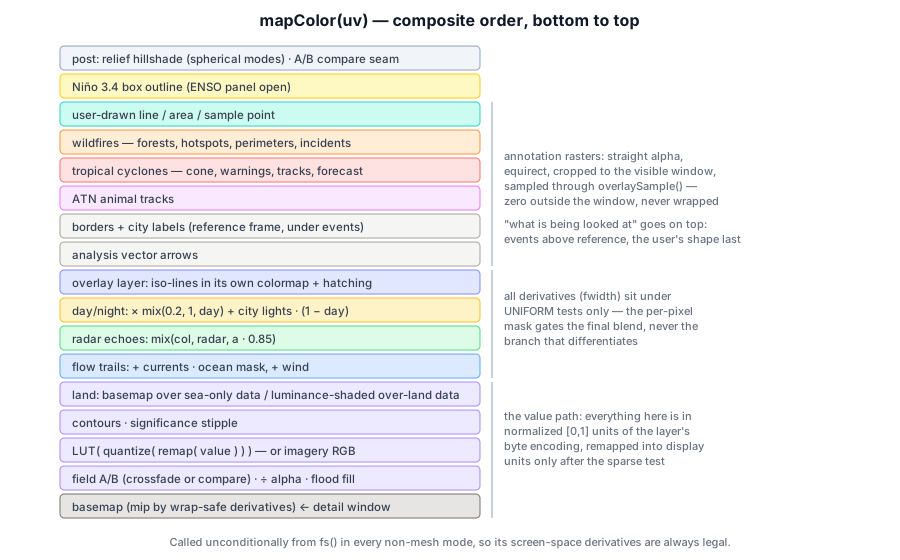
The composite, layer by layer#
5.1 Basemap and wrap-safe mip selection#
The basemap picks its mip level from uv derivatives. But uv.x jumps 0↔1 at the ±180° seam, which the polar and pseudocylindrical projections put in the middle of the screen. The symptom is a one-pixel column blasted to the smallest mip. The fix is to also measure the derivative of the half-rotated coordinate and take the smaller:
let ux2 = fract(uv.x + 0.5);
let du = vec2<f32>(min(abs(dpdx(uv.x)), abs(dpdx(ux2))), dpdx(uv.y));
let dv = vec2<f32>(min(abs(dpdy(uv.x)), abs(dpdy(ux2))), dpdy(uv.y));
let lod = max(0.0, 0.5 * log2(max(dot(du, du), dot(dv, dv)) * 2048.0 * 2048.0));
The Niño-box outline uses the same trick for its line width.
Where the streamed detail window covers the view (§7.1), its color replaces the basemap's. Alpha-0 texels are tile-fetch holes and keep the global fallback. The land mask and every data path stay on the global textures, so the window is purely cosmetic sharpening.
5.2 The value path and the halo fix#
For imagery layers the field is the color, and uncovered pixels fall back to basemap × 0.35. For value layers:
var val = s.r / max(s.a, 0.25);
var hasData = s.a >= 0.5;
Masked cells store value 0, so a plain bilinear fetch bleeds 0 into valid neighbors and rings every coast and cloud hole with a dark halo. But the sampled value is effectively premultiplied by the sampled mask, so dividing by alpha recovers the coverage-weighted mean of the valid neighbors.
5.3 Coastal flood fill#
The data grid (0.25–1°) is coarser than the land mask, so a fringe of ocean pixels has no data cell where the basemap already says "water". Shown as-is, that ring reads as dark water. The shader searches outward in 4 radii × 8 directions, doubling the v step because equirect texels are 2:1, and floods the nearest valid values to the coast:
if (!hasData && landMask < 0.6 && u.pad.z < 0.5) {         // not for sparse feeds
  let tx = 1.0 / max(u.p1.w, 1.0);                          // one field texel
  for (var r = 1; r <= 4; r = r + 1) {
    for (var k = 0; k < 8; k = k + 1) {
      let ang = f32(k) * 0.785398163;
      let sn = textureSampleLevel(fieldTex, samp, uv + vec2(cos(ang) * f32(r) * tx, sin(ang) * 2.0 * f32(r) * tx), 0.0);
      if (sn.a >= 0.5) { sum = sum + sn.r / sn.a; cnt = cnt + 1.0; }
    }
    if (cnt > 0.0) { break; }                               // nearest ring wins
  }
}
Sparse feeds opt out, for the Coral Reef Watch reason in §2.5.
5.4 Scale, colormap, contours, over-land shading#
In order:
- Sparse test on the raw encoding:
val < 0.02means "nothing here" and renders as background. - Display-range remap
val = (val − scl.x) · scl.y. Values are byte-encoded over the layer's range at fetch time, so narrowing the scale is a shift-and-stretch here, not a refetch. It runs after the sparse test, because remapping first would move the "nothing here" floor and flood empty ocean with color. - Discrete levels (
?bands=5|8|10|16) quantize to band centers, so a reader can count steps instead of estimating a gradient. - LUT lookup, clamped to
[0.002, 0.998]. The shared sampler wraps in u for longitude, so a value of exactly 1.0 would otherwise blend the LUT's two ends (yellow + purple = tan). - Iso-contours (
?iso, 14 bands), anti-aliased byfwidthand faded in the flood-filled ring:WGSLlet ph = val * u.p1.x; let aa = max(fwidth(ph), 1e-4) * 1.5; let line = 1.0 - smoothstep(0.0, aa, min(fract(ph), 1.0 - fract(ph))); - No-coverage tone: ocean with no data is a clean deep blue
(0.02, 0.05, 0.10)rather than the basemap's speckly water. - Over-land shading for
overLandlayers. The data color is modulated by the basemap's luminance over land (terrain shows through, like a tinted shaded-relief map) and blended toward the basemap by the ⚙ opacity slider. The coastline is etched withlandMask·(1−landMask)·4, which peaks exactly at the land/sea edge. Sea-only layers simply show the basemap on land.
For an analysis result, "does this cover land?" comes from the display sink, which propagates it from its source layers. Assuming yes painted water-only fields like chlorophyll across the continents, because every coastal cell of the 1° analysis grid overlaps a lot of shoreline.
The color-scale controls live in ⚙:
- min/max inputs;
- fit: the 2nd–98th percentile of the frame on screen, cos(lat)-weighted and restricted to the drawn region if there is one;
- reset, bands, and a colormap override.
The fit needs no sort. A 256-bin histogram over the stored bytes is the exact distribution, because the values are bytes. The flip side is a precision floor: narrow the window far enough and only a few of the 256 steps remain, so the UI warns ≈N steps — banding below 24 rather than letting a smooth gradient turn into stripes unexplained. Scale, bands and colormap all travel in share links (vmin, vmax, bands, cmap), because the same colors mean different numbers once the range moves. The colormap tooltip warns off Turbo, since its lightness is not monotonic and it collapses under red-green color-vision deficiency.
5.5 Significance stipple#
An analysis result whose per-cell test failed keeps its value — the estimate exists, the evidence for it is weak — and gets a dot screen instead. Blanking it would be indistinguishable from missing data and would throw the estimate away. Desaturating it would be worse on the diverging colormaps these results use: washing a cell toward the pale midpoint reads as "near zero", which is a claim about the value, not about the confidence in it.
let flagged = smoothstep(0.35, 0.65, s.b / max(s.a, 0.25));     // blue channel = "failed"
let cell = fract(fp / max(u.sig.y, 2.0)) - 0.5;                 // 7 px pitch, SCREEN space
let dots = 1.0 - smoothstep(u.sig.z * 0.75, u.sig.z, length(cell));
shaded = mix(shaded, shaded * (1.0 - u.sig.w), dots * flagged);
Dots are phased in screen space so their spacing stays constant while zooming. The legend's note line carries the derivation caveat (which baseline, which significance filter), so it survives into a screenshot.
5.6 Two layers at once: the overlay layer#
A colorbar can only carry one quantity, so a second layer (?over=, or the "+ overlay…" picker) takes the channels that are left:
- iso-lines tinted by its own colormap, so they read against its own legend strip;
- diagonal hatching above the threshold that makes it actionable.
Which of the two it uses is derived from the layer's own metadata, not from the pair:
- An ordinal field (bleaching alert, heatwave category) sets
overlayBandsto its class count, so every line lands on a real category boundary, and hatches from its alert level up. - A sparse field (heat stress ≥ 4 °C-weeks, rainfall ≥ 25 mm/day) hatches above its physical threshold.
- The ice layer hatches at the 15% ice edge.
- A continuous field is lines only.
Any layer can therefore go over any other with no per-pair table. Thresholds are authored in physical units and normalized with the same curve the field was encoded on (normalizeValue, log-aware).
if (u.lay2.x > 0.5) {                                    // uniform test: fwidth is legal here
  let o  = textureSampleLevel(fieldTex2, samp, uv, 0.0);
  let ov = o.r / max(o.a, 0.25);
  let ph = ov * u.lay2.x;
  var line = 1.0 - smoothstep(0.0, max(fwidth(ph), 1e-4) * 1.5, min(fract(ph), 1.0 - fract(ph)));
  line = line * step(0.5, round(ph));                    // no contour at value 0
  let hatch = select(0.0, smoothstep(0.5, 0.95, abs(sin((fp.x + fp.y) * 0.16))) * 0.42,
                     u.lay2.z > 0.5 && ov >= u.lay2.y);
  let solid = select(0.0, 1.0, o.a >= 0.85);             // no spurious rings at coasts
  col = mix(col, tint, clamp(line * 0.95 + hatch, 0.0, 1.0) * u.lay2.w * solid);
}
Correctness details:
- Derivatives in uniform control flow. Every derivative sits under the uniform
lay2.xtest, never under the per-pixel mask test, becausefwidthin non-uniform control flow is undefined. The mask only gates the final blend. - No zero contour. A sparse overlay is zero across most of the world, and its zeroth contour would otherwise flood every empty cell with line.
- Screen-space hatching. The hatch phase is computed in screen pixels, so stroke spacing stays constant while zooming.
- Independent stacks. The two stacks are never loaded in lockstep. They have unrelated coverage floors — heat stress from 2016, marine heatwaves from mid-2024 — so the overlay streams its own stack (
loadOverlay), andpairOverlay(t)reconciles them per displayed moment. It picks the nearest overlay frame within half the cadence, with a 16-day floor for monthly cadences and one day for sub-monthly ones. That is the same rule the analysis engine pairs stacks by, so the map and a program agree on what "the same moment" means. Outside that window the overlay draws nothing rather than a stale field, and the ⓘ panel says so. - No crossfade. The overlay snaps to its paired frame, which costs nothing legible for line work and keeps one binding instead of two.
The analysis language reaches the same compositor: display takes an optional over input. The result becomes a synthetic BaseLayer (key: 'analysis-over') and goes through exactly the path a picked overlay does — uniforms, legend strip, date pairing — instead of a fork.
5.7 Flow, radar and day/night#
Particle trails are additive: currents are masked to ocean, wind is everywhere (§8). Radar alpha-blends at 85%.
Day/night darkens toward the real terminator. The subsolar point comes from a ~20-line mean-elements solar ephemeris (sun.ts, good to about 0.01°). Per pixel it takes the cosine of the solar zenith, applies a ±7° twilight band, and fades city lights in at night:
let cosZ = sin(latF) * sin(u.rot.w) + cos(latF) * cos(u.rot.w) * cos(lonF - u.rot.z);
let day  = smoothstep(-0.12, 0.12, cosZ);
col = col * mix(0.2, 1.0, day) + nightLights * (1.0 - day) * 1.15;
The sun is evaluated at the map's current date but at a fixed UTC hour (the ⚙ slider, ?sunh=). Otherwise time-lapse playback sweeps months per second and the spinning hour angle strobes the terminator. With the hour held, only the seasonal tilt and the ±4°/yr equation-of-time wobble move it. The night map (1×1 black until first use) loads lazily.
5.8 Annotations and the Niño box#
The rasterized overlays are composited last, in a deliberate order:
- Analysis arrows.
- Borders and cities: the reference frame goes under events, so a fire perimeter is never cut by a state line drawn on top of it.
- Animal tracks.
- Cyclones and fires: during a live event this is what is being looked at, and an official graphic that anything can hide is worse than useless.
- Drawn geometry: last, because it is what the user is actively working with.
All five are straight-alpha equirect rasters sampled through the annotation window (§9.1). With the ENSO panel open, the Niño 3.4 box (5°S–5°N, 170°W–120°W) is outlined with screen-width lines in uv space, so it tracks the globe as it rotates.
Four ways to put the Earth on screen#
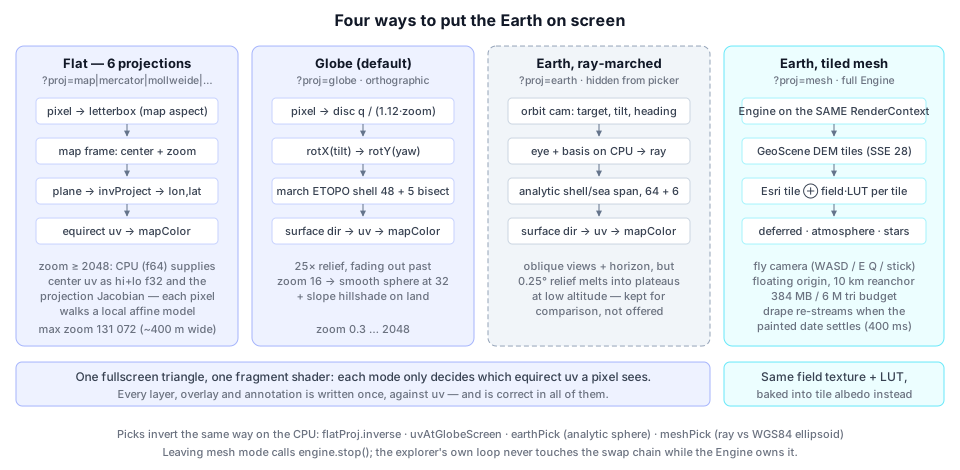
Because the display is factored as mapColor(uv), three of the four modes need only an inverse: screen pixel → uv. The fourth is a whole second renderer.
6.1 Flat projections#
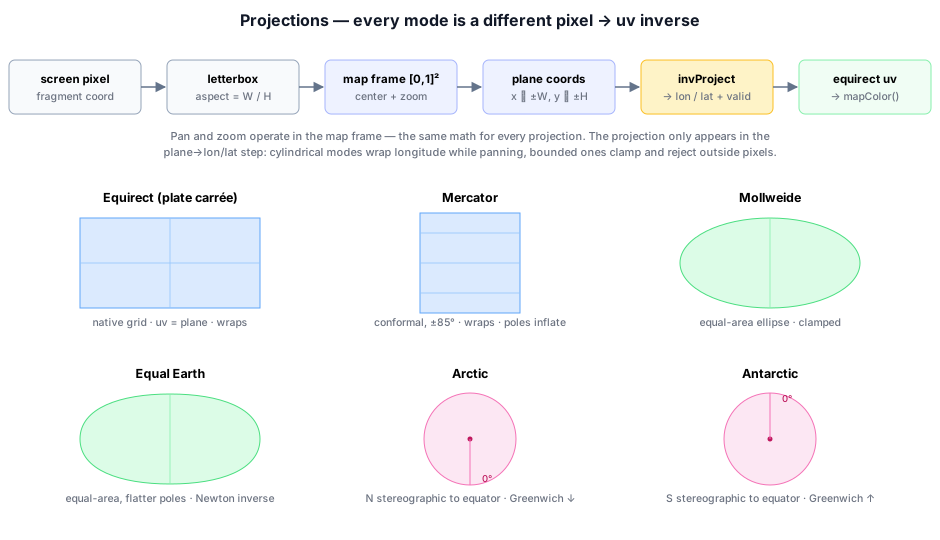
Pan and zoom live in a normalized map frame ([0,1]² spanning the projection's world bounds), so their math is identical for every projection, and the projection appears in exactly one step. The pipeline:
- Letterbox the pixel to the projection's aspect.
- Apply
view.xy + (fuv − 0.5)/zoom. - Scale to the projection plane.
- Call
invProject. - Convert lon/lat to uv.
Each projection is a branch in invProject (WGSL), with CPU twins in geo_projections.ts for picking and view clamping. Those twins are round-trip tested against independently written textbook forward projections at seven points each, plus corner extents, out-of-domain rejection and polar orientation.
let vuv   = u.view.xy + (fuv - vec2(0.5)) / u.view.z;
let plane = vec2((vuv.x*2.0 - 1.0) * ext.x, (1.0 - vuv.y*2.0) * ext.y);
let ll    = invProject(mode, plane);                                // lon, lat, valid
uv = vec2(fract(ll.x / (2.0*PI) + 0.5), clamp(0.5 - ll.y / PI, 0.0, 1.0));| Mode | Half-extents | Inverse |
|---|---|---|
| Equirect (default flat) | π × π/2 | the identity: the plane is (lon, lat). Wraps while panning |
| Mercator | π × π | lat = 2·atan(exp(y)) − π/2, valid to ±85.05°. Wraps. The tooltip warns that polar areas inflate |
| Mollweide | 2√2 × √2 | θ = asin(y/√2), sin φ = (2θ + sin 2θ)/π, λ = πx/(2√2 cos θ). Pixels outside the ellipse are invalid, and the poles are single points on the rim |
| Equal Earth | 2.7066 × 1.3180 | Newton-iterates θ from the 9th-degree y polynomial (4 fixed iterations), then λ through the derivative |
| Arctic / Antarctic | 2 × 2 | polar stereographic to the equator: lat = ±(π/2 − 2·atan(ρ/2)), lon = atan2(x, ∓y). Greenwich points down on the north view and up on the south, with 90°E on the right in both. Made for sea ice |
var t = p.y / 1.340264;                         // Equal Earth: initial guess y ≈ A1·θ
for (var i = 0; i < 4; i = i + 1) {
  let t2 = t * t;
  let f  = t*(1.340264 + t2*(-0.081106 + t2*t2*(0.000893 + 0.003796*t2))) - p.y;
  let fp = 1.340264 + t2*(-0.243318 + t2*t2*(0.006251 + 0.034164*t2));
  t = t - f / fp;
}
A war story lives in that Horner factoring: nesting t⁶ where t⁴ belongs compiles fine and looks right. The round-trip test caught it, twice.
Cylindrical modes wrap viewCx mod 1 while panning; bounded ones clamp. At zoom 1 the whole world letterboxes, and a click in the side bars is not a place.
Deep zoom. Flat modes zoom to 131,072× — about 400 m across the screen, as deep as the aerial tiles go. Past about 2048× the per-pixel uv step falls below f32's ulp on the absolute transform, and the map would dissolve into blocks. So above LINEAR_ZOOM = 2048 the CPU takes over the conditioning:
- It evaluates the view center in f64.
- It splits the center into an exact f32
hipart plus a residuallo. - It measures the projection's Jacobian by central differences (
e = 1e-3of the frame).
Every projection is locally affine at that scale, so each pixel walks a well-conditioned local linear model:
let uvRel = u.lin0.zw + u.lin1.xy * duv.x + u.lin1.zw * duv.y;      // lo + J·Δ   (small terms)
uv  = vec2(fract(u.lin0.x + uvRel.x), clamp(u.lin0.y + uvRel.y, 0.0, 1.0));
wuv = (u.lin0.xy - u.win0.xy + uvRel) * u.win0.zw;                   // exact: nearby f32 values
The CPU fills these uniforms from slightly below the threshold (0.999×), so f32 rounding of the zoom uniform can never land the shader in the deep branch while they are still zero. A zero Jacobian — the view center is off the projection's shape — shows background rather than a smeared world origin.
6.2 The globe (the default)#
An orthographic sphere is rotated by yaw and tilt, and the wheel zooms it from 0.3× (a small sphere with space around it) to 2048×. With relief on, the surface is the ETOPO heightfield sphere-traced through a thin shell, so mountain ranges get true limb silhouettes and parallax as the globe turns:
- The shell's outer radius is
1 + ex · 9000 m / R. - The march takes 48 uniform steps from the shell's front face to just past sea level, then 5 bisections to refine the crossing.
- Rays that reach the unit sphere hit ocean; rays grazing the limb may pass through untouched and show sky.
The ETOPO texture's two packed bytes force manual bilinear filtering. Hardware filtering would blend the high and low bytes independently and ripple at every low-byte wrap, so topoMeters() does four textureLoads, decodes each, then mixes:
fn decodeTopo(c : vec4<f32>) -> f32 {
  return TOPO_MIN_M + ((c.r * 65280.0 + c.g * 255.0) / 65535.0) * TOPO_SPAN_M;
}
Relief is 25× exaggerated at overview zoom and fades out between zoom 16 and 32. Past that the march terraces up close, and 0.25° ETOPO has no detail to offer anyway, so the streamed detail window carries the look instead. A post-pass adds a subtle slope hillshade on land, lit from the upper left like a physical relief globe under room light. It uses only textureLoad, which is safe in non-uniform flow.
The globe is otherwise flat-shaded: it doubles as a preview for a physical, emissive LED sphere display, which is also why ?nogui and ?spin exist.
Wheel zoom anchors at the cursor. It restores the lon/lat under the pointer by nudging yaw and tilt, which is exact at the sphere center and converges over successive steps at the limb.
6.3 Earth, ray-marched (kept for comparison)#
?proj=earth puts a perspective orbit camera over the same heightfield. The camera has a target lon/lat, tilt off the vertical (0 → 1.45 rad), heading and altitude in radii. That keeps "what am I looking at" separate from "from where", which is what makes dragging feel like flying rather than spinning.
earthCamera() builds the eye and a roll-free basis on the CPU, because the basis is uniform across the frame and in f32 the difference between "computed once" and "computed per pixel" shows up as shimmer. A general ray needs a general intersection, so the shader:
- solves ray/sphere analytically for the outer shell and the sea-level sphere;
- marches only the span between them — 64 steps plus 6 bisections;
- stops at the sea surface when nothing is hit.
It works, and it buys oblique views, a horizon and parallax. But at low altitude 0.25° ETOPO melts into plateaus, a data-resolution limit no camera work fixes. So the mode is hidden from the picker (the option exists, hidden, so ?proj=earth still selects it) and survives as a one-URL comparison against the mode that replaced it.
6.4 Earth, tiled mesh — a second renderer on the same canvas#
"🏔 Earth (tiled mesh)" (?proj=mesh) abandons the one-global-heightfield approach and streams real detail per view. It builds a full Engine — deferred preset with TAA and ACES — driving a GeoScene:
const engine = await Engine.create({
  canvas,
  context: ctx,              // share the explorer's device AND swap chain — no second GPUDevice
  renderPreset: deferredPreset({ transparent: false, taa: true, aces: true }),
});
const frame = GeoFrame.atLonLat(startLon, startLat, startAlt);   // origin AT the camera
const scene = new GeoScene(ctx.device, frame, { maxConcurrent: 24 });
terrain = meshUseIon
  ? scene.addTerrain(await resolveIonAsset(ION_ASSETS.worldTerrain, token), { imagery }).tileset
  : scene.addRasterDemTerrain(AWS_TERRARIUM, { imagery }).tileset;
terrain.maxSSE = 28;
scene.setBudget(384 * 1024 * 1024, 6_000_000);
scene.attach(engine, { cameraGO });   // GeoFeature + floating-origin reanchor (10 km)
One loop at a time. Two rAF loops on one canvas would fight, and acquiring the same canvas texture twice in one frame is the failure mode. In mesh mode the explorer's frame():
- bails before
ctx.update(); - calls
meshEngine.run()every frame (a no-op when already running). Leaving the mode callsstop(), andrun()used to live only in the "no engine yet" branch, so every visit after the first showed a frozen canvas; - still advances the time-lapse, so the drape follows the clock;
- keeps rescheduling itself, because it is the only thing watching the projection picker for a way out of the mode.
Elevation source. AWS Terrarium is the no-account default: Web-Mercator PNG tiles to z15. Cesium ion World Terrain is quantized-mesh on a geographic scheme. It reaches the poles (Mercator stops at ±85.05°, which is the hole at the top of the globe) and carries a per-tile watermask. Switching source or token tears the engine down and rebuilds it, carrying the camera pose across. Swapping the DEM is a statement about data, not location, and dropping back to the start point would make the two impossible to compare.
The drape. Terrain tiles use an ordinary PBR material whose albedo is the imagery drape. The data layer is composited into that imagery before the tile is built, so the terrain shader needs no change. GeoTerrainOptions.imagery accepts a drape source, and the explorer supplies one that loads Esri World Imagery for the tile's Mercator block (loadImageryWithFallback, stepping down two zoom levels up to four times on failure) and runs it through DrapeCompositor. That is a fullscreen pass over a target the size of the tile texture:
- Same inputs as the 2D map. It samples the same field texture and LUT the map uses, so colors match by construction.
- Tile pixel → field uv. Each output pixel inverts Web Mercator (
lat = atan(sinh(π − 2π·ny))) to find its field uv. - Same value logic. It repeats the map's halo fix, coastal flood fill (v step doubled) and sparse test.
- Land clip. For sea-only layers it clips against the high-resolution land mask. The data grid's own mask is about 25 km, the wrong shore.
- Output.
mix(imagery, LUT(value), coverage · opacity).
The flight panel's slider runs from photo (0) to data alone (1). Cross-fading is how you tell "the sea really is that warm here" from "that is just what the water looks like".
Because the drape is baked into each tile, repainting means re-streaming: clearCache() throws away every resident tile. So refreshMeshDrape() is careful:
- What goes in the key. Everything the drape samples: layer, frame date, opacity, view, colormap and season. Switching the ramp or the season once repainted nothing.
- Settle first. A changed key must hold for 400 ms before anything is cleared. A layer's frames arrive one at a time, each arrival moves
currentField, and clearing on every change produced the "reloads from the coarsest level over and over" flash on first entry. - Not while playing. During playback the date moves every second or so, and clearing the cache that often left the globe at 0 tiles. The clock and flat-map state advance, but the paint waits until the user pauses or scrubs. Animating the drape itself would need the layer sampled in the terrain shader rather than baked per tile.
Sky. An AtmosphereFeature (sky-view LUT plus the altitude-horizon limb mapping) goes before deferred lighting. Appending it with addFeature() puts it after tonemapping, where it contributes nothing, which is what happened on the first attempt. A CurvedHorizonStarsFeature with the real Yale BSC5 catalog baked at 4096 wide goes before the tonemap. At the default 2048, a texel is about four screen pixels and every star arrives as a soft blob.
CurvedHorizonSky rebases the dome, the aerial-perspective fog and the starfield onto the real ellipsoid. It is fed each frame with:
- the camera's ECEF position, for the local ground radius — the ellipsoid is ~21 km closer to the center at the poles, and a fixed equatorial radius reads a mid-latitude camera as underground;
- the planet center in the floating frame;
- the toward-sun vector.
Stars fade in with altitude and night, and aerial fog fades out between 50 and 150 km.
The camera envelope. The mesh camera is the engine's CameraController in fly mode, and its speed is derived from altitude. That makes the pose a feedback loop, and the per-frame hook bounds it at the state, not at each input:
- Altitude comes from the geodetic height,
ecefToGeodetic(frame.ecefFromWorldPoint(position)). It must not come from local y: the floating origin re-anchors under the camera every 10 km, so local y reads about 0 however high you are. - Height above terrain is
height − scene.heightAt(lon, lat), with a finiteness check rather than?? 0. A NaN from a half-loaded tile would sail through??, and NaN is absorbing: it goes from AGL to speed to position, and every later frame is NaN too. - Hard limits. A non-finite pose or one above 12,000 km (where the disc just fills a 45° frame) is restored to the last good pose or clamped. A floor keeps the camera
MIN_AGL = 25 mabove the ground, solved in geodetic space by rebuilding the position at the same lon/lat. - Clip planes. The far plane is the exact horizon distance × 1.15. The √(2Rh) approximation undershoots at altitude and, above ~4000 km, cut away the whole Earth. The near plane is
clamp(AGL · 0.01, 1, 20 km), which keeps the depth ratio near 1:100 instead of a z-fighting 1:580,000. - Speeds. Horizontal speed is
clamp(AGL · 1.2, 12, 2×10⁶)m/s, which crosses the visible ground in a few seconds at any height, with a walking-pace floor at treetop level. Vertical speed uses a gentlerAGL · 0.8, becausedh/dt = k·hintegrates to an exponential. Wheel dolly is 12% of speed per notch, so one click can no longer throw the camera 2000 km. - Up vector.
worldUpeases from the local radial (level, surface-relative flight) to frozen (free flight) between about 32 km and 319 km altitude, and above that band movement follows the view. There is no second orbit-camera model to switch to. The previous design did switch, and orbit recomputes position from pivot and distance every frame — three separate ways for "fly up" to end with the planet gone and no way back. - Look sensitivity scales with the planet's apparent size, so a full drag from far out sweeps roughly the disc, not past it.
Place jumps. The flight panel's place list (Santa Barbara, Great Barrier Reef, Galápagos, Florida Keys, Cape Hatteras, Red Sea) reloads the page with mlon/mlat/malt/myaw. A jump across the globe needs a new tangent frame, not a reanchor: GeoFrame.reanchor moves the origin but keeps the basis, so "up" would still point at California from the Coral Sea.
Picking. A click casts the camera ray at the WGS84 ellipsoid (rayEllipsoidIntersect), not the streamed mesh. A mesh raycast would return null wherever tiles have not loaded, and the answer reads a data grid whose cells are tens of kilometers across, so the few hundred meters of relief is far inside one cell. The status line reports resident tiles, bytes, position and altitude straight from cacheStats(), because a terrain that is still filling in looks identical to one that has failed.
Detail where you are looking#
7.1 The streamed detail window#
The global basemap is 4096 px wide, about 10 km per texel. Zoomed in, the explorer streams an equirect crop of the visible rect from imaging tiles (TileWindowStreamer). chooseDetailSource sizes the window from the view:
- Target resolution. The world width needed is
needW = max(screenW/du, 2·screenH/dv), at least one texel per screen pixel. - Blue Marble (GIBS shaded relief + bathymetry, EPSG:4326, levels up to 7, about 488 m/px) serves up to
640·2⁷ = 81,920px of world. Its tiles are already equirect, so they are drawn straight in. - Esri World Imagery (Web Mercator, z ≤ 19, sub-meter) serves beyond that. The Mercator mosaic is reprojected to equirect one destination row at a time: x is shared between the two projections, so each row is a single 1-px
drawImagefrommercY(lat). - Limits. The level steps down until the crop fits 110 tiles and 3200×2304 px. A result coarser than 5120 px of world returns null, because it would be blurrier than the baked basemap.
The driver detailTick requests only after the view key has been stable for 250 ms, so a zoom gesture does not spray requests for every intermediate level. The rect comes from visibleUvRect:
- It samples a 7×7 grid of screen points through the active inverse.
- It unwraps u about the center, so a view astride ±180° stays contiguous.
- It extends to the pole when every longitude is on screen.
- It pads 15% per side, so small pans keep sampling inside the window while the next one loads.
The old window stays up until the new one is assembled, so there is never a flash back to the basemap. Attribution for whichever provider is on screen is shown at bottom right.
7.2 The annotation window#
Compositing annotations by uv keeps one rasterization correct in every projection and on the globe. But a world-sized canvas spends its texels uniformly across the planet: zoomed into a bay, a 2048-wide raster leaves about 6 texels per degree, so a 3-px marker arrives as a 60-px blob. So the rasters cover only what is visible, at the same texel budget (2048 wide, with height following the canvas aspect so texels are square on screen):
fn overlaySample(t : texture_2d<f32>, uv : vec2<f32>) -> vec4<f32> {
  let q = vec2<f32>(fract(uv.x - u.ovw.x) * u.ovw.z, (uv.y - u.ovw.y) * u.ovw.w);
  if (q.x < 0.0 || q.x > 1.0 || q.y < 0.0 || q.y > 1.0) {
    return vec4<f32>(0.0);          // the shared sampler WRAPS in u — never smear the edge
  }
  return textureSampleLevel(t, samp, q, 0.0);
}
The window maps onto roughly the whole canvas at every zoom, so a feature authored at N raster px stays about N screen px. That is why no marker radius or line width had to change when this stopped drawing the whole world.
overlayTick re-rasterizes after a 200 ms settle, and only when the window moved by more than 2% of its size. Below 1.5× zoom the world raster already has texels to spare, and keeping the whole world means panning never re-rasterizes at all. The fire and border overlays re-query rather than just redraw on a settle, since their data is viewport- and scale-scoped.
Getting lon/lat onto a window that may straddle the antimeridian is the subtle part, so every overlay shares one helper:
function projectPath(pts: LonLat[], TW: number, TH: number) {
  let prevU = (pts[0].lon + 180) / 360;
  const us = pts.map((p) => {
    const uu = (p.lon + 180) / 360;
    prevU = uu - Math.round(uu - prevU);        // continue the previous point's wrap copy
    return prevU;
  });
  const shift = Math.round(us[0] - (overlayWin.u0 + overlayWin.du / 2));   // once per PATH
  return pts.map((p, i) => ({ x: overlayX(us[i] - shift, TW), y: overlayY(p.lat, TH) }));
}
Unwrap once, then shift the whole path onto the window's copy of the world. Re-wrapping each vertex independently tears a line in half wherever it crosses the window edge — a bug that hides until someone pans to the Pacific. Independent points (analysis arrows) instead take the wrap copy nearest the window, since there is no path to tear. strokeCased (a dark casing under the color), drawLabel (white on a dark stroke) and makeLabelPlacer (greedy screen-space collision, fed in priority order) are shared the same way.
Currents and wind flow#
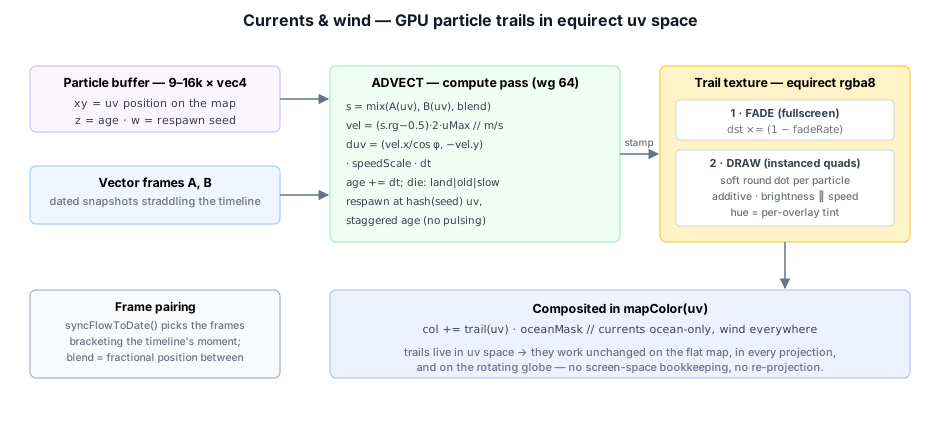
The moving streamlines are FlowOverlay, one GPU particle system per vector layer:
| Particles | Speed scale | Life | Fade | Tint | |
|---|---|---|---|---|---|
| Currents | 9,000 | 0.05 | 8 s | 0.02 | blue |
| Wind | 16,000 | 0.011 | 4 s | 0.03 | pale |
Particles live in equirect uv space, and that one choice does most of the work. The trail texture is sampled by mapColor(uv) like any other layer, so the flow composites identically on the flat map, in every projection and on the rotating globe, with no screen-space bookkeeping. (The mesh mode does not show flow.)
Advection is a compute pass (workgroup 64). Each particle is a vec4: xy = uv, z = age, w = respawn seed. Velocity is sampled from both dated frames bracketing the timeline and mixed, so the flow evolves smoothly through the time-lapse. The step applies the one bit of map geometry that matters: a degree of longitude shrinks by cos(latitude), so east-west motion is divided by it, with a 0.2 floor that caps the stretch near 78°:
let s    = mix(textureSampleLevel(fieldA, fsamp, uv, 0.0),
               textureSampleLevel(fieldB, fsamp, uv, 0.0), au.blend);
let vel  = (s.rg - vec2(0.5)) * 2.0 * au.uMax;                 // m/s
let cosl = max(cos(radians(lat)), 0.2);
let step = vec2(vel.x / cosl, -vel.y) * au.speedScale * au.dt;
Respawn. A particle dies when it ages out, drifts onto a masked cell (land), stalls below 0.02 m/s, or leaves the window. It respawns at a hashed random position with a staggered initial age, so respawns never pulse in visible waves. dt is clamped to 50 ms on the CPU.
Windowing. Particles live in a window of uv space, the same idea as the annotation rasters: the whole world zoomed out, the visible rect zoomed in. A fixed world-space density fails at zoom in two ways that share one cause:
- A 2048-wide trail raster leaves a few hundred texels covering a 4° view, which arrive on screen as soft smears.
- Of 16k particles, only the handful inside the view draw anything.
Advecting and stamping in window-local uv puts every texel and every particle where the user is looking. Particles convert to world uv only to sample the field, and the whole-world case still wraps in u, or the antimeridian would wear a bald seam.
The speed subtlety. Dividing the world step by the window span is geographically exact and unusable. The same 20 m/s crosses a 4°-wide window about 90× faster than it crosses the globe, and 90× the speed is also 90× the trail length, so the view fills with white. Multiplying back by the span holds the apparent speed constant instead: trail length, ink density and motion look the same at every zoom, and only the detail changes. It is a scalar, so direction is untouched, and trail length still ranks fast against slow within any one view.
flowTick re-windows after a 350 ms settle. That is longer than the other drivers because a window change clears the trail texture — old trails are in the wrong frame of reference — and re-windowing every frame of a drag would leave the flow permanently blank.
Trails accumulate in an rgba8 texture via two draws per frame:
- A fullscreen fade whose fragment returns
vec4(0, 0, 0, rate)withzero / one-minus-src-alphablending, sodst ×= (1 − rate). That exponential decay turns earlier positions into a comet tail. - The particles as instanced soft dots with additive blending, brightness driven by the speed channel and hue by the overlay's tint. They are kept dim so trails read as thin streamlines rather than speckle.
The shader samples the trails through flowSample, which returns zero outside the window. Additive light leaking from a wrapped edge would be far more visible than a stray annotation.
Which frames? The same clock that drives the base layer picks each overlay's bracketing frames by date (syncFlowToDate). The stacks start in different years, so pairing by index would drift; outside a stack's coverage it clamps to the nearest frame. Wind streams lazily on first toggle, nearest-now first. GFS is a forecast model, so (last) would be the +7-day edge, not current conditions. The flow starts moving as soon as one frame lands, and the dated history backfills through the pool.
Vector overlays in one raster#
Tracks, storms, fires, borders and cities, drawn shapes and analysis arrows share a pattern:
- Keep the data (paths, polygons, points) in memory.
- On any change — or when the annotation window moves — rasterize into an
OffscreenCanvassized byoverlayRasterSize(). - Upload with
Texture.fromBitmap(transferToImageBitmap()). - Destroy the previous texture and bump that overlay's generation counter.
Nothing projects forward into any map projection. Every overlay is correct in all six flat modes and on both spheres because the only projection anywhere is the inverse that turns a pixel into uv.
The analysis extrema markers (annotate sink) are the one exception. They are HTML pins positioned each frame through the forward projection on the flat map, and hidden on the globe.
Reading the numbers#
10.1 Hover and long-press#
A color map answers "where"; a number answers "how much". Hover shows the base value, the overlay value if any, and lat/lon in a box that flips sides near the window edge. "— no data" is a real answer (land, ice, a cloud gap), and saying so beats an empty tooltip that reads as broken. Readouts are coalesced to one sample per animation frame, since pointermove can outpace the display several times over.
The readout has its own listener rather than a branch in the pan handler, because that handler returns early down every drag path. Values come from GriddedField.sample(lon, lat), a nearest-cell lookup on the retained bytes.
10.2 Picks and point series#
pickLonLat routes a click through the active mode's CPU inverse:
| Mode | Inverse |
|---|---|
| Flat | flatProj.inverse after the letterbox and pan transform |
| Globe | uvAtGlobeScreen, the analytic sphere |
| Earth | earthPick, the analytic sphere |
| Mesh | meshPick, the ellipsoid |
The globe and earth picks intersect the smooth sphere rather than re-marching the relief. A pick asks a geographic question, and the parallax difference is far smaller than one data cell. A pick further than 4 px of drag from its press is a pan, not a pick.
The point panel plots the absolute frames at that point, whatever view is displayed, filtered by season. It reports min, mean, max and a least-squares trend per decade. Trends are relative quantities, so °F scales by 9/5 without the offset. A marker (white ring around a dot) is rasterized into the geometry texture so it lands correctly in every mode. The panel's title bar drags it, a corner grip resizes the chart (remembered in localStorage), and CSV downloads exactly the plotted values.
10.3 The by-year view#
A long record drawn end to end buries the question people usually bring to it — "is this year unusual for the time of year?" — under the seasonal cycle. by year folds the series onto Jan→Dec:
- One line per year, drawn in gray.
- The latest year is blue; click a line to pin up to three more in fixed colors.
- Hover identifies a line by its distance to the polyline, so a hover between two monthly samples still hits.
- Year labels sit directly at each highlighted line's end, nudged apart vertically.
A note ranks the newest month against the same month in every year, in the form "
10.4 Drawn lines and areas#
The ╱ and ⬟ draw modes (?draw=line|area) turn clicks into vertices, and a shape measures itself on every vertex. An explicit "finish" gesture is a terrible thing to require, because nothing on screen can tell you it exists. Below the minimum vertex count, the panel says what to do next. The panel's toolbar has ✓ finish, ↶ undo and ✕ clear, since a phone has no Enter, Esc or double-click (on the desktop those still work).
- Line → transect. Value against distance along the great circles through the vertices, on the frame on screen. It takes 24–400 samples, about one per 25 km, and follows the timeline as frames change.
- Area → area mean. A cos(lat)-weighted mean inside the polygon over the whole stack (season-filtered). Only the polygon's latitude band is scanned before the even-odd test. Each row reports the within-region standard deviation (not a standard error — neighboring cells are strongly autocorrelated, so sd/√n would be a confidence interval the data cannot support), valid cells, cells in region and coverage. The worst coverage across the series is shown up front, because a mean over a polygon that is mostly land or cloud is a real number about a small part of the shape.
The drawing is rasterized into the geometry texture. Legs are densified along their great circles, with a step that shrinks with the window (max(2, 100·du) km), because a straight line in equirect pixels is not a straight line on the Earth, and at high latitude the two diverge badly.
An area doubles as an analysis region: the panel's region button copies the ring as the points parameter, and ?shape= shares it. A shared shape restores immediately, and its readout fills in when frames arrive.
10.5 CSV provenance#
Every readout exports to CSV, and the file carries a # header:
- what the numbers are, and the layer with its units;
- the product, provider, access path, reference URL and license, from the layer's citation;
- the layer's caveats;
- the grid actually used (cells and degrees);
- a decimation warning if the stride was above 1 — spatial means are over the subsampled cells and will differ slightly from operational figures;
- notes if the export came from a derived view or a season filter.
A CSV outlives the page that produced it, and one that has lost track of which product and which units it holds still looks authoritative, which is worse than having none.
Explaining, reproducing, importing#
11.1 The layer-info panel (ⓘ, I, ?info)#
A colorbar says what the colors map to; it does not say whether 8 is alarming or ordinary. Every layer carries an entry in geo_layer_info.ts answering the same questions in the same order:
- What the quantity is and how it was measured.
- What this scale's range means, including any operational threshold.
- What change over time means.
- Whether the record is long enough to show a trend.
- Which other layers explain the pattern.
The last one renders as clickable chips that switch layers, routed through the same switchLayer as the picker so the <select> follows.
The panel also shows the live state: the legend title and ticks, the source, the coverage floor, the view note, the overlay (how it is drawn and which frame it paired to, or that none did), caveats, and the citation. The content rules keep it honest:
- Name the thresholds where the science defines them: coral bleaching at 4 and 8 °C-weeks, the 15% sea-ice edge, the 26.5 °C tropical-cyclone threshold.
- Say plainly where a feed's sampling undercuts a reading. A 12:00 UTC snapshot of an instantaneous rain rate cannot answer "how wet was that month".
11.2 Get this data (⚙ → data, ?data)#
The reproduce panel rebuilds the exact griddap request behind the frame on screen, using reproduce.ts. Its query builder repeats loadScalar's byte for byte. It offers:
- NetCDF and CSV download URLs, an ERDDAP table link and the dataset page;
- an xarray snippet, which adds a
da.max(dim="time")-style line when a daily reduction is active (ERDDAP cannot aggregate over time server-side) and a longitude-convention-agnostic subset when a region is drawn; - an R snippet;
- a citation with the access date and the exact subset.
The resolution is read off the grid that came back, not derived from metadata, because strideScale is a stride multiplier and these products' native grids disagree. Baked layers and analysis results say plainly that there is no live query to hand over, rather than produce a URL that would fail from a browser.
11.3 Your data (⚙ → your data, drag-and-drop, ?region=, ?stations=)#
- A GeoJSON study area becomes the drawn region. It uses the first polygon's outer ring, with warnings when more polygons or holes were ignored. It funnels into exactly the same
drawVertsthe mouse produces, so an imported boundary gets the area readout, the CSV export, the region button and every analysis op for free. - A station CSV is collocated against the layer on screen:
- The delimiter is auto-detected, and column aliases cover Darwin Core (
decimalLatitude…), so OBIS and GBIF exports drop straight in. - Each timed station goes to its nearest absolute frame within 16 days.
- The report shows the guessed columns first, because matching the wrong column produces confident nonsense.
- It exports every station, misses included, with lag and status.
- The delimiter is auto-detected, and column aliases cover Darwin Core (
Data deeplinks wait for frames through whenFramesReady, with an 8 s deadline, after which they run anyway and report the real problem. Acting early produces something that looks like a failure (a match-up with no frames) or something plausible but wrong (a request naming (last)).
Asking questions: the analysis graph#
The ⚗ Analysis button opens the other half of the sample: a typed dataflow language over the same data. It has 26 ops (layer, enso, region, forecast, mask, filter, derive, isoline, anomaly, lag, selectFrames, areaMean, timeReduce, trend, math, correlate, correlateSeries, regress, display, chart, answer, scatter, histogram, hovmoller, annotate, displayVectors), one interpreter, and three front ends:
- Presets: correlation maps, per-decade trends, regional series, a forecast, with significance options.
- Ask: an LLM, Claude or Gemini, writes whole programs through a tool whose JSON schema is generated from the op table. Programs execute locally, and validation errors feed a self-repair loop.
- Graph: a node editor.
The explorer's side of the contract is small:
- Providers.
buildAnalysisProviders()gives theFieldStoreone provider per layer, built on the same loaders as the display. Each provider declares unit, relative flag, coverage floor, caveats and a conversion. Baked stacks come first, then live months the bake doesn't cover, deduped by month, with all-null grids rejected. Fishing effort and the two vector layers (wind, currents) have custom providers. Fields cross into the analysis world as decoded physical floats on a fixed 1° grid, and the run executes in a Web Worker. - The ONI series comes from the same baked-plus-live record as the ENSO panel.
displaytakes over the map exactly like a built-in view. Values are re-encoded into bytes over the sink's legend range, with per-frame significance flags in the blue channel, and become the ownedderivedstack — scrubbable when temporal, with the sink's colormap and physical legend. Any ordinary layer, view or pick action clears it back.annotateplaces extrema pins;displayVectorsrasterizes arrows into the analysis-arrow texture on the annotation window, with spacing and length growing with zoom.- The forecast op runs a small CNN (190 KB
.tflite) on-device through LiteRT.js, lazily loaded:- Input: the last four monthly 1° SST-anomaly fields.
- It rolls forward autoregressively for 1–6 months.
- Held-out MAE is 0.46 °C against 0.50 °C for persistence; it is labeled a demonstration model, not an operational forecast.
- The version string
sst-anom-v2is mirrored in the explorer and must be bumped with a retrain.
- Exports reuse the map's CSV writer, so plot data carries the same provenance header.
Programs round-trip as JSON: ?prog= links, saved presets, ?analysis=run|ask|graph. The full story is in the Analysis module guide and the tutorials.
The ENSO panel#
⚙ → climate → ENSO (?enso) opens a CPC-style ONI bar chart, 1981 → now:
- Bars are red past +0.5, blue past −0.5, gray between.
- Dashed threshold lines, and year ticks every five years.
- A "now" line classifies the latest complete season, plus the current month's to-date anomaly.
- A teal marker follows the map's timeline, so scrubbing the map classifies the month on screen in the form "ONI +x.x · El Niño (strength, peak +y.y)".
- Hovering the chart classifies any month.
- The Niño 3.4 box is outlined on the map while the panel is open.
Input, touch and small screens#
The map runs on a phone, and every touch stand-in keys off the event's own pointerType, so the mouse paths are unchanged and a hybrid machine gets both:
| Gesture | Mouse | Touch |
|---|---|---|
| Pan / rotate | drag | one-finger drag |
| Zoom | wheel (anchored at cursor), +/−/⟲ buttons | pinch (anchored at the midpoint) |
| Aim (earth mode) | shift-drag | two-finger drag of the midpoint |
| Value readout | hover | long-press (450 ms), pinned until the next touch |
| Zoom in / close a shape | double-click | double-tap (320 ms, 40 px) |
| Compare seam | follows the cursor | drag it as a handle (44 px grab zone) |
| Mesh flight | drag look · WASD · E/Q · Alt faster | joystick (left) · look-drag (right half) · ▲/▼ hold buttons |
Details that matter:
- Taps vs drags. A 12 px slop separates taps from drags, and a long-press or double-tap sets
suppressClickso the synthetic click that follows doesn't also open a point series. The flag is cleared on every pointerdown, or a lost long-press would swallow the next mouse click on a hybrid machine. - OS interruptions.
pointercancel— the OS taking the gesture for an app switcher or an incoming call — is never treated as a tap. Apointerleavefrom a lifting finger no longer wipes the long-press readout it just produced. - Mesh touch controls use the engine's
TouchControls. They appear only after an actual touch (capability is not use: every touch laptop reports touch), and they are torn down with the mode, since their listeners callpreventDefaultand would eat the flat map's pinch. Held inputs are zeroed on teardown, because a hold button that vanishes under a finger never sends its release and the camera would climb forever. The joystick sits atedgeY: 132to clear the legend, which is the whole reason to be in the mode. - Controls. The main bar holds ▶, the date, the scrubber, the layer and overlay pickers, the ⌖ ╱ ⬟ draw-mode segment, projection, 🔍, ⚙, ⚗ and 🔗 Share. Everything else lives in the ⚙ menu — four titled sections (time, field, layers, data) laid out as columns that wrap, so on a desktop it is a 2×2 grid rather than a twenty-row list — instead of a growing toolbar. Every control opts out of browser autofill, because session restore liked to resurrect form state over the URL-derived defaults. Temperatures default to Fahrenheit (
?unit=cfor Celsius). Absolute temperatures convert with the offset; anomalies, deltas, spreads and trends scale by 9/5 only. - Active-overlay chips. Every toggle the ⚙ menu can switch on (the iso overlay layer, currents, wind, radar, storms, fire, tracks, day/night, ENSO) also appears as a chip under the bar with its own ×, so what is drawn is visible as state without opening anything. The storms chip carries "· latest advisory" because that overlay does not follow the time slider (§2.11); the fire chip carries "· last 24 h". Borders and cities are deliberately not chips: they are on by default and read as the map, not as something added to it.
- Place search. 🔍 (or
/) searches Natural Earth's 1:10M populated-places set in-page — the same file the city labels draw from (§2.13), so no geocoding service and no key. Matching is folded (diacritics stripped) and graded: name prefix, then word prefix, then substring, then country prefix ("japan" lists Japan's cities, biggest first); ties fall to Natural Earth's prominence order. A pastedlat, lon(also21.3 N 157.9 W, and a lon-first pair when that is the only reading on the planet) goes straight to the map. Arrival is an eased 1.1 s glide, expressed per mode: uv center + zoom on the flat map (nearest wrap copy, so it never crosses the whole world; a polar projection says so if the place is off-map), yaw/tilt by the shortest arc on the globe, the orbit target in the ray-marched earth, and a reload withmlon/mlatin mesh mode (§6.4 explains why a jump there needs a new tangent frame). Grabbing the map mid-flight cancels it. - Keyboard. Space plays/pauses;
←/→step a frame;Shift+←/→step to the frame nearest the same date a year away, whatever the cadence;Home/Endjump to the ends;/opens search;Ithe layer info;?a shortcut sheet (also ⚙ → data → shortcuts); Enter/Esc finish/clear a drawn shape. The scrubber has year tick marks (a<datalist>, rebuilt only when the stack's shape changes) and shows the date under the pointer while hovering or dragging — the big label only ever shows the frame on screen, which is no help in aiming for one that is not. - Phone layout. On narrow screens (≤ 820 px) the control bar becomes one horizontally scrollable row, with a fade on its trailing edge while there is more to the right (a
data-moreflag set from a scroll/resize observer). The ⚙ menu becomes a bottom sheet — reached with a thumb, scrolling under it, the map still visible above — and the footer is hidden (the ⓘ carries the same explanations). On coarse pointers, targets grow and inputs go to 16 px, the size below which iOS zooms the page on focus. The viewport tag setsmaximum-scale=1for the same reason. - Styling. Layout and skin live in
geo_gis_explorer.css::roottokens, three shared looks (.gis-panel,.gis-ctrl,.gis-btn) and one class per floating panel. The TypeScript builds the DOM and sets only what is per-instance — a width, an accent color, a display toggle — which is what lets the phone and coarse-pointer rules override without!important. Hover and:focus-visiblestates come from the same file, and every icon-only button carries anaria-label. - Footer and credits. The footer is one line: ⓘ,
?, the guide and tutorial links, and a "© data credits" popover listing every source the page can draw. Under the dev server (import.meta.hot) the doc links are rewritten to the same pages on taosengine.com, since the built book and docs are not served there.
Deeplinks#
🔗 Share writes only what differs from the defaults, and every one of these is also accepted on load:
| Param | Effect |
|---|---|
layer, over | base layer and overlay layer keys |
view, dyr, season | analysis view, Δ reference years (1–5), month filter (djf, jja, 1..12 …) |
date, cmp | jump to the nearest frame; pin a compare date |
proj | globe (default), map, mercator, mollweide, equalearth, arctic, antarctic, mesh, earth (hidden). Legacy ?globe accepted |
z, cx, cy | flat zoom and view center (map-frame units) |
clon, clat, calt, ctilt, chdg | ray-marched earth camera |
mlon, mlat, malt, myaw, mpitch, drape, ion=1 | mesh-mode start pose, drape opacity, Cesium ion terrain |
res | fetch stride: 1 native (default), 2 = 0.5°, 4 = 1° |
step | cadence in months: 4, 2, 1, or sub-monthly 0.5, 0.25, 0.033 (default, daily; newest 120 frames) |
agg | GFS daily sampling: max, min, mean (default 12:00 UTC snapshot) |
vmin, vmax, bands, cmap | color-scale override |
iso, unit=c, alpha, speed | contours, Celsius, over-land opacity, playback speed |
currents, wind, radar, storms, fire | overlays on |
borders=0, cities=0 | reference overlays off (on by default) |
sun, sunh | day/night terminator and its fixed UTC hour |
enso | ENSO panel |
species, obisgrid, tracks, year | OBIS taxon and grid precision, ATN taxon, GFW year |
draw, shape | draw mode; a drawn ring as "lon,lat …" |
region, stations | import a GeoJSON region / station CSV from a URL |
play, spin, byyear, menu | start playing, spin the globe, fold point charts by year, open ⚙ |
info, data | open the layer-info panel / the reproduce panel |
analysis, prog | open the analysis panel (=run, =ask, =graph); load and run an encoded program |
nogui | display mode: no controls (kiosks, the physical-globe preview) |
Things that bit, and what they taught#
A few lessons recur across the file, and they generalize:
- Bound the state, not the inputs. The mesh camera's runaway and NaN failures were each fixed at the pose, not at the speed that fed it (§6.4).
- Absorbing values need finiteness checks, not null checks.
?? 0lets NaN straight through, and one NaN poisons every later frame. - A 200 with nulls is still a hole. Reject empty grids at every loader, or they masquerade as measurements (§3.2).
- Settle before you pay. Tile windows (250 ms), annotation rasters (200 ms), flow windows (350 ms) and mesh drapes (400 ms) all wait for the view to stop moving, and each for a different reason.
- Derivatives belong under uniform control flow. Every
fwidthsits under a uniform test; per-pixel masks gate only the blend. - Say what the picture cannot. The sampling hour, the baseline, the decimation, the season and the significance filter go into legends, CSV headers and citations — wherever the output will outlive the page.